
How to Use DCA on Binance TH

Dollar-Cost Averaging (DCA) is a simple way to invest in crypto regularly without needing to time the market. With the DCA feature on Binance TH, you can set up automatic purchases on a daily, weekly, or monthly schedule, helping you build your portfolio step by step.
Instead of worrying about the “best” time to buy, you choose the asset, set the amount, and let the system handle the rest.
What is DCA?
DCA, or Dollar-Cost Averaging, is an investment strategy where you invest a fixed amount at regular intervals.
Rather than buying all at once, you spread your purchases over time. This can help reduce the impact of short-term market volatility and support a more disciplined long-term investing habit.
Why use DCA on Binance TH?
Here are some of the main benefits of using DCA:
1. Invest consistently over time
By buying on a regular schedule, you can keep building your portfolio without needing to react to every price move.
2. Reduce the stress of market timing
You do not need to guess when the market is at the top or bottom. DCA helps make investing more systematic.
3. Save time with automation
Once your plan is set, Binance TH will execute your purchases automatically based on your chosen schedule.
4. Stay disciplined
DCA can help you build a steady investing routine that supports long-term goals.
How to Use DCA on Binance TH
Step 1: Go to DCA
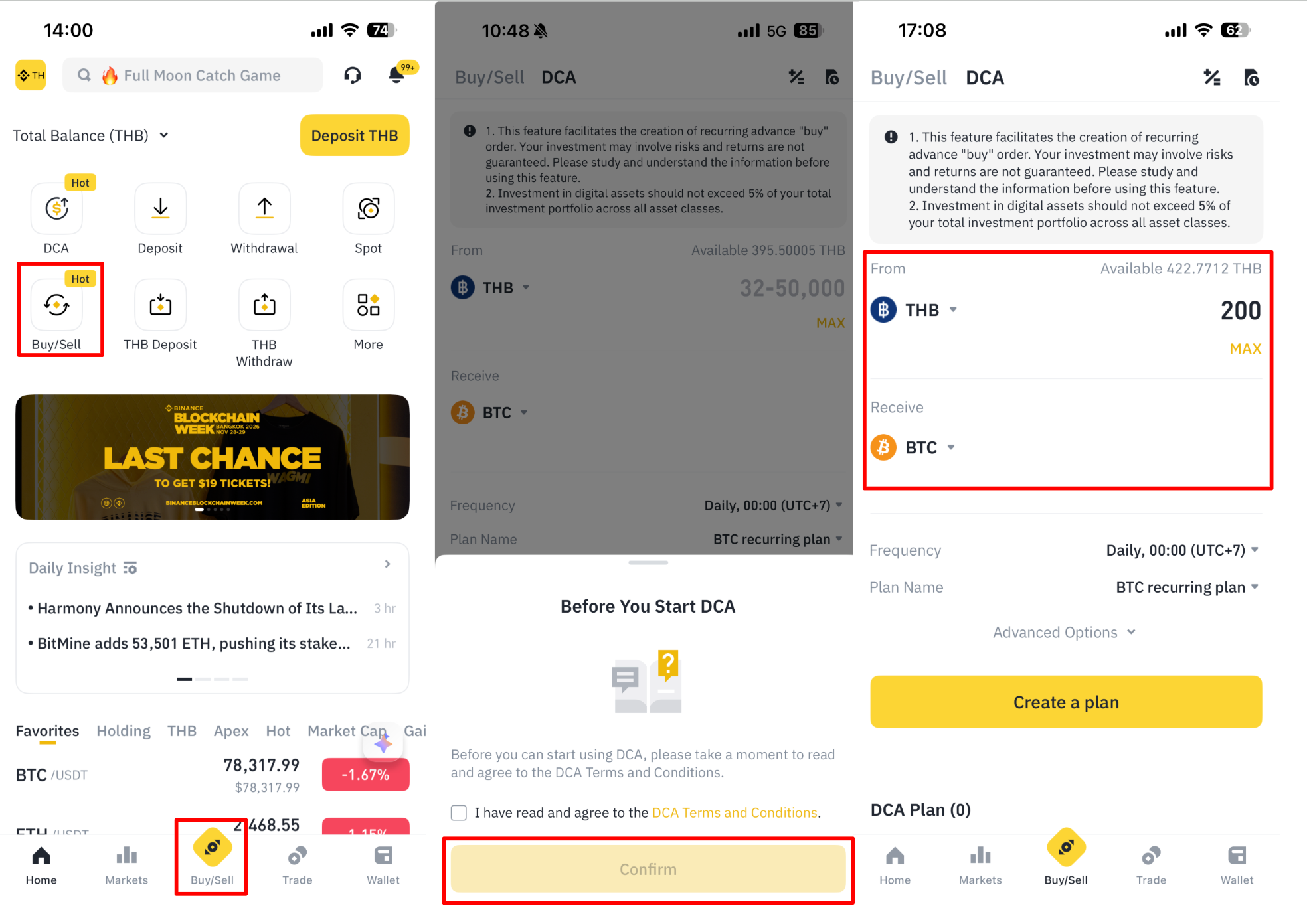
Log in to your Binance TH account and go to [Easy Buy/Sell] > [DCA].
Before using the feature for the first time, please read and accept the Terms and Conditions, then tap [Confirm].
Step 2: Choose your assets
Select the asset you want to spend in the From field, then choose the cryptocurrency you want to receive in the Receive field.
Step 3: Enter your investment amount
Enter the amount you want to invest for each recurring purchase.
The maximum amount per transaction is:
50,000 THB, or 1,500 USDT/USDC
Step 4: Choose your purchase frequency
Select the schedule that works best for you: Daily, Weekly, or Monthly
Frequency | Day | Time |
|---|---|---|
Daily | — | 00:00 – 23:00 |
Weekly | Monday – Sunday | 00:00 – 23:00 |
Monthly | Day 1 – 31 | 00:00 – 23:00 |
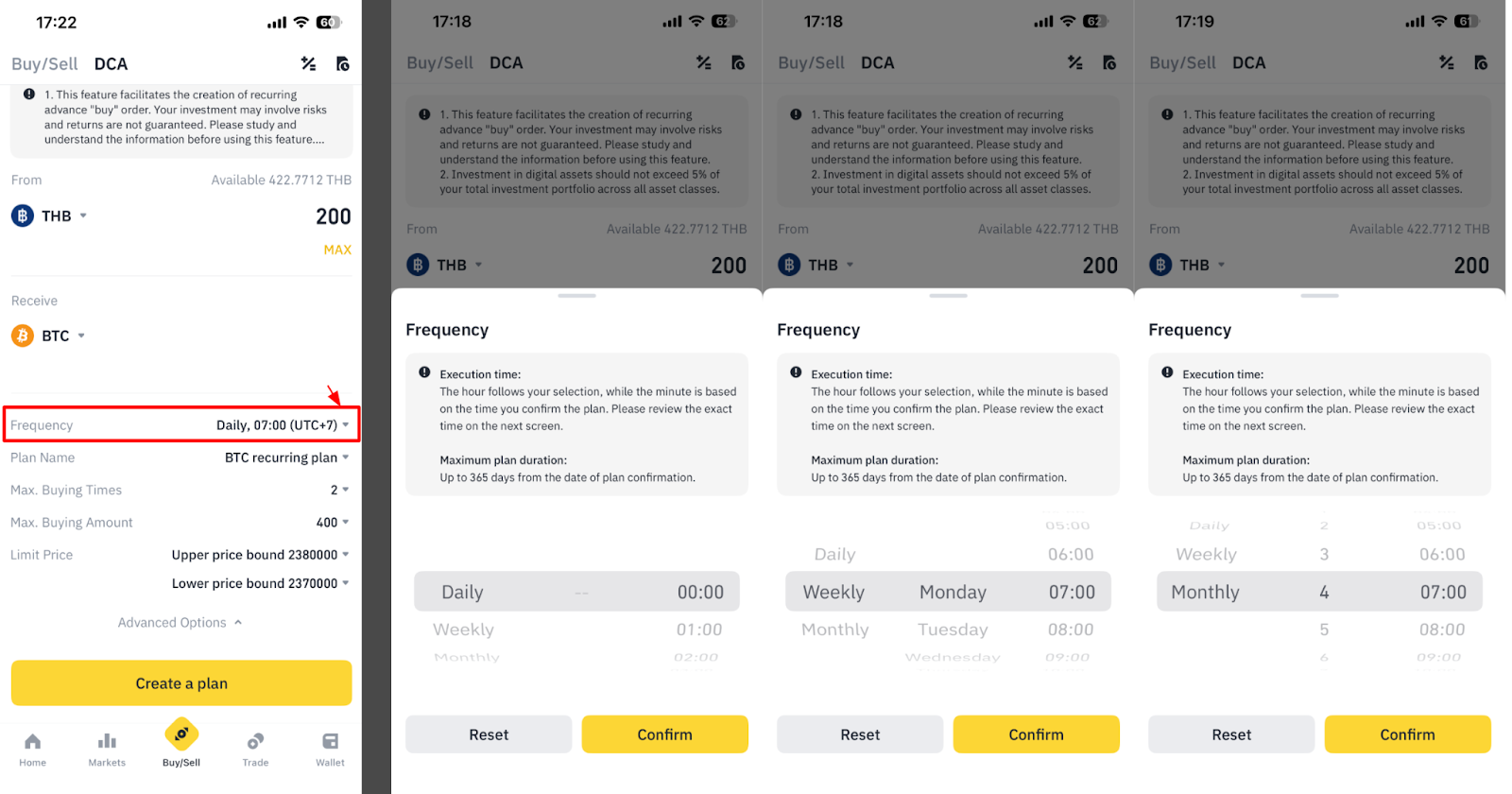
Remark: You can also choose the day and time based on the selected frequency.
Step 5: Set advanced options (optional)
You can expand Advanced Settings to customize your plan further.
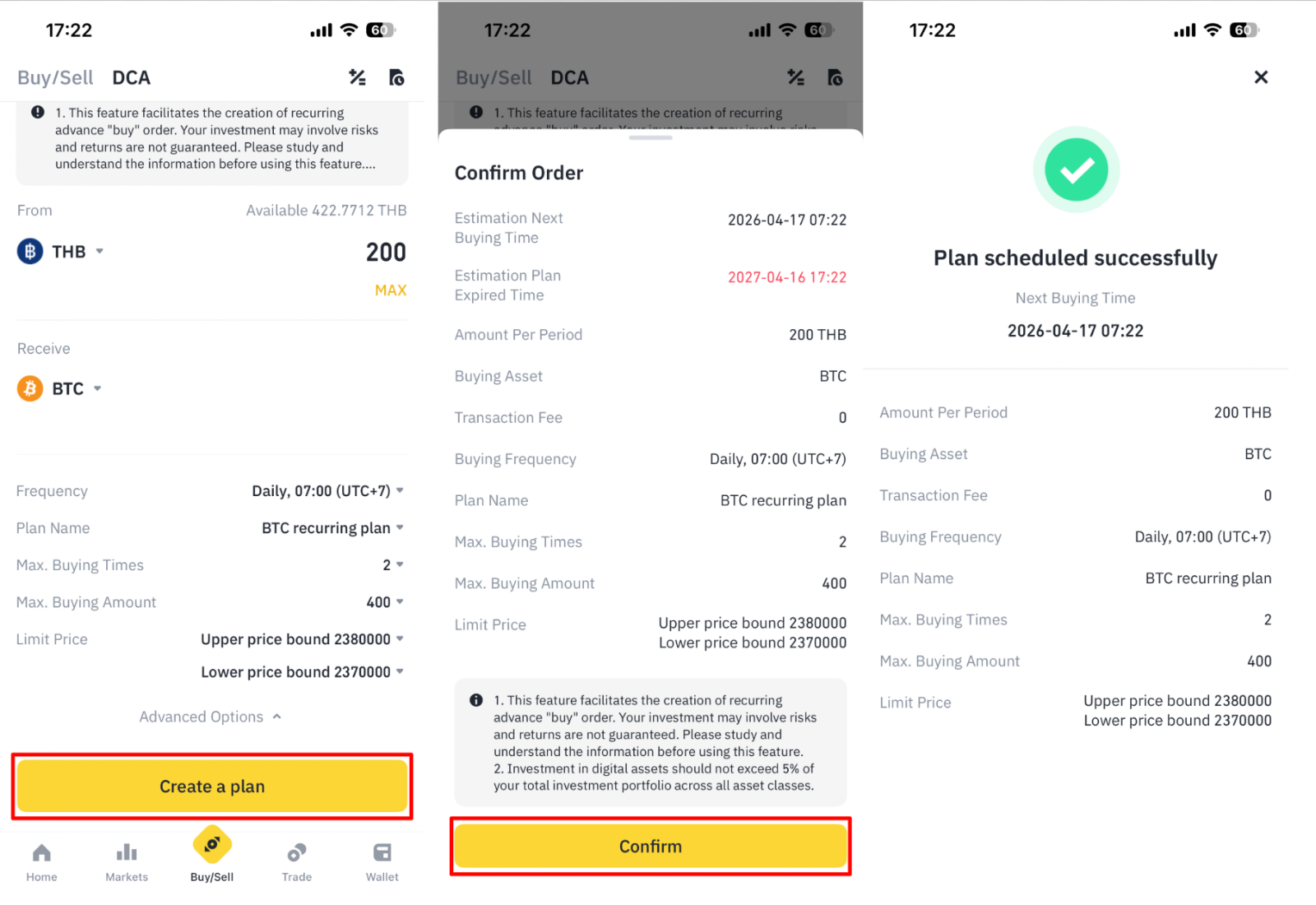
5.1) Plan Name: Give your plan a name for easier tracking with Alphabet and Number only.
5.2) Max Buying Times: Set the maximum number of purchases before the plan stops automatically
5.3) Max Buying Amount: Set a total spending cap for the plan
5.4) Limit Price: Set a price condition for your recurring purchase. If the market price goes beyond this specified limit, the order will be created, but the status will end up as failed.
Step 6: Review and confirm
Tap [Create Plan], review the plan details, then tap [Confirm] to complete the setup.
Step 7: Check your transaction history
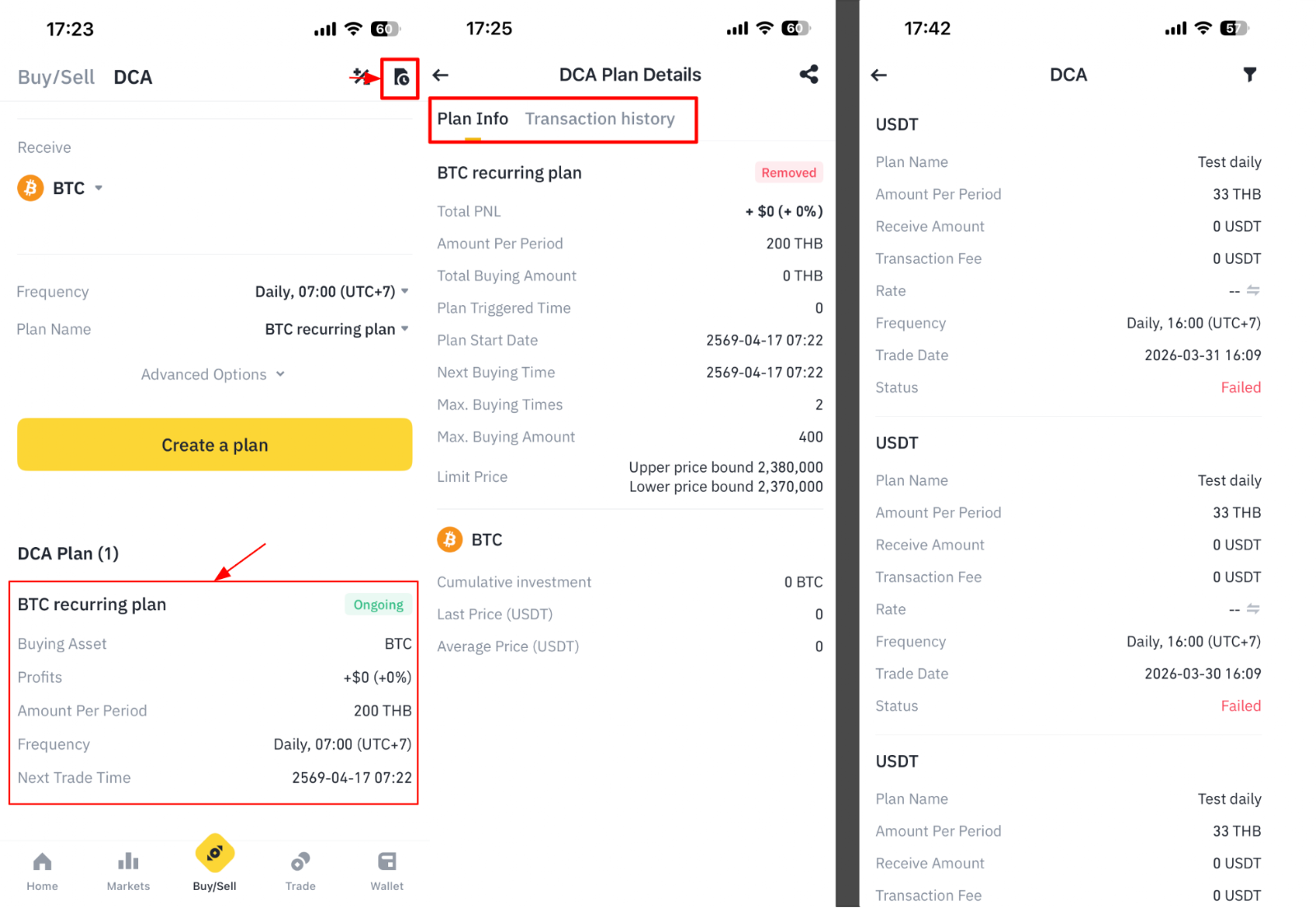
After your plan is created, you can view the plan details from the DCA page.
To review past transactions, tap the [Transaction History] icon.
How to manage your DCA plans
You can manage your existing DCA plans directly in the app.
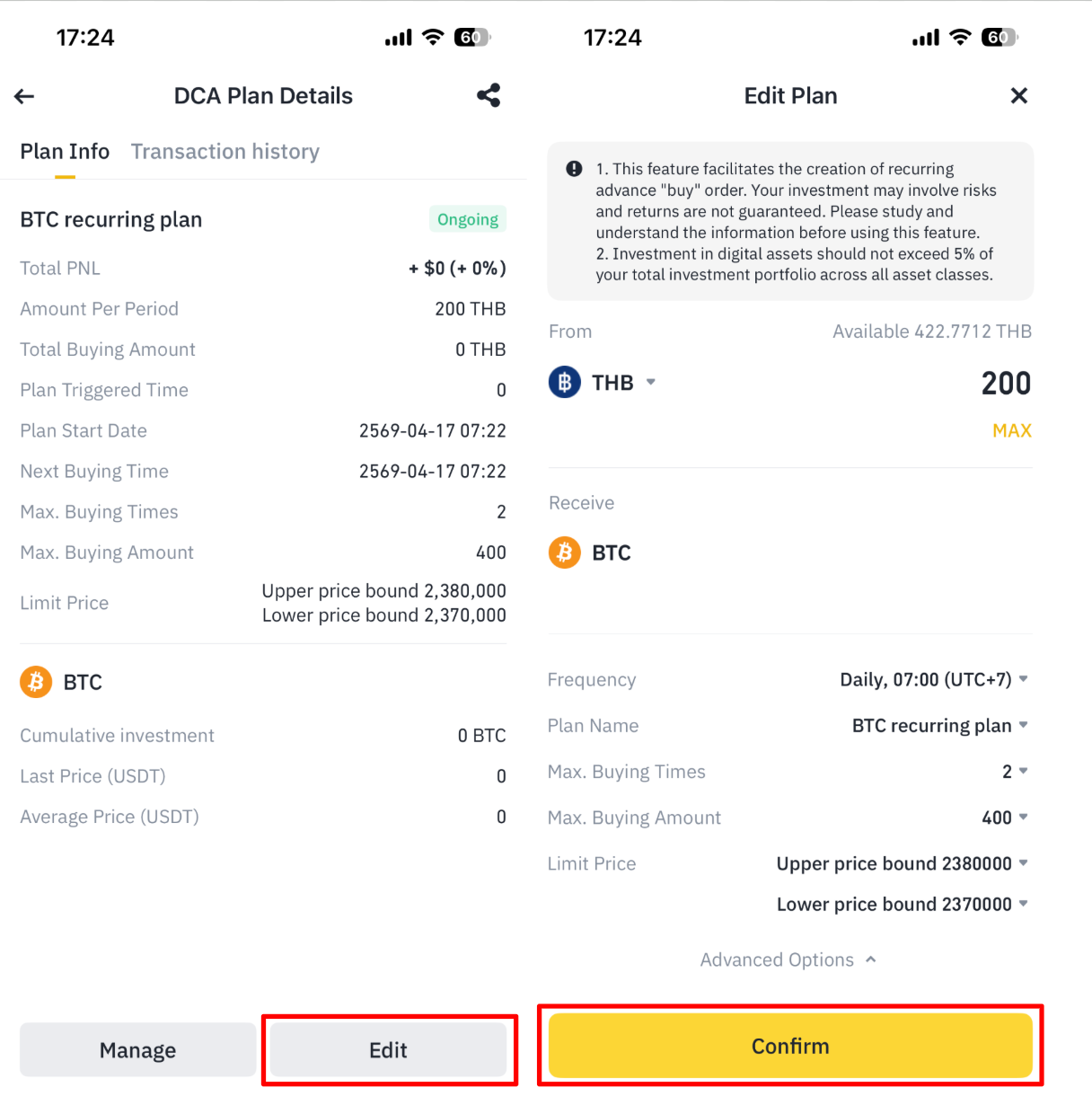
1. Edit a plan
Select the plan you want to update, go to [Edit], change the relevant details, then tap [Confirm].
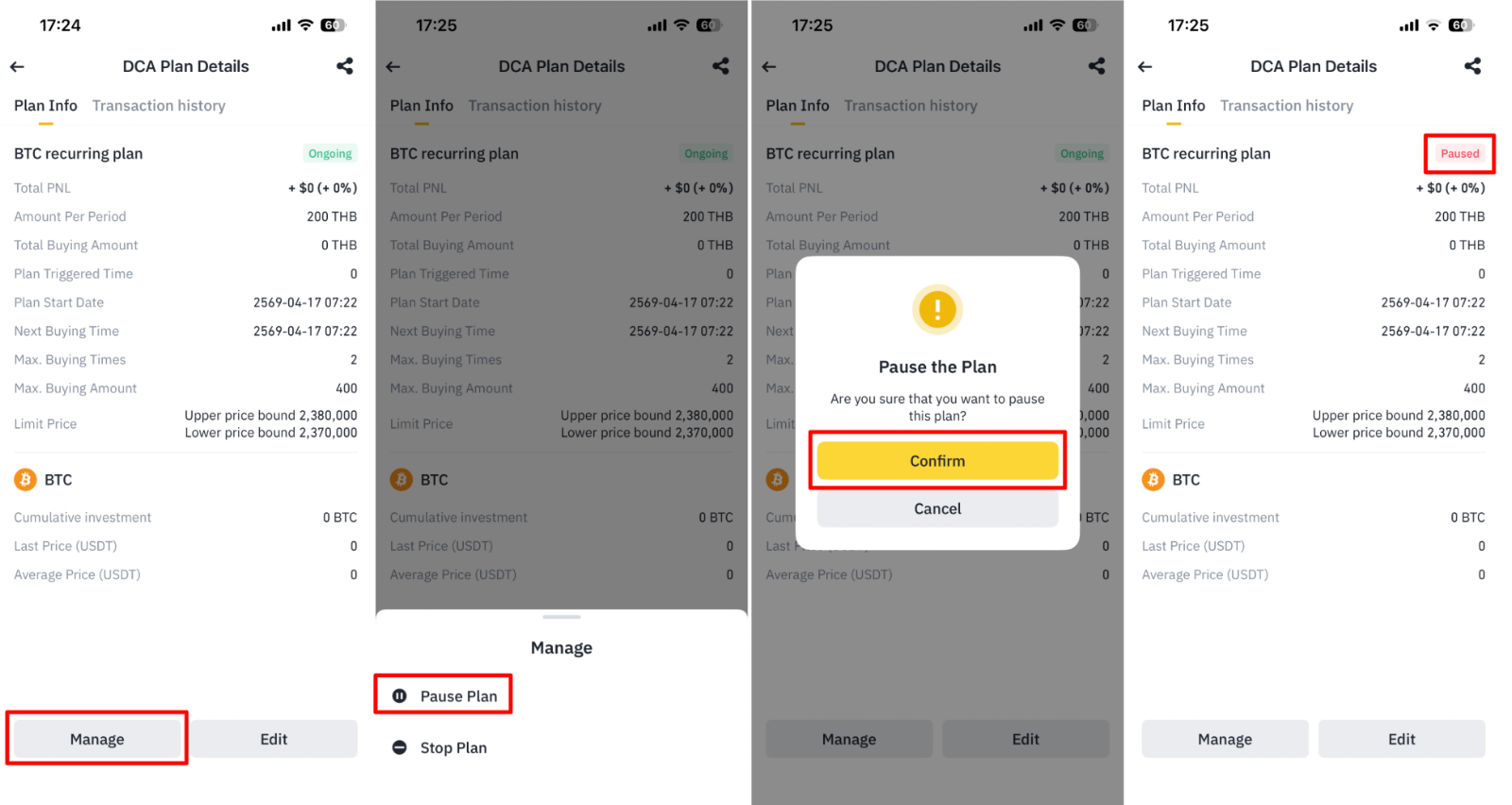
2. Pause a plan
If you want to stop a plan temporarily, go to [Manage] > [Pause Plan], then tap [Confirm]. The plan status will change from Ongoing to Paused.
To continue the plan later, go to [Manage] > [Resume Plan].
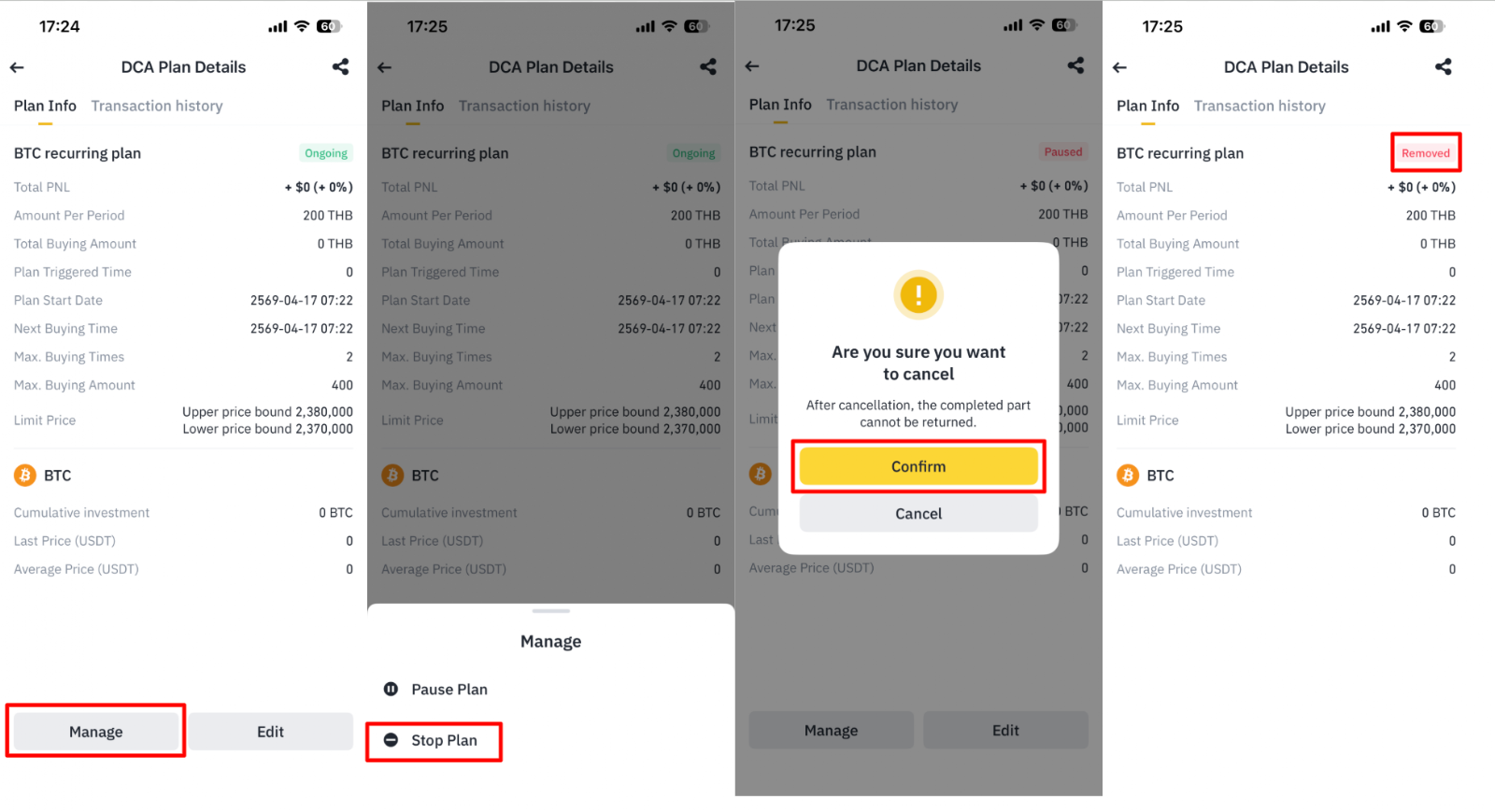
3. Stop a plan
If you want to end a plan permanently, go to [Manage] > [Stop Plan], then tap [Confirm].
Once stopped, the plan status will change to Removed, and it will no longer appear in your DCA plan list.
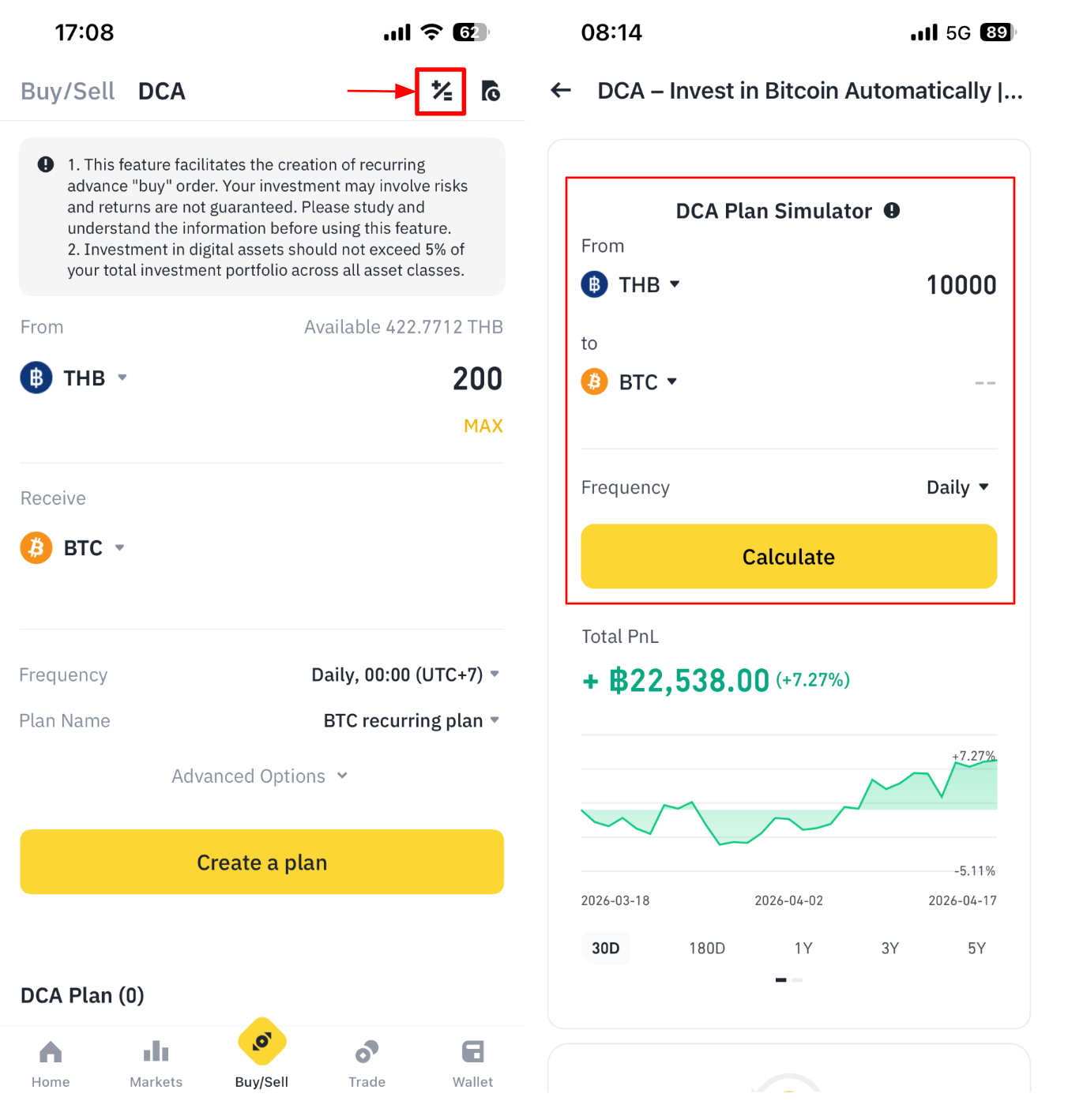
What is the DCA Plan Simulator?
The DCA Plan Simulator is a tool that helps you estimate how a DCA strategy might have performed based on historical market data.
With the simulator, you can:
Choose the asset you want to invest from, such as THB
Choose the crypto you want to invest in, such as BTC
Enter the investment amount
Select the investment frequency
After tapping [Calculate], the simulator can show the following:
Estimated PnL
Estimated percentage return
Performance charts across different time periods, such as 30D, 180D, 1Y, 3Y, and 5Y
Cost analysis, showing the market price and the average purchase price of your DCA plan over the selected period
Important: The simulator uses historical data for reference only. Past performance does not guarantee future results.
Frequently Asked Questions
1. When will my DCA transaction be executed?
For daily, weekly, and monthly plans, the first execution depends on the schedule you set.
Please note that the actual execution minute is linked to the minute when the plan was created. Because of this, the exact execution time may differ slightly from the minute shown in the frequency setting.
2. What happens with monthly plans scheduled on dates like the 31st?
A monthly plan runs on the same calendar date each month. If a month does not have that date, the plan will skip that month and continue in the next month that includes that date.
3. How many DCA plans can I create?
You can create up to 10 DCA plans in total, including both active and paused plans.
4. What is the maximum amount allowed per transaction?
Each recurring purchase can be up to:
50,000 THB, or 1,500 USDT/USDC
5. How long does a DCA plan stay active?
Each plan is valid for up to 365 days from the creation date. After that, you will need to create a new plan if you want to continue investing automatically.
Final note
DCA can help make investing easier, more consistent, and less emotional. However, it does not remove investment risk. Please make sure you understand the product, assess your own risk tolerance, and invest only an amount you are comfortable with.