
REST Open API v1.0.0
Scroll down for code samples, example requests and responses. Select a language for code samples from the tabs above or the mobile navigation menu.
Base URLs:
General Info
General API Information
- The base endpoint is: https://api.binance.th
- All endpoints return either a JSON object or array.
- Data is returned in ascending order. Oldest first, newest last.
- All time and timestamp related fields are in milliseconds.
HTTP Return Codes
- HTTP
4XXreturn codes are used for malformed requests; the issue is on the sender's side. - HTTP
403return code is used when the WAF Limit (Web Application Firewall) has been violated. - HTTP
429return code is used when breaking a request rate limit. - HTTP
418return code is used when an IP has been auto-banned for continuing to send requests after receiving429codes. - HTTP
5XXreturn codes are used for internal errors; the issue is on server side. It is important to NOT treat this as a failure operation; the execution status is UNKNOWN and could have been a success.
Response fields description
| Name | Type | Mandatory | Description |
|---|---|---|---|
| code | Number | Yes | 0 indicates success; non-zero values indicate failure |
| msg | String | Yes | error message |
| timestamp | Number | Yes | server timestamp |
| data | Object | No | response data |
General Information on Endpoints
- For
GETendpoints, parameters must be sent as aquery string. - For
POSTendpoints, the parameters may be sent as aquery stringor in therequest bodywith content typeapplication/x-www-form-urlencoded. You may mix parameters between both thequery stringandrequest bodyif you wish to do so. - Parameters may be sent in any order.
- If a parameter sent in both the
query stringandrequest body, thebody stringparameter will be used.
LIMITS
General Info on Limits
- The following
intervalLettervalues for headers:- SECOND => S
- MINUTE => M
- HOUR => H
- DAY => D
intervalNumdescribes the amount of the interval. For example,intervalNum5 withintervalLetterM means "Every 5 minutes".- A 429 will be returned when either rate limit is violated.
IP Limits
- Every request will contain
X-MBX-USED-WEIGHT-(intervalNum)(intervalLetter)in the response headers which has the current used weight for the IP for all request rate limiters defined. - Each route has a
weightwhich determines for the number of requests each endpoint counts for. Heavier endpoints and endpoints that do operations on multiple symbols will have a heavierweight. - When a 429 is received, it's your obligation as an API to back off and not spam the API.
- Repeatedly violating rate limits and/or failing to back off after receiving 429s will result in an automated IP ban (HTTP status 418).
- IP bans are tracked and scale in duration for repeat offenders, from 2 minutes to 3 days.
- A
Retry-Afterheader is sent with a 418 or 429 responses and will give the number of seconds required to wait, in the case of a 418, to prevent a ban, or, in the case of a 429, until the ban is over. - The limits on the API are based on the IPs, not the API keys.
We recommend using the websocket for getting data as much as possible, as this will not count to the request rate limit.
Order Rate Limits
- Every successful order response will contain a
X-MBX-ORDER-COUNT-(intervalNum)(intervalLetter)header which has the current order count for the account for all order rate limiters defined. - Rejected/unsuccessful orders are not guaranteed to have
X-MBX-ORDER-COUNT-**headers in the response. - The order rate limit is counted against each account.
Endpoint security type
- Each endpoint has a security type that determines the how you will interact with it. This is stated next to the NAME of the endpoint.
- If no security type is stated, assume the security type is NONE.
- API-keys are passed into the Rest API via the
X-MBX-APIKEYheader. - API-keys and secret-keys are case sensitive.
- API-keys can be configured to only access certain types of secure endpoints. For example, one API-key could be used for SIGNED only, while another API-key can access everything except for SIGNED routes.
- By default, API-keys can access all secure routes.
| Security Type | Description |
|---|---|
| NONE | Endpoint can be accessed freely. |
| USER_STREAM | Endpoint requires sending a valid API-Key. |
| SIGNED | Endpoint requires sending a valid API-Key and signature. |
SIGNED Endpoint security
SIGNEDendpoints require an additional parameter,signature, to be sent in thequery stringorrequest body.- Endpoints use
HMAC SHA256signatures. TheHMAC SHA256 signatureis a keyedHMAC SHA256operation. Use yoursecretKeyas the key andtotalParamsas the value for the HMAC operation. - The
signatureis not case sensitive. totalParamsis defined as thequery stringconcatenated with therequest body.
Timing security
- A
SIGNEDendpoint also requires a parameter,timestamp, to be sent which should be the millisecond timestamp of when the request was created and sent. - An additional parameter,
recvWindow, may be sent to specify the number of milliseconds aftertimestampthe request is valid for. IfrecvWindowis not sent, it defaults to 5000. - The logic is as follows:
The logic is as follows:
if (timestamp < (serverTime + 1000) && (serverTime - timestamp) <= recvWindow) {
  // process request
} else {
  // reject request
}
Serious trading is about timing. Networks can be unstable and unreliable,
which can lead to requests taking varying amounts of time to reach the
servers. With recvWindow, you can specify that the request must be
processed within a certain number of milliseconds or be rejected by the
server.
It is recommended to use a small recvWindow of 5000 or less! The max cannot go beyond 60,000!
SIGNED Endpoint Examples for POST /api/v1/order
Here is a step-by-step example of how to send a vaild signed payload from the Linux command line using echo, openssl, and curl.
| Key | Value |
|---|---|
| apiKey | vmPUZE6mv9SD5VNHk4HlWFsOr6aKE2zvsw0MuIgwCIPy6utIco14y7Ju91duEh8A |
| secretKey | NhqPtmdSJYdKjVHjA7PZj4Mge3R5YNiP1e3UZjInClVN65XAbvqqM6A7H5fATj0j |
| Parameter | Value |
|---|---|
| symbol | LTCBTC |
| side | BUY |
| type | LIMIT |
| timeInForce | GTC |
| quantity | 1 |
| price | 0.1 |
| recvWindow | 5000 |
| timestamp | 1499827319559 |
Example 1: As a request body
- requestBody:
symbol=LTCBTC
&side=BUY
&type=LIMIT
&timeInForce=GTC
&quantity=1
&price=0.1
&recvWindow=5000
×tamp=1499827319559
Example 1: HMAC SHA256 signature:
[linux]$ echo -n "symbol=LTCBTC&side=BUY&type=LIMIT&timeInForce=GTC&quantity=1&price=0.1&recvWindow=5000×tamp=1499827319559" | openssl dgst -sha256 -hmac "NhqPtmdSJYdKjVHjA7PZj4Mge3R5YNiP1e3UZjInClVN65XAbvqqM6A7H5fATj0j"
(stdin)= c8db56825ae71d6d79447849e617115f4a920fa2acdcab2b053c4b2838bd6b71
Example 1: curl command:
(HMAC SHA256)
[linux]$ curl -H "X-MBX-APIKEY: vmPUZE6mv9SD5VNHk4HlWFsOr6aKE2zvsw0MuIgwCIPy6utIco14y7Ju91duEh8A" -X POST 'https://api.binance.th/api/v1/order' -d 'symbol=LTCBTC&side=BUY&type=LIMIT&timeInForce=GTC&quantity=1&price=0.1&recvWindow=5000×tamp=1499827319559&signature=c8db56825ae71d6d79447849e617115f4a920fa2acdcab2b053c4b2838bd6b71'
Example 2: As a query string
- queryString:
symbol=LTCBTC
&side=BUY
&type=LIMIT
&timeInForce=GTC
&quantity=1
&price=0.1
&recvWindow=5000
×tamp=1499827319559
Example 2: HMAC SHA256 signature:
[linux]$ echo -n "symbol=LTCBTC&side=BUY&type=LIMIT&timeInForce=GTC&quantity=1&price=0.1&recvWindow=5000×tamp=1499827319559" | openssl dgst -sha256 -hmac "NhqPtmdSJYdKjVHjA7PZj4Mge3R5YNiP1e3UZjInClVN65XAbvqqM6A7H5fATj0j"
(stdin)= c8db56825ae71d6d79447849e617115f4a920fa2acdcab2b053c4b2838bd6b71
Example 2: curl command:
(HMAC SHA256)
[linux]$ curl -H "X-MBX-APIKEY: vmPUZE6mv9SD5VNHk4HlWFsOr6aKE2zvsw0MuIgwCIPy6utIco14y7Ju91duEh8A" -X POST 'https://api.binance.th/api/v1/order?symbol=LTCBTC&side=BUY&type=LIMIT&timeInForce=GTC&quantity=1&price=0.1&recvWindow=5000×tamp=1499827319559&signature=c8db56825ae71d6d79447849e617115f4a920fa2acdcab2b053c4b2838bd6b71'
Example 3: Mixed query string and request body
- queryString:
symbol=LTCBTC
&side=BUY
&type=LIMIT
&timeInForce=GTC
- requestBody:
quantity=1&price=0.1&recvWindow=5000×tamp=1499827319559
Example 3: HMAC SHA256 signature:
[linux]$ echo -n "symbol=LTCBTC&side=BUY&type=LIMIT&timeInForce=GTCquantity=1&price=0.1&recvWindow=5000×tamp=1499827319559" | openssl dgst -sha256 -hmac "NhqPtmdSJYdKjVHjA7PZj4Mge3R5YNiP1e3UZjInClVN65XAbvqqM6A7H5fATj0j"
(stdin)= 0fd168b8ddb4876a0358a8d14d0c9f3da0e9b20c5d52b2a00fcf7d1c602f9a77
curl command:
(HMAC SHA256)
[linux]$ curl -H "X-MBX-APIKEY: vmPUZE6mv9SD5VNHk4HlWFsOr6aKE2zvsw0MuIgwCIPy6utIco14y7Ju91duEh8A" -X POST 'https://api.binance.th/api/v1/order?symbol=LTCBTC&side=BUY&type=LIMIT&timeInForce=GTC' -d 'quantity=1&price=0.1&recvWindow=5000×tamp=1499827319559&signature=0fd168b8ddb4876a0358a8d14d0c9f3da0e9b20c5d52b2a00fcf7d1c602f9a77'
Note that the signature is different in example 3. There is no & between "GTC" and "quantity=1".
Public API Definitions
Terminology
base assetrefers to the asset that is thequantityof a symbol.quote assetrefers to the asset that is thepriceof a symbol.
ENUM definitions
Order status (status):
| Status | Description |
|---|---|
| NEW | The order has been accepted by the engine. |
| PARTIALLY_FILLED | A part of the order has been filled. |
| FILLED | The order has been completed. |
| CANCELED | The order has been canceled by the user. |
| REJECTED | The order was not accepted by the engine and not processed. |
| EXPIRED | The order was canceled according to the order type's rules (e.g. LIMIT FOK orders with no fill, LIMIT IOC or MARKET orders that partially fill) or by the exchange, (e.g. orders canceled during liquidation, orders canceled during maintenance) |
Order types (orderTypes, type):
- LIMIT
- MARKET
- STOP_LOSS
- STOP_LOSS_LIMIT
- TAKE_PROFIT
- TAKE_PROFIT_LIMIT
- LIMIT_MAKER
Order Response Type (newOrderRespType):
- ACK
- RESULT
- FULL
Order side (side):
- BUY
- SELL
Time in force (timeInForce, for LIMIT, STOP_LOSS_LIMIT, TAKE_PROFIT_LIMIT):
| Status | Description |
|---|---|
| GTC | Good Til Canceled. An order will be on the book unless the order is canceled. |
| IOC | Immediate Or Cancel. An order will try to fill the order as much as it can before the order expires. |
| FOK | Fill or Kill. An order will expire if the full order cannot be filled upon execution. |
Kline/Candlestick chart intervals:
m -> minutes; h -> hours; d -> days; w -> weeks; M -> months
- 1m
- 3m
- 5m
- 15m
- 30m
- 1h
- 2h
- 4h
- 6h
- 8h
- 12h
- 1d
- 3d
- 1w
- 1M
Rate limiters (rateLimitType)
REQUEST_WEIGHT
ORDERS
RAW_REQUESTS
Rate limit intervals (interval)
- SECOND
- MINUTE
- DAY
Filters
Filters define trading rules on a symbol or an exchange.
Filters come in two forms: symbol filters and exchange filters.
Symbol Filters
PRICE_FILTER
The PRICE_FILTER defines the price rules for a symbol. There are 3 parts:
minPricedefines the minimumprice/stopPriceallowed; disabled onminPrice== 0.maxPricedefines the maximumprice/stopPriceallowed; disabled onmaxPrice== 0.tickSizedefines the intervals that aprice/stopPricecan be increased/decreased by; disabled ontickSize== 0.
Any of the above variables can be set to 0, which disables that rule in the price filter. In order to pass the price filter, the following must be true for price/stopPrice of the enabled rules:
price>=minPriceprice<=maxPrice- (
price-minPrice) %tickSize== 0
/exchangeInfo format:
{
  "filterType": "PRICE_FILTER",
  "minPrice": "0.00000100",
  "maxPrice": "100000.00000000",
  "tickSize": "0.00000100"
}
PERCENT_PRICE
The PERCENT_PRICE filter defines valid range for a price based on the average of the previous trades.
avgPriceMins is the number of minutes the average price is calculated over. 0 means the last price is used.
In order to pass the percent price, the following must be true for price:
price<=weightedAveragePrice*multiplierUpprice>=weightedAveragePrice*multiplierDown
/exchangeInfo format:
{
  "filterType": "PERCENT_PRICE",
  "multiplierUp": "1.3000",
  "multiplierDown": "0.7000",
  "avgPriceMins": 5
}
LOT_SIZE
The LOT_SIZE filter defines the quantity (aka "lots" in auction terms) rules for a symbol. There are 3 parts:
minQtydefines the minimumquantityallowed.maxQtydefines the maximumquantityallowed.stepSizedefines the intervals that aquantitycan be increased/decreased by.
In order to pass the lot size, the following must be true for quantity:
quantity>=minQtyquantity<=maxQty- (
quantity-minQty) %stepSize== 0
/exchangeInfo format:
{
  "filterType": "LOT_SIZE",
  "minQty": "0.00100000",
  "maxQty": "100000.00000000",
  "stepSize": "0.00100000"
}
MIN_NOTIONAL
The MIN_NOTIONAL filter defines the minimum notional value allowed for an order on a symbol.
An order's notional value is the price * quantity.
applyToMarket determines whether or not the MIN_NOTIONAL filter will also be applied to MARKET orders.
Since MARKET orders have no price, the average price is used over the last avgPriceMins minutes.
avgPriceMins is the number of minutes the average price is calculated over. 0 means the last price is used.
/exchangeInfo format:
{
  "filterType": "MIN_NOTIONAL",
  "minNotional": "0.00100000",
  "applyToMarket": true,
  "avgPriceMins": 5
}
MARKET_LOT_SIZE
The MARKET_LOT_SIZE filter defines the quantity (aka "lots" in auction terms) rules for MARKET orders on a symbol. There are 3 parts:
minQtydefines the minimumquantityallowed.maxQtydefines the maximumquantityallowed.stepSizedefines the intervals that aquantitycan be increased/decreased by.
In order to pass the market lot size, the following must be true for quantity:
quantity>=minQtyquantity<=maxQty- (
quantity-minQty) %stepSize== 0
/exchangeInfo format:
{
  "filterType": "MARKET_LOT_SIZE",
  "minQty": "0.00100000",
  "maxQty": "100000.00000000",
  "stepSize": "0.00100000"
}
MAX_NUM_ORDERS
The MAX_NUM_ORDERS filter defines the maximum number of orders an account is allowed to have open on a symbol.
Note that both "algo" orders and normal orders are counted for this filter.
/exchangeInfo format:
{
  "filterType": "MAX_NUM_ORDERS",
  "limit": 25
}
MAX_NUM_ALGO_ORDERS(*)
The MAX_NUM_ALGO_ORDERS filter defines the maximum number of "algo" orders an account is allowed to have open on a symbol.
"Algo" orders are STOP_LOSS, STOP_LOSS_LIMIT, TAKE_PROFIT, and TAKE_PROFIT_LIMIT orders.
/exchangeInfo format:
{
  "filterType": "MAX_NUM_ALGO_ORDERS",
  "maxNumAlgoOrders": 5
}
Exchange Filters
EXCHANGE_MAX_NUM_ORDERS
The MAX_NUM_ORDERS filter defines the maximum number of orders an account is allowed to have open on the exchange.
Note that both "algo" orders and normal orders are counted for this filter.
EXCHANGE_MAX_NUM_ALGO_ORDERS(*)
The MAX_ALGO_ORDERS filter defines the maximum number of "algo" orders an account is allowed to have open on the exchange.
"Algo" orders are STOP_LOSS, STOP_LOSS_LIMIT, TAKE_PROFIT, and TAKE_PROFIT_LIMIT orders.
Tips
The above are marked with "(*)" may NOT be supported by SITE symbols.
Best Practice Guide
This guide focuses on integration patterns and operational best practices. For complete endpoint definitions, refer to the API Reference section.
1. Getting Started: Account & API Key Setup
Creating Your Account
- Sign Up: Register for a Binance TH account using the mobile application or at https://www.binance.th
- Complete Identity Verification: Complete the Know Your Customer (KYC) or Know Your Business (KYB) verification process before accessing trading and API functionality.
Funding Your Account
Before using trading APIs, ensure your account has sufficient balance.
Deposit Fiat (THB)
- Open the Wallet section in the Binance TH application
- Select Deposit
- Choose THB
- Follow the instructions to deposit funds from your bank account
Deposit Digital Assets
- Open the Wallet section
- Select Deposit
- Choose the desired cryptocurrency
- Follow the instructions to transfer funds from another exchange or wallet
API Key Generation
- Login: Access your Binance TH account on the web
- Click your user icon in the top-right corner and select API Management
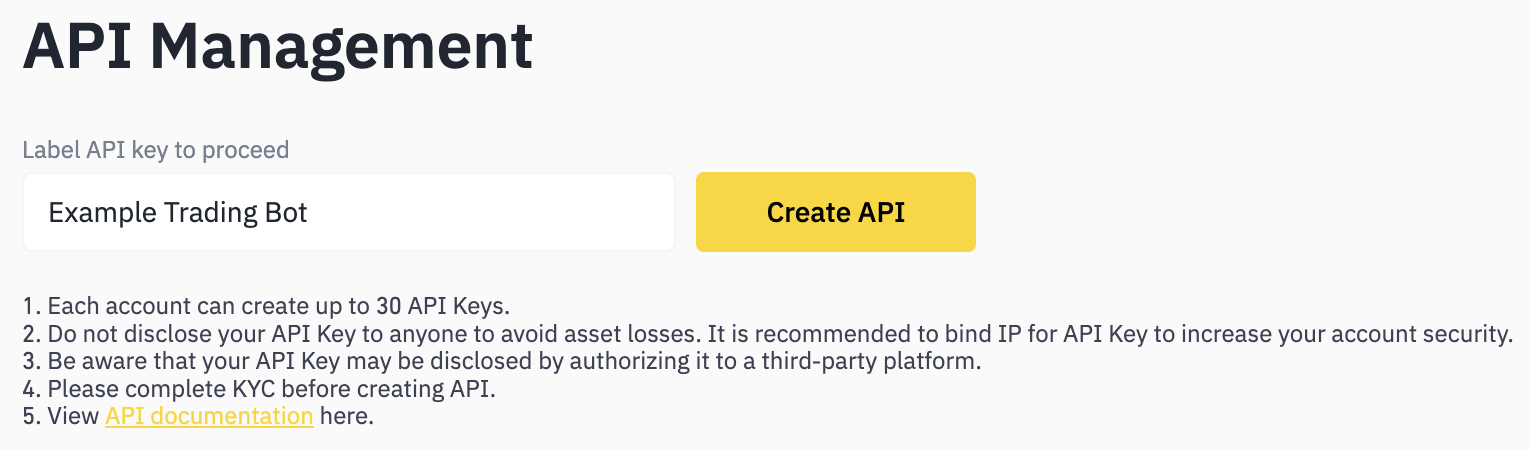
- Enter a name for your API key (for example: Example Trading Bot) and click Create API
- Pass the two-factor authentication (2FA) prompt
- Your API key will now be generated. Store the key and secret securely.
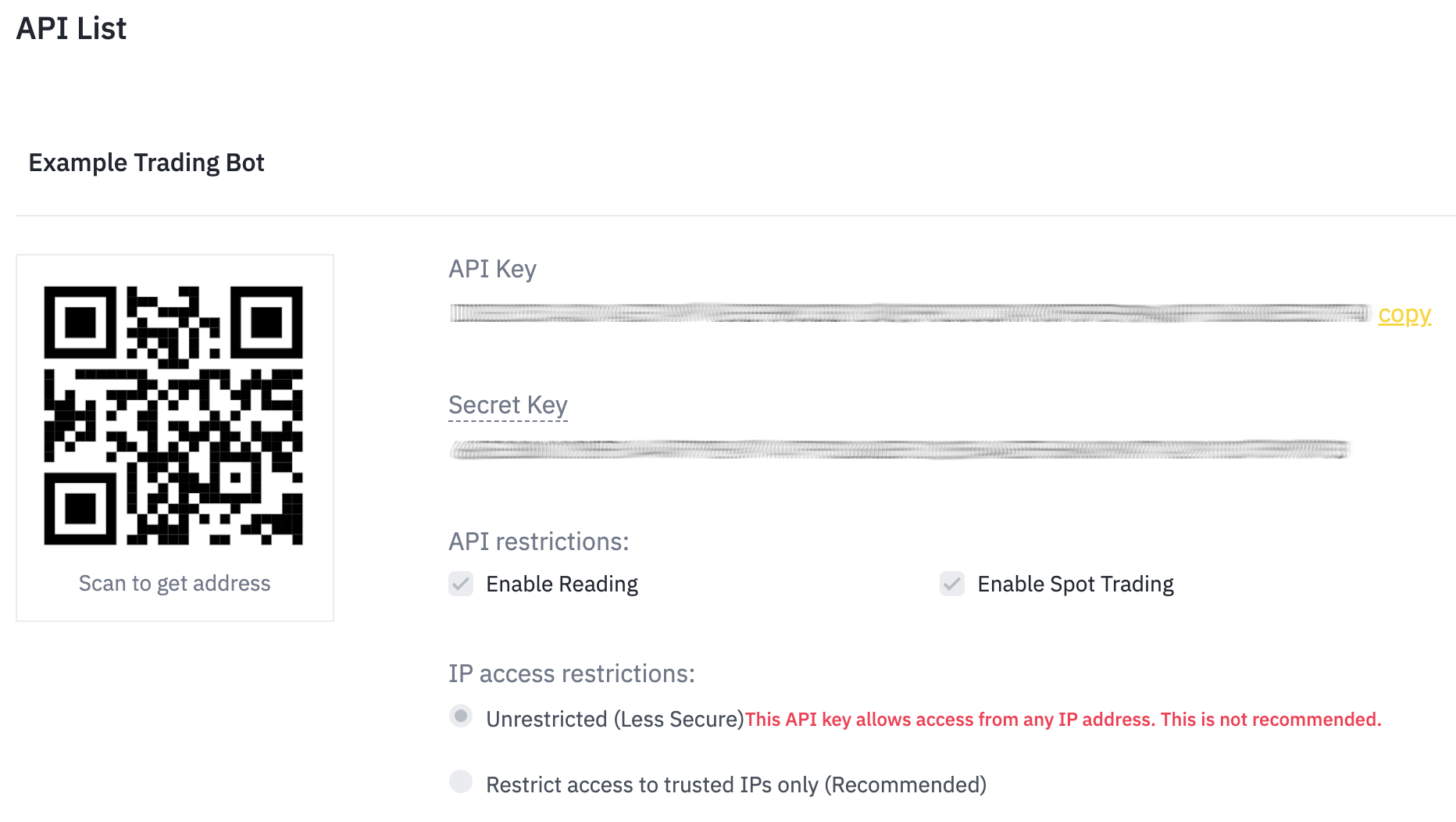
- Click Edit Restrictions to configure additional security settings such as IP address whitelisting.
API Key Security
Follow these best practices to secure your API keys:
- Store Securely: Never share your API keys or secrets
- Use Separate Keys: Create different keys for different applications or services
- Limit Permissions: Grant only the permissions required for your use case
- Monitor Usage: Regularly review API activity and permissions
API Authentication Types
Security Type Configuration:
NONE: Public endpoints (no authentication required)USER_STREAM: Requires API Key onlySIGNED: Requires an API Key and a request signature generated using your API Secret.
Permission Scopes:
Configure API keys with the minimal permissions required for your application.
- Read-only: For market data and account information queries
- Trading: For placing and managing orders
Additional Security Best Practices
- IP Whitelisting (Recommended): Restrict API key usage to specific IP addresses
- Key Rotation: Rotate API keys regularly (recommended every 90 days)
- Environment Separation: Use different API keys for development, staging, and production environments
Storage Best Practices
2. Authentication & Signing (CRITICAL)
Understanding SIGNED Endpoints
SIGNED endpoints require:
X-MBX-APIKEYheader containing your API keytimestampparameter (milliseconds since Unix epoch)signatureparameter (HMAC SHA256 hash)- Optional
recvWindowparameter (default: 5000ms, max: 60000ms)
Signature Generation Formula
The signature is calculated using HMAC SHA256:
signature = HMAC_SHA256(secretKey, totalParams)
Where:
secretKey: Your API secret keytotalParams: Query string + Request body concatenated
Step-by-Step Signature Process
1. Construct the Parameter String
For Query String Only:
symbol=BTCTHB&side=BUY&type=LIMIT&timeInForce=GTC&quantity=0.1&price=1000000&recvWindow=5000×tamp=1499827319559
For Mixed Query + Body (NO & between sections):
Query: symbol=BTCTHB&side=BUY&type=LIMIT&timeInForce=GTC
Body: quantity=0.1&price=1000000&recvWindow=5000×tamp=1499827319559
Concatenated: symbol=BTCTHB&side=BUY&type=LIMIT&timeInForce=GTCquantity=0.1&price=1000000&recvWindow=5000×tamp=1499827319559
2. Generate HMAC SHA256 Hash
Java Example:
import javax.crypto.Mac;
import javax.crypto.spec.SecretKeySpec;
import java.nio.charset.StandardCharsets;
import java.util.LinkedHashMap;
import java.util.Map;
import java.util.stream.Collectors;

public class SignatureGenerator {

    public static String generateSignature(String secretKey, Map<String, String> params)
            throws Exception {
        // Build parameter string
        String paramString = params.entrySet().stream()
            .map(entry -> entry.getKey() + "=" + entry.getValue())
            .collect(Collectors.joining("&"));

        // Generate HMAC SHA256
        Mac sha256_HMAC = Mac.getInstance("HmacSHA256");
        SecretKeySpec secret_key = new SecretKeySpec(
            secretKey.getBytes(StandardCharsets.UTF_8),
            "HmacSHA256"
        );
        sha256_HMAC.init(secret_key);

        byte[] hash = sha256_HMAC.doFinal(paramString.getBytes(StandardCharsets.UTF_8));

        // Convert to hex string
        StringBuilder hex = new StringBuilder();
        for (byte b : hash) {
            hex.append(String.format("%02x", b));
        }
        return hex.toString();
      }

    // Usage example
    public static void main(String[] args) throws Exception {
        String apiSecret = "YOUR_SECRET_KEY";
        long timestamp = System.currentTimeMillis();

        Map<String, String> params = new LinkedHashMap<>();
        params.put("symbol", "BTCTHB");
        params.put("side", "BUY");
        params.put("type", "LIMIT");
        params.put("timeInForce", "GTC");
        params.put("quantity", "0.1");
        params.put("price", "1000000");
        params.put("recvWindow", "5000");
        params.put("timestamp", String.valueOf(timestamp));

        String signature = generateSignature(apiSecret, params);
        System.out.println("Signature: " + signature);
    }
}
Timestamp Drift Handling
The server validates timestamps using this logic:
if (timestamp < (serverTime + 1000) && (serverTime - timestamp) <= recvWindow) {
  // Request accepted
} else {
  // Request rejected with -1021 error
}
Best Practices:
Synchronize System Time with NTP Server
- Linux/Mac: Use
ntpdateorchrony - Windows: Enable Windows Time service
- Cloud servers: Verify NTP is configured correctly
- Linux/Mac: Use
Query Server Time Periodically
- Call
GET /api/v1/timeon application startup - Calculate offset between local and server time
- Refresh offset every 30-60 minutes
- Apply offset to all subsequent timestamp generation
- Call
Account for Network Latency
- Measure round-trip time to API servers
- Consider using timestamp slightly earlier than current time for high-latency networks
- Increase
recvWindowonly when necessary (not as default solution)
Java Implementation:
import java.net.http.HttpClient;
import java.net.http.HttpRequest;
import java.net.http.HttpResponse;
import java.net.URI;
import org.json.JSONObject;

public class TimestampManager {
    private long timeOffset = 0;
    private long lastSync = 0;
    private static final long SYNC_INTERVAL = 3600000; // 1 hour in milliseconds
    private final HttpClient httpClient = HttpClient.newHttpClient();

    public void syncTime() throws Exception {
        HttpRequest request = HttpRequest.newBuilder()
            .uri(URI.create("https://api.binance.th/api/v1/time"))
            .GET()
            .build();

        HttpResponse<String> response = httpClient.send(
            request,
            HttpResponse.BodyHandlers.ofString()
        );

        JSONObject json = new JSONObject(response.body());
        long serverTime = json.getLong("serverTime");
        long localTime = System.currentTimeMillis();

        this.timeOffset = serverTime - localTime;
        this.lastSync = localTime;
    }

    public long getTimestamp() throws Exception {
        long currentTime = System.currentTimeMillis();

        // Resync if needed
        if ((currentTime - lastSync) > SYNC_INTERVAL) {
            syncTime();
        }

        return currentTime + timeOffset;
    }
}
recvWindow Best Practice
The recvWindow parameter defines how long a request remains valid after the timestamp.
Recommendations:
| Use Case | Recommended recvWindow | Rationale |
|---|---|---|
| Low latency network (< 50ms) | 5000ms (default) | Standard security |
| High latency network (50-200ms) | 10000ms | Accommodates network delay |
| Unstable network (200-500ms) | 15000-20000ms | Maximum flexibility |
| Never exceed | 60000ms | Security limit |
Common Authentication Failures
Error -1021: Timestamp outside recvWindow
Causes & Solutions:
| Cause | Solution |
|---|---|
| System clock drift | Sync with NTP server regularly |
| Cached/reused timestamp | Generate fresh timestamp for each request |
| Network latency > recvWindow | Increase recvWindow to 10000-20000ms |
| Timezone issues | Always use UTC/Unix timestamp in milliseconds |
| Server time query failure | Implement fallback NTP synchronization |
Important: Never cache or reuse timestamps across multiple requests.
Error -1022: Invalid signature
Common Causes:
- Incorrect parameter ordering when mixing query string and request body
- URL encoding issues: Sign the original parameter values, not URL-encoded ones
- Case sensitivity: Secret keys and API keys are case-sensitive
- Including signature in signed data: The
signatureparameter must NOT be included in the string being signed - Character encoding: Ensure UTF-8 encoding for all strings
- Whitespace: Trim any leading/trailing whitespace from parameter values
Debugging Steps:
- Print the exact parameter string being signed
- Verify parameter order matches request
- Check for URL encoding issues
- Confirm secret key is correct and case-sensitive
- Test with known working examples from documentation
Error -2015: Invalid API key
Causes:
- API key not properly set in
X-MBX-APIKEYheader - API key revoked or expired
- IP address not whitelisted (if IP restriction enabled)
- API key lacks required permissions for the endpoint
- Extra whitespace in API key header value
3. Market Data Flow
Overview: How to Read the Market
The recommended flow for consuming market data:
1. GET /api/v1/exchangeInfo → Understand symbols, filters, and trading rules
2. Subscribe to WebSocket depth stream → Receive real-time updates
3. GET /api/v1/depth → Get initial orderbook snapshot
4. Maintain local orderbook → Apply updates correctly
5. Monitor trade/ticker streams → Track price movements
6. Use REST for recovery → Resync on disconnect
Step 1: Get Exchange Information
Purpose: Understand available trading pairs, filters, and rules before trading.
Key Information to Extract:
Call GET /api/v1/exchangeInfo and extract:
- Symbol Status: Check if
statusisTRADING(notBREAKorHALT) - Symbol Type:
GLOBAL(supports all features) vsSITE(limited features) - Filters: Price limits, lot sizes, minimum notional values
- Order Types: Supported order types for the symbol
- Precision: Base and quote asset precision
Critical Filters:
| Filter Type | Purpose | Key Fields |
|---|---|---|
PRICE_FILTER |
Price constraints | minPrice, maxPrice, tickSize |
LOT_SIZE |
Quantity constraints | minQty, maxQty, stepSize |
MIN_NOTIONAL |
Minimum order value | minNotional (price × quantity) |
MARKET_LOT_SIZE |
Market order quantity limits | minQty, maxQty, stepSize |
Best Practice: Cache exchange info for 1 hour, refresh periodically to catch any trading rule updates.
Step 2: Subscribe to Orderbook Stream
WebSocket Endpoints:
- Standard updates (1000ms):
wss://nbstream.binance.th/w3w/wsa/stream?<symbol>@depth - Fast updates (100ms):
wss://nbstream.binance.th/w3w/wsa/stream?<symbol>@depth@100ms
Diff Depth Stream Structure:
{
  "e": "depthUpdate",
  "E": 1672515782136,
  "s": "BTCTHB",
  "U": 157,
  "u": 160,
  "b": [["1000000.00", "0.5"]],
  "a": [["1001000.00", "0.3"]]
}
Important: Quantity of 0 means remove price level from the orderbook.
Step 3: Maintain Local Orderbook
Correct Synchronization Process:
- Subscribe to WebSocket stream first (buffer incoming messages)
- Get snapshot via REST:
GET /api/v1/depth?symbol=BTCTHB&limit=1000 - Drop all events where
u(final update ID) ≤ snapshot'slastUpdateId - Verify first event: Must have
U≤lastUpdateId + 1ANDu≥lastUpdateId + 1 - Apply subsequent updates: Each update's
Ushould equal previousu + 1 - Handle gaps: If
U≠previous_u + 1, resync immediately
Update Rules:
- If
quantity = 0: Remove price level - If
quantity > 0and price exists: Update quantity - If
quantity > 0and price doesn't exist: Add new price level
Data Structure Recommendations:
- Use sorted map/tree structure for bids (descending) and asks (ascending)
- Maintain separate collections for bids and asks
- Store last update ID for gap detection
- Implement automatic resync on gap detection
Step 4: Monitor Trades and Ticker for Pricing
Stream Options:
| Stream | WebSocket Endpoint | Use Case |
|---|---|---|
| Trade Stream | <symbol>@trade |
Real-time executed trades, market direction |
| Book Ticker | <symbol>@bookTicker |
Best bid/ask updates only |
| 24hr Ticker | <symbol>@ticker |
Price statistics, volume, 24h change |
| Mini Ticker | <symbol>@miniTicker |
Lightweight price updates |
Recommendations:
- For price discovery: Use trade stream to see actual execution prices
- For spread monitoring: Use book ticker stream (lighter than full depth)
- For market statistics: Use 24hr ticker stream
- For multiple symbols: Use combined streams or all-market streams
Rate Limit Consideration: WebSocket streams do NOT count toward REST API rate limits. Prefer WebSocket over polling REST endpoints.
4. Trading Flow
Overview: Place → Monitor → Reconcile
1. Retrieve symbol filters from exchangeInfo
2. Validate and format order parameters
3. Submit order with proper authentication
4. Listen to user data stream for real-time updates
5. Reconcile with REST API if needed
Step 1: Get Symbol Filters and Format Order
Filter Validation Rules:
Price Filter:
price >= minPrice
price <= maxPrice
(price - minPrice) % tickSize == 0
Lot Size Filter:
quantity >= minQty
quantity <= maxQty
(quantity - minQty) % stepSize == 0
Min Notional Filter:
price × quantity >= minNotional
Best Practice: Always round DOWN to comply with filters, never round up.
Precision Handling:
- Use decimal/BigDecimal types (not float/double) for financial calculations
- Round to step size BEFORE submitting order
- Validate all constraints before sending to API
Step 2: Send Order
Order Parameters:
| Parameter | Required | Description |
|---|---|---|
symbol |
Yes | Trading pair (e.g., BTCTHB) |
side |
Yes | BUY or SELL |
type |
Yes | LIMIT, MARKET, STOP_LOSS, etc. |
timeInForce |
Conditional | Required for LIMIT orders (GTC, IOC, FOK) |
quantity |
Yes | Order quantity |
price |
Conditional | Required for LIMIT orders |
newClientOrderId |
No | Client-specified order ID (recommended for idempotency) |
newOrderRespType |
No | ACK, RESULT, or FULL (default: FULL) |
Order Response Types:
ACK: Fastest, minimal response (only acknowledgment)RESULT: Returns order status immediately after placementFULL: Returns complete execution details (recommended for production)
Best Practices:
- Use newClientOrderId: Enables order tracking and idempotency
- Set newOrderRespType to FULL: Get complete execution details
- Validate locally first: Check filters before submitting to avoid rejections
- Handle rate limits: Monitor
X-MBX-ORDER-COUNT-*headers - Use appropriate order types:
LIMIT: For price controlMARKET: For immediate execution (subject to slippage)STOP_LOSS_LIMIT: For stop orders with price protection
Step 3: Listen to User Data Stream for Execution
User Data Stream Setup:
- Create ListenKey:
POST /api/v1/listenKey - Connect WebSocket:
wss://nbstream.binance.th/w3w/wsa/stream?streams={listenKey} - Keep-alive:
PUT /api/v1/listenKeyevery 30 minutes - Close when done:
DELETE /api/v1/listenKey
Event Types:
| Event Type | Event Name | Contains |
|---|---|---|
| Order Update | executionReport |
Order status, fills, cancellations |
| Balance Update | outboundAccountPosition |
Contains the assets that were possibly changed by the event that generated the balance change |
| Balance Delta | balanceUpdate |
Individual balance changes |
Order Status Flow:
NEW → PARTIALLY_FILLED → FILLED
NEW → CANCELED
NEW → REJECTED
NEW → EXPIRED
Key Fields in executionReport:
X: Current order status (NEW, FILLED, PARTIALLY_FILLED, CANCELED, REJECTED)i: Order IDc: Client order IDz: Cumulative filled quantityL: Last executed pricel: Last executed quantityn: Commission amountN: Commission asset
Best Practice: Store order updates in database with event time and update ID for audit trail.
Step 4: Reconcile Using REST if WebSocket Disconnects
Reconciliation Scenarios:
- WebSocket disconnect: Query all open orders and recent trades
- Missed updates: Check order status by ID
- Periodic verification: Reconcile every few minutes as safety check
Reconciliation Endpoints:
| Endpoint | Purpose | Weight |
|---|---|---|
GET /api/v1/order |
Query specific order | 2 |
GET /api/v1/openOrders |
Get all open orders | 3 (per symbol) or 40 (for all) |
GET /api/v1/allOrders |
Get order history | 10 |
GET /api/v1/userTrades |
Get trade history | 10 |
Reconciliation Strategy:
- On disconnect: Immediately query open orders for active symbols
- Match by client order ID: Use
origClientOrderIdparameter for tracking - Verify fills: Cross-check with trade history if needed
- Update local state: Sync all order statuses and balances
Important: Always reconcile after WebSocket reconnection to ensure no updates were missed.
5. Wallet / Balance Logic
Understanding Available vs Locked Balance
Balance Structure (GET /api/v1/accountV2):
{
  "asset": "BTC",
  "free": "0.5",
  "locked": "0.1"
}
Balance States:
| State | Description | Can Trade? | Can Withdraw? |
|---|---|---|---|
free |
Available balance | Yes | Yes |
locked |
Reserved in orders/withdrawals | No | No |
Total Balance: total = free + locked
When Balance Updates After Trades
Balance Update Sequence:
1. Order Placement:
- SELL order: Base asset moves from free to locked
- BUY order: Quote asset moves from free to locked
2. Order Execution:
- Sold asset: locked decreases
- Bought asset: free increases (minus commission)
- Commission: Deducted from received asset
3. Order Cancellation:
- Remaining locked amount returns to free
Example Flow:
Initial: BTC free=1.0, locked=0.0

1. Place SELL 0.5 BTC @ 1,000,000 THB:
   BTC free=0.5, locked=0.5

2. Filled 0.3 BTC:
   BTC free=0.5, locked=0.2
   THB free=+300,000 (minus commission)

3. Cancel order:
   BTC free=0.7, locked=0.0
   (0.2 BTC returned from canceled portion)
User Data Stream Events:
outboundAccountPosition: Contains the assets that were possibly changed by the event that generated the balance change (sent after any balance change)balanceUpdate: Specific balance delta with reason
Best Practice:
- Listen to WebSocket for real-time balance updates
- Query
GET /api/v1/accountV2for periodic reconciliation - Never rely solely on calculated balances; always verify with API
How to Track Transfers
Deposit Tracking:
- Endpoint:
GET /api/v1/capital/deposit/history - Monitor status: 0=pending, 6=credited, 1=failed
- Use
startTimeandendTimefor specific periods - Check
txIdfor blockchain verification
Withdrawal Tracking:
- Endpoint:
GET /api/v1/capital/withdraw/history - Monitor status: 0=pending, 6=completed, 4=failed
- Withdrawals deduct from
freebalance immediately - Failed withdrawals return funds to
freebalance
Transfer Best Practices:
- Poll periodically: Check every 1-5 minutes for deposit confirmations
- Handle blockchain delays: Crypto deposits require network confirmations
- Verify txId: Cross-check with blockchain explorers for crypto transfers
- Reconcile balances: After deposits/withdrawals, verify account balance matches expectations
6. How to Withdraw
Initiating a Withdrawal
- Endpoint:
POST /api/v1/capital/withdraw - Requires
SIGNEDrequest - Funds are deducted from free balance immediately
Tracking Withdrawal Status
- Endpoint:
GET /api/v1/capital/withdraw/history - Status values:
0= Email Sent1= Cancelled2= Awaiting Approval3= Rejected4= Processing5= Failure6= Completed
Withdrawal Best Practices
- Always validate address and network before submitting
- Monitor withdrawal status until completion
- Handle failures and retries carefully
- Reconcile balance after withdrawal
7. Rate Limits & Throughput Management
Understanding Weight-Based Rate Limits
The API uses a weight-based rate limiting system. Each endpoint has an assigned weight, and your total consumed weight is tracked per IP address.
IP Rate Limits:
| Window | Limit |
|---|---|
| 10 seconds | 1,000 weight |
| 1 minute | 6,000 weight |
How Weights Work:
- Each endpoint consumes a specific weight per call (e.g.,
GET /api/v1/time= weight 1) - Heavier endpoints and multi-symbol queries consume more weight
- All requests from the same IP share the same weight pool, regardless of API key
Example Weight Costs:
| Endpoint | Weight |
|---|---|
GET /api/v1/time |
1 |
GET /api/v1/depth (limit 1–100) |
1 |
GET /api/v1/depth (limit 101–500) |
5 |
GET /api/v1/depth (limit 501–1000) |
10 |
GET /api/v1/order |
2 |
GET /api/v1/openOrders (per symbol) |
3 |
GET /api/v1/openOrders (all symbols) |
40 |
GET /api/v1/allOrders |
10 |
Order Rate Limits
Order rate limits are tracked separately per account (not per IP).
- Every successful order response includes
X-MBX-ORDER-COUNT-(intervalNum)(intervalLetter)headers showing your current order count - Rejected or unsuccessful orders are not guaranteed to include these headers
- Exceeding the order rate limit returns HTTP 429
Monitoring Rate Limit Headers
Every API response includes headers to help you track your usage:
IP Weight Headers:
X-MBX-USED-WEIGHT-10S: 42     # Weight used in current 10-second window
X-MBX-USED-WEIGHT-1M: 358     # Weight used in current 1-minute window
Order Count Headers (on order responses):
X-MBX-ORDER-COUNT-10S: 3      # Orders placed in current 10-second window
X-MBX-ORDER-COUNT-1D: 47      # Orders placed in current day window
Best Practices:
- Read these headers on every response and track usage in your application
- Set internal thresholds at ~80% of the limit to trigger throttling before hitting the actual limit
- Log limit usage for capacity planning and debugging
IP Ban Behavior
Repeated rate limit violations escalate from temporary throttling to IP bans:
| HTTP Status | Meaning | Action |
|---|---|---|
| 429 | Rate limit exceeded | Back off immediately; check Retry-After header |
| 418 | IP has been auto-banned | Stop all requests; wait for ban to expire |
Ban Escalation:
- Bans are tracked and scale in duration for repeat offenders
- Range: 2 minutes to 3 days depending on violation history
- Both 429 and 418 responses include a
Retry-Afterheader (in seconds)
Backpressure Design
Design your application to handle rate limits gracefully rather than hitting them:
1. Request Budgeting:
- Calculate the total weight of your polling loop per cycle
- Ensure your cycle fits within the 10-second and 1-minute windows
- Leave headroom for ad-hoc requests (order placement, queries)
2. Request Prioritization:
- Assign priority levels to API calls (e.g., order placement > market data polling > historical queries)
- When approaching limits, drop or defer low-priority requests first
3. Use a Rate Limiter / Token Bucket:
- Implement a token bucket or sliding window counter in your client
- Deduct the endpoint weight from your budget before every request
- Queue or delay requests when the budget is exhausted
4. Prefer WebSocket Over Polling:
| Data Need | REST (costs weight) | WebSocket (free) |
|---|---|---|
| Orderbook updates | GET /api/v1/depth |
<symbol>@depth stream |
| Price updates | GET /api/v1/ticker/24hr |
<symbol>@ticker stream |
| Trade execution updates | GET /api/v1/order (polling) |
User Data Stream (executionReport) |
| Balance changes | GET /api/v1/accountV2 (polling) |
User Data Stream (outboundAccountPosition) |
5. Batch Where Possible:
- Use combined WebSocket streams (
?streams=stream1/stream2/stream3) instead of separate connections - Query multiple symbols in a single
exchangeInfocall instead of per-symbol requests
8. Failure & Retry Best Practices
What to Do on -1021 Timestamp Error
Error Message:
{
  "code": -1021,
  "msg": "Timestamp for this request is outside of the recvWindow."
}
Resolution Steps:
Immediate Action: Sync time with server
- Call
GET /api/v1/time - Calculate offset:
serverTime - localTime - Apply offset to all subsequent requests
- Call
System-Level Fix:
- Verify NTP is running and synchronized
- Check system time zone is correct
- Restart NTP daemon if necessary
Application-Level Fix:
- Implement automatic time sync on startup
- Refresh offset every hour
- Never cache timestamps across requests
Last Resort: Increase
recvWindow(but not beyond 60000ms)
Prevention:
- Implement time sync manager (see code examples in section 2)
- Monitor system clock drift
- Alert on repeated timestamp errors
How to Retry on Network Timeout
Retry Strategy:
Exponential Backoff: - 1st retry: 1 second - 2nd retry: 2 seconds - 3rd retry: 4 seconds - 4th retry: 8 seconds - Max delay: 32 seconds
HTTP Status Codes to Retry:
| Status Code | Description | Retry? | Strategy |
|---|---|---|---|
| 429 | Rate limit exceeded | Yes | Wait for Retry-After header value |
| 418 | IP banned | No | Stop and investigate |
| 5xx | Server error | Yes | Exponential backoff |
| 408 | Timeout | Yes | Exponential backoff |
| -1021 | Timestamp error | Yes | Sync time, then retry |
| -1003 | Rate limit | Yes | Backoff and reduce request rate |
Do NOT Retry:
- 400: Bad request (fix parameters)
- 401: Unauthorized (check API key)
- 403: Forbidden (WAF violation, stop immediately)
- 418: IP banned
Best Practices:
- Check Retry-After header: Honor rate limit backoff times
- Add jitter: Random delay prevents thundering herd
- Circuit breaker: Stop retrying after repeated failures
- Log retry attempts: Track patterns for debugging
- Alert on repeated failures: Investigate systematic issues
Idempotency Considerations
Use Client Order IDs:
- Parameter:
newClientOrderId - Format: Unique string up to 36 characters
- Recommendation: Use UUID or timestamp-based ID
Benefits:
- Duplicate prevention: Same client order ID won't create duplicate orders
- Order tracking: Query orders by your ID instead of exchange ID
- Retry safety: Safely retry order placement on timeout
Query by Client Order ID:
GET /api/v1/order?symbol=BTCTHB&origClientOrderId=YOUR_CLIENT_ID
Idempotent Retry Flow:
1. Generate unique clientOrderId
2. Submit order with clientOrderId
3. On timeout:
   a. Query order by clientOrderId
   b. If exists: Order was placed successfully
   c. If not exists: Safe to retry with same clientOrderId
4. On network error:
   a. Retry with same clientOrderId
   b. Exchange prevents duplicate if first attempt succeeded
Best Practice: Always use client order IDs for production trading systems.
WebSocket Connection Lifecycle
Base Endpoint:
Binance TH uses a single WebSocket endpoint for all symbols:
wss://nbstream.binance.th/w3w/wsa/stream
Streams are accessed via query parameter: ?streams=<streamName1>/<streamName2>
Connection Limits:
| Limit | Value | Notes |
|---|---|---|
| Connection lifetime | 24 hours | Expect disconnection at the 24-hour mark; plan for automatic reconnection |
| Max streams per connection | 1,024 | Use multiple connections if you need more streams |
| Inbound message limit | 5 messages/second | Includes PING, PONG, and JSON control messages (subscribe/unsubscribe) |
Ping/Pong Behavior:
- The server sends a ping frame every 3 minutes
- If the server does not receive a pong frame within 10 minutes, the connection is disconnected
- Unsolicited pong frames are allowed (you can send pong frames proactively)
Symbol Stream Names:
All symbols in stream names must be lowercase (e.g., btcthb@depth, not BTCTHB@depth).
WebSocket Reconnect Logic
Reconnection Strategy:
1. Exponential Backoff: - Initial reconnect: Immediate - 1st failure: 5 seconds - 2nd failure: 10 seconds - 3rd failure: 20 seconds - Max delay: 60 seconds
2. User Data Stream Keep-Alive:
- Ping every 30 minutes: PUT /api/v1/listenKey
- If ping fails: Create new listen key and reconnect
- Close old listen key after successful reconnection
3. Market Data Stream Reconnection: - Depth stream: Get new snapshot and resync orderbook - Trade stream: No reconciliation needed (real-time only) - Ticker stream: No reconciliation needed
WebSocket Best Practices:
- Buffer messages during snapshot: Don't drop updates during sync
- Implement heartbeat: Send ping frames to keep connection alive
- Handle connection state: Track connecting, connected, disconnecting, disconnected
- Automatic recovery: Reconnect without manual intervention
- Alert on repeated failures: Monitor connection stability
Connection Health Monitoring:
- Track connection uptime
- Count reconnection attempts
- Monitor message latency
- Alert on degraded performance
For additional code examples, language-specific SDKs, and implementation guides, please refer to the separate code samples documentation.
General Endpoints
Check Server Time
Code samples
# You can also use wget
curl -X GET https://api.binance.th/api/v1/time \
  -H 'Accept: application/json'
GET https://api.binance.th/api/v1/time HTTP/1.1
Host: api.binance.th
Accept: application/json
const headers = {
  Accept: "application/json",
};

fetch("https://api.binance.th/api/v1/time", {
  method: "GET",

  headers: headers,
})
  .then(function (res) {
    return res.json();
  })
  .then(function (body) {
    console.log(body);
  });
require 'rest-client'
require 'json'

headers = {
  'Accept' => 'application/json'
}

result = RestClient.get 'https://api.binance.th/api/v1/time',
  params: {
  }, headers: headers

p JSON.parse(result)
import requests
headers = {
  'Accept': 'application/json'
}

r = requests.get('https://api.binance.th/api/v1/time', headers = headers)

print(r.json())
<?php

require 'vendor/autoload.php';

$headers = array(
    'Accept' => 'application/json',
);

$client = new \GuzzleHttp\Client();

// Define array of request body.
$request_body = array();

try {
    $response = $client->request('GET','https://api.binance.th/api/v1/time', array(
        'headers' => $headers,
        'json' => $request_body,
       )
    );
    print_r($response->getBody()->getContents());
 }
 catch (\GuzzleHttp\Exception\BadResponseException $e) {
    // handle exception or api errors.
    print_r($e->getMessage());
 }

 // ...
URL obj = new URL("https://api.binance.th/api/v1/time");
HttpURLConnection con = (HttpURLConnection) obj.openConnection();
con.setRequestMethod("GET");
int responseCode = con.getResponseCode();
BufferedReader in = new BufferedReader(
    new InputStreamReader(con.getInputStream()));
String inputLine;
StringBuffer response = new StringBuffer();
while ((inputLine = in.readLine()) != null) {
    response.append(inputLine);
}
in.close();
System.out.println(response.toString());
package main

import (
       "bytes"
       "net/http"
)

func main() {

    headers := map[string][]string{
        "Accept": []string{"application/json"},
    }

    data := bytes.NewBuffer([]byte{jsonReq})
    req, err := http.NewRequest("GET", "https://api.binance.th/api/v1/time", data)
    req.Header = headers

    client := &http.Client{}
    resp, err := client.Do(req)
    // ...
}
GET /api/v1/time
Test connectivity to the Rest API and get the current server time.
Weight(IP): 1
Example responses
200 Response
{ "serverTime": 1655374964469 }
Responses
| Status | Meaning | Description | Schema |
|---|---|---|---|
| 200 | OK | OK | Inline |
Response Schema
Execution Rules
Code samples
# You can also use wget
curl -X GET https://api.binance.th/api/v1/executionRules \
  -H 'Accept: application/json'
GET https://api.binance.th/api/v1/executionRules HTTP/1.1
Host: api.binance.th
Accept: application/json
const headers = {
  Accept: "application/json",
};

fetch("https://api.binance.th/api/v1/executionRules", {
  method: "GET",

  headers: headers,
})
  .then(function (res) {
    return res.json();
  })
  .then(function (body) {
    console.log(body);
  });
require 'rest-client'
require 'json'

headers = {
  'Accept' => 'application/json'
}

result = RestClient.get 'https://api.binance.th/api/v1/executionRules',
  params: {
  }, headers: headers

p JSON.parse(result)
import requests
headers = {
  'Accept': 'application/json'
}

r = requests.get('https://api.binance.th/api/v1/executionRules', headers = headers)

print(r.json())
<?php

require 'vendor/autoload.php';

$headers = array(
    'Accept' => 'application/json',
);

$client = new \GuzzleHttp\Client();

// Define array of request body.
$request_body = array();

try {
    $response = $client->request('GET','https://api.binance.th/api/v1/executionRules', array(
        'headers' => $headers,
        'json' => $request_body,
       )
    );
    print_r($response->getBody()->getContents());
 }
 catch (\GuzzleHttp\Exception\BadResponseException $e) {
    // handle exception or api errors.
    print_r($e->getMessage());
 }

 // ...
URL obj = new URL("https://api.binance.th/api/v1/executionRules");
HttpURLConnection con = (HttpURLConnection) obj.openConnection();
con.setRequestMethod("GET");
int responseCode = con.getResponseCode();
BufferedReader in = new BufferedReader(
    new InputStreamReader(con.getInputStream()));
String inputLine;
StringBuffer response = new StringBuffer();
while ((inputLine = in.readLine()) != null) {
    response.append(inputLine);
}
in.close();
System.out.println(response.toString());
package main

import (
       "bytes"
       "net/http"
)

func main() {

    headers := map[string][]string{
        "Accept": []string{"application/json"},
    }

    data := bytes.NewBuffer([]byte{jsonReq})
    req, err := http.NewRequest("GET", "https://api.binance.th/api/v1/executionRules", data)
    req.Header = headers

    client := &http.Client{}
    resp, err := client.Do(req)
    // ...
}
GET /api/v1/executionRules
Query execution rules for a symbol or all symbols.
Weight(IP): 1
Parameters
| Name | In | Type | Required | Description |
|---|---|---|---|---|
| symbol | query | string | false | none |
Example responses
200 Response
{
  "symbolRules": [
    {
      "symbol": "BAZUSD",
      "rules": [
        {
          "ruleType": "PRICE_RANGE",
          "bidMultiplierUp": "2.0000",
          "bidMultiplierDown": "0.5000",
          "askMultiplierUp": "2.0000",
          "askMultiplierDown": "0.5000"
        }
      ]
    }
  ]
}
Responses
| Status | Meaning | Description | Schema |
|---|---|---|---|
| 200 | OK | OK | Inline |
Response Schema
Exchange Information
Code samples
# You can also use wget
curl -X GET https://api.binance.th/api/v1/exchangeInfo \
  -H 'Accept: application/json' \
  -H 'X-MBX-APIKEY: API_KEY'
GET https://api.binance.th/api/v1/exchangeInfo HTTP/1.1
Host: api.binance.th
Accept: application/json
const headers = {
  Accept: "application/json",
  "X-MBX-APIKEY": "API_KEY",
};

fetch("https://api.binance.th/api/v1/exchangeInfo", {
  method: "GET",

  headers: headers,
})
  .then(function (res) {
    return res.json();
  })
  .then(function (body) {
    console.log(body);
  });
require 'rest-client'
require 'json'

headers = {
  'Accept' => 'application/json',
  'X-MBX-APIKEY' => 'API_KEY'
}

result = RestClient.get 'https://api.binance.th/api/v1/exchangeInfo',
  params: {
  }, headers: headers

p JSON.parse(result)
import requests
headers = {
  'Accept': 'application/json',
  'X-MBX-APIKEY': 'API_KEY'
}

r = requests.get('https://api.binance.th/api/v1/exchangeInfo', headers = headers)

print(r.json())
<?php

require 'vendor/autoload.php';

$headers = array(
    'Accept' => 'application/json',
    'X-MBX-APIKEY' => 'API_KEY',
);

$client = new \GuzzleHttp\Client();

// Define array of request body.
$request_body = array();

try {
    $response = $client->request('GET','https://api.binance.th/api/v1/exchangeInfo', array(
        'headers' => $headers,
        'json' => $request_body,
       )
    );
    print_r($response->getBody()->getContents());
 }
 catch (\GuzzleHttp\Exception\BadResponseException $e) {
    // handle exception or api errors.
    print_r($e->getMessage());
 }

 // ...
URL obj = new URL("https://api.binance.th/api/v1/exchangeInfo");
HttpURLConnection con = (HttpURLConnection) obj.openConnection();
con.setRequestMethod("GET");
int responseCode = con.getResponseCode();
BufferedReader in = new BufferedReader(
    new InputStreamReader(con.getInputStream()));
String inputLine;
StringBuffer response = new StringBuffer();
while ((inputLine = in.readLine()) != null) {
    response.append(inputLine);
}
in.close();
System.out.println(response.toString());
package main

import (
       "bytes"
       "net/http"
)

func main() {

    headers := map[string][]string{
        "Accept": []string{"application/json"},
        "X-MBX-APIKEY": []string{"API_KEY"},
    }

    data := bytes.NewBuffer([]byte{jsonReq})
    req, err := http.NewRequest("GET", "https://api.binance.th/api/v1/exchangeInfo", data)
    req.Header = headers

    client := &http.Client{}
    resp, err := client.Do(req)
    // ...
}
GET /api/v1/exchangeInfo
Current exchange trading rules and symbol information.
Weight(IP): 10
Example responses
200 Response
{
  "timezone": "UTC",
  "serverTime": 1565246363776,
  "rateLimits": [{}],
  "exchangeFilters": [],
  "symbols": [
    {
      "symbol": "ETHBTC",
      "status": "TRADING",
      "baseAsset": "ETH",
      "baseAssetPrecision": 8,
      "quoteAsset": "BTC",
      "quotePrecision": 8,
      "quoteAssetPrecision": 8,
      "baseCommissionPrecision": 8,
      "quoteCommissionPrecision": 8,
      "type": "GLOBAL",
      "orderTypes": [
        "LIMIT",
        "LIMIT_MAKER",
        "MARKET",
        "STOP_LOSS_LIMIT",
        "TAKE_PROFIT_LIMIT"
      ],
      "filters": []
    }
  ]
}
Responses
| Status | Meaning | Description | Schema |
|---|---|---|---|
| 200 | OK | OK | Inline |
Response Schema
Reference Price
Code samples
# You can also use wget
curl -X GET https://api.binance.th/api/v1/referencePrice \
  -H 'Accept: application/json'
GET https://api.binance.th/api/v1/referencePrice HTTP/1.1
Host: api.binance.th
Accept: application/json
const headers = {
  Accept: "application/json",
};

fetch("https://api.binance.th/api/v1/referencePrice", {
  method: "GET",

  headers: headers,
})
  .then(function (res) {
    return res.json();
  })
  .then(function (body) {
    console.log(body);
  });
require 'rest-client'
require 'json'

headers = {
  'Accept' => 'application/json'
}

result = RestClient.get 'https://api.binance.th/api/v1/referencePrice',
  params: {
  }, headers: headers

p JSON.parse(result)
import requests
headers = {
  'Accept': 'application/json'
}

r = requests.get('https://api.binance.th/api/v1/referencePrice', headers = headers)

print(r.json())
<?php

require 'vendor/autoload.php';

$headers = array(
    'Accept' => 'application/json',
);

$client = new \GuzzleHttp\Client();

// Define array of request body.
$request_body = array();

try {
    $response = $client->request('GET','https://api.binance.th/api/v1/referencePrice', array(
        'headers' => $headers,
        'json' => $request_body,
       )
    );
    print_r($response->getBody()->getContents());
 }
 catch (\GuzzleHttp\Exception\BadResponseException $e) {
    // handle exception or api errors.
    print_r($e->getMessage());
 }

 // ...
URL obj = new URL("https://api.binance.th/api/v1/referencePrice");
HttpURLConnection con = (HttpURLConnection) obj.openConnection();
con.setRequestMethod("GET");
int responseCode = con.getResponseCode();
BufferedReader in = new BufferedReader(
    new InputStreamReader(con.getInputStream()));
String inputLine;
StringBuffer response = new StringBuffer();
while ((inputLine = in.readLine()) != null) {
    response.append(inputLine);
}
in.close();
System.out.println(response.toString());
package main

import (
       "bytes"
       "net/http"
)

func main() {

    headers := map[string][]string{
        "Accept": []string{"application/json"},
    }

    data := bytes.NewBuffer([]byte{jsonReq})
    req, err := http.NewRequest("GET", "https://api.binance.th/api/v1/referencePrice", data)
    req.Header = headers

    client := &http.Client{}
    resp, err := client.Do(req)
    // ...
}
GET /api/v1/referencePrice
Query the reference price for a symbol or all symbols.
Weight(IP): 1
Parameters
| Name | In | Type | Required | Description |
|---|---|---|---|---|
| symbol | query | string | false | none |
Example responses
200 Response
{
  "symbol": "BAZUSD",
  "referencePrice": "10.00",
  "timestamp": 1770736694138
}
Responses
| Status | Meaning | Description | Schema |
|---|---|---|---|
| 200 | OK | OK | Inline |
Response Schema
Check Symbol Type
Code samples
# You can also use wget
curl -X GET https://api.binance.th/api/v1/symbolType \
  -H 'Accept: application/json'
GET https://api.binance.th/api/v1/symbolType HTTP/1.1
Host: api.binance.th
Accept: application/json
const headers = {
  Accept: "application/json",
};

fetch("https://api.binance.th/api/v1/symbolType", {
  method: "GET",

  headers: headers,
})
  .then(function (res) {
    return res.json();
  })
  .then(function (body) {
    console.log(body);
  });
require 'rest-client'
require 'json'

headers = {
  'Accept' => 'application/json'
}

result = RestClient.get 'https://api.binance.th/api/v1/symbolType',
  params: {
  }, headers: headers

p JSON.parse(result)
import requests
headers = {
  'Accept': 'application/json'
}

r = requests.get('https://api.binance.th/api/v1/symbolType', headers = headers)

print(r.json())
<?php

require 'vendor/autoload.php';

$headers = array(
    'Accept' => 'application/json',
);

$client = new \GuzzleHttp\Client();

// Define array of request body.
$request_body = array();

try {
    $response = $client->request('GET','https://api.binance.th/api/v1/symbolType', array(
        'headers' => $headers,
        'json' => $request_body,
       )
    );
    print_r($response->getBody()->getContents());
 }
 catch (\GuzzleHttp\Exception\BadResponseException $e) {
    // handle exception or api errors.
    print_r($e->getMessage());
 }

 // ...
URL obj = new URL("https://api.binance.th/api/v1/symbolType");
HttpURLConnection con = (HttpURLConnection) obj.openConnection();
con.setRequestMethod("GET");
int responseCode = con.getResponseCode();
BufferedReader in = new BufferedReader(
    new InputStreamReader(con.getInputStream()));
String inputLine;
StringBuffer response = new StringBuffer();
while ((inputLine = in.readLine()) != null) {
    response.append(inputLine);
}
in.close();
System.out.println(response.toString());
package main

import (
       "bytes"
       "net/http"
)

func main() {

    headers := map[string][]string{
        "Accept": []string{"application/json"},
    }

    data := bytes.NewBuffer([]byte{jsonReq})
    req, err := http.NewRequest("GET", "https://api.binance.th/api/v1/symbolType", data)
    req.Header = headers

    client := &http.Client{}
    resp, err := client.Do(req)
    // ...
}
GET /api/v1/symbolType
Check Symbol Type, type will be GLOBAL or SITE.
Weight(IP): 1
Parameters
| Name | In | Type | Required | Description |
|---|---|---|---|---|
| symbol | query | string | false | Check Symbol Type(GET /api/v1/symbolType) |
Example responses
200 Response
[
  { "symbol": "BTCBUSD", "type": "GLOBAL" },
  { "symbol": "BTCUSDT", "type": "SITE" }
]
Responses
| Status | Meaning | Description | Schema |
|---|---|---|---|
| 200 | OK | OK | Inline |
Response Schema
Market Data Endpoints
Symbol Order Book Ticker
Code samples
# You can also use wget
curl -X GET https://api.binance.th/api/v1/ticker/bookTicker?symbol=string \
  -H 'Accept: application/json'
GET https://api.binance.th/api/v1/ticker/bookTicker?symbol=string HTTP/1.1
Host: api.binance.th
Accept: application/json
const headers = {
  Accept: "application/json",
};

fetch("https://api.binance.th/api/v1/ticker/bookTicker?symbol=string", {
  method: "GET",

  headers: headers,
})
  .then(function (res) {
    return res.json();
  })
  .then(function (body) {
    console.log(body);
  });
require 'rest-client'
require 'json'

headers = {
  'Accept' => 'application/json'
}

result = RestClient.get 'https://api.binance.th/api/v1/ticker/bookTicker',
  params: {
  'symbol' => 'string'
}, headers: headers

p JSON.parse(result)
import requests
headers = {
  'Accept': 'application/json'
}

r = requests.get('https://api.binance.th/api/v1/ticker/bookTicker', params={
  'symbol': 'string'
}, headers = headers)

print(r.json())
<?php

require 'vendor/autoload.php';

$headers = array(
    'Accept' => 'application/json',
);

$client = new \GuzzleHttp\Client();

// Define array of request body.
$request_body = array();

try {
    $response = $client->request('GET','https://api.binance.th/api/v1/ticker/bookTicker', array(
        'headers' => $headers,
        'json' => $request_body,
       )
    );
    print_r($response->getBody()->getContents());
 }
 catch (\GuzzleHttp\Exception\BadResponseException $e) {
    // handle exception or api errors.
    print_r($e->getMessage());
 }

 // ...
URL obj = new URL("https://api.binance.th/api/v1/ticker/bookTicker?symbol=string");
HttpURLConnection con = (HttpURLConnection) obj.openConnection();
con.setRequestMethod("GET");
int responseCode = con.getResponseCode();
BufferedReader in = new BufferedReader(
    new InputStreamReader(con.getInputStream()));
String inputLine;
StringBuffer response = new StringBuffer();
while ((inputLine = in.readLine()) != null) {
    response.append(inputLine);
}
in.close();
System.out.println(response.toString());
package main

import (
       "bytes"
       "net/http"
)

func main() {

    headers := map[string][]string{
        "Accept": []string{"application/json"},
    }

    data := bytes.NewBuffer([]byte{jsonReq})
    req, err := http.NewRequest("GET", "https://api.binance.th/api/v1/ticker/bookTicker", data)
    req.Header = headers

    client := &http.Client{}
    resp, err := client.Do(req)
    // ...
}
GET /api/v1/ticker/bookTicker
Best price/qty on the order book for a symbol or symbols.
Weight(IP): 1
Parameters
| Name | In | Type | Required | Description |
|---|---|---|---|---|
| symbol | query | string | true | none |
Example responses
200 Response
{
  "symbol": "ETHBTC",
  "bidPrice": "0.07946700",
  "bidQty": "9.00000000",
  "askPrice": "100000.00000000",
  "askQty": "1000.00000000"
}
Responses
| Status | Meaning | Description | Schema |
|---|---|---|---|
| 200 | OK | OK | Inline |
Response Schema
Kline/Candlestick Data
Code samples
# You can also use wget
curl -X GET https://api.binance.th/api/v1/klines?symbol=string&interval=string \
  -H 'Accept: application/json'
GET https://api.binance.th/api/v1/klines?symbol=string&interval=string HTTP/1.1
Host: api.binance.th
Accept: application/json
const headers = {
  Accept: "application/json",
};

fetch("https://api.binance.th/api/v1/klines?symbol=string&interval=string", {
  method: "GET",

  headers: headers,
})
  .then(function (res) {
    return res.json();
  })
  .then(function (body) {
    console.log(body);
  });
require 'rest-client'
require 'json'

headers = {
  'Accept' => 'application/json'
}

result = RestClient.get 'https://api.binance.th/api/v1/klines',
  params: {
  'symbol' => 'string',
'interval' => 'string'
}, headers: headers

p JSON.parse(result)
import requests
headers = {
  'Accept': 'application/json'
}

r = requests.get('https://api.binance.th/api/v1/klines', params={
  'symbol': 'string',  'interval': 'string'
}, headers = headers)

print(r.json())
<?php

require 'vendor/autoload.php';

$headers = array(
    'Accept' => 'application/json',
);

$client = new \GuzzleHttp\Client();

// Define array of request body.
$request_body = array();

try {
    $response = $client->request('GET','https://api.binance.th/api/v1/klines', array(
        'headers' => $headers,
        'json' => $request_body,
       )
    );
    print_r($response->getBody()->getContents());
 }
 catch (\GuzzleHttp\Exception\BadResponseException $e) {
    // handle exception or api errors.
    print_r($e->getMessage());
 }

 // ...
URL obj = new URL("https://api.binance.th/api/v1/klines?symbol=string&interval=string");
HttpURLConnection con = (HttpURLConnection) obj.openConnection();
con.setRequestMethod("GET");
int responseCode = con.getResponseCode();
BufferedReader in = new BufferedReader(
    new InputStreamReader(con.getInputStream()));
String inputLine;
StringBuffer response = new StringBuffer();
while ((inputLine = in.readLine()) != null) {
    response.append(inputLine);
}
in.close();
System.out.println(response.toString());
package main

import (
       "bytes"
       "net/http"
)

func main() {

    headers := map[string][]string{
        "Accept": []string{"application/json"},
    }

    data := bytes.NewBuffer([]byte{jsonReq})
    req, err := http.NewRequest("GET", "https://api.binance.th/api/v1/klines", data)
    req.Header = headers

    client := &http.Client{}
    resp, err := client.Do(req)
    // ...
}
GET /api/v1/klines
Kline/candlestick bars for a symbol. Klines are uniquely identified by their open time.
Weight(IP): 1
Response ordered oldest to newest.
Parameters
| Name | In | Type | Required | Description |
|---|---|---|---|---|
| symbol | query | string | true | none |
| interval | query | string | true | Kline interval. Valid intervals are: 1m, 3m, 5m, 15m, 30m, 1h, 2h, 4h, 6h, 8h, 12h, 1d, 3d, 1w, 1M. |
| startTime | query | number | false | Default 10days from current timestamp. |
| endTime | query | number | false | Default current timestamp. |
| limit | query | integer | false | Default 500; max 1000. |
Example responses
200 Response
[
  [
    1499040000000,      // Open time
    "0.01634790",       // Open
    "0.80000000",       // High
    "0.01575800",       // Low
    "0.01577100",       // Close
    "148976.11427815",  // Volume
    1499644799999,      // Close time
    "2434.19055334",    // Quote asset volume
    308,                // Number of trades
    "1756.87402397",    // Taker buy base asset volume
    "28.46694368"       // Taker buy quote asset volume,
    "0"
  ]
]
Responses
| Status | Meaning | Description | Schema |
|---|---|---|---|
| 200 | OK | OK | Inline |
Response Schema
24hr Ticker Price Change Statistics
Code samples
# You can also use wget
curl -X GET https://api.binance.th/api/v1/ticker/24hr?symbol=string \
  -H 'Accept: application/json'
GET https://api.binance.th/api/v1/ticker/24hr?symbol=string HTTP/1.1
Host: api.binance.th
Accept: application/json
const headers = {
  Accept: "application/json",
};

fetch("https://api.binance.th/api/v1/ticker/24hr?symbol=string", {
  method: "GET",

  headers: headers,
})
  .then(function (res) {
    return res.json();
  })
  .then(function (body) {
    console.log(body);
  });
require 'rest-client'
require 'json'

headers = {
  'Accept' => 'application/json'
}

result = RestClient.get 'https://api.binance.th/api/v1/ticker/24hr',
  params: {
  'symbol' => 'string'
}, headers: headers

p JSON.parse(result)
import requests
headers = {
  'Accept': 'application/json'
}

r = requests.get('https://api.binance.th/api/v1/ticker/24hr', params={
  'symbol': 'string'
}, headers = headers)

print(r.json())
<?php

require 'vendor/autoload.php';

$headers = array(
    'Accept' => 'application/json',
);

$client = new \GuzzleHttp\Client();

// Define array of request body.
$request_body = array();

try {
    $response = $client->request('GET','https://api.binance.th/api/v1/ticker/24hr', array(
        'headers' => $headers,
        'json' => $request_body,
       )
    );
    print_r($response->getBody()->getContents());
 }
 catch (\GuzzleHttp\Exception\BadResponseException $e) {
    // handle exception or api errors.
    print_r($e->getMessage());
 }

 // ...
URL obj = new URL("https://api.binance.th/api/v1/ticker/24hr?symbol=string");
HttpURLConnection con = (HttpURLConnection) obj.openConnection();
con.setRequestMethod("GET");
int responseCode = con.getResponseCode();
BufferedReader in = new BufferedReader(
    new InputStreamReader(con.getInputStream()));
String inputLine;
StringBuffer response = new StringBuffer();
while ((inputLine = in.readLine()) != null) {
    response.append(inputLine);
}
in.close();
System.out.println(response.toString());
package main

import (
       "bytes"
       "net/http"
)

func main() {

    headers := map[string][]string{
        "Accept": []string{"application/json"},
    }

    data := bytes.NewBuffer([]byte{jsonReq})
    req, err := http.NewRequest("GET", "https://api.binance.th/api/v1/ticker/24hr", data)
    req.Header = headers

    client := &http.Client{}
    resp, err := client.Do(req)
    // ...
}
GET /api/v1/ticker/24hr
24 hour rolling window price change statistics.
Weight(IP): 1
Parameters
| Name | In | Type | Required | Description |
|---|---|---|---|---|
| symbol | query | string | true | The symbol of the currency to query. Check Symbol Type(GET /api/v1/symbolType) |
Example responses
200 Response
{
  "symbol": "BNBBTC",
  "priceChange": "-94.99999800",
  "priceChangePercent": "-95.960",
  "weightedAvgPrice": "0.29628482",
  "prevClosePrice": "0.10002000",
  "lastPrice": "4.00000200",
  "lastQty": "200.00000000",
  "bidPrice": "4.00000000",
  "bidQty": "100.00000000",
  "askPrice": "4.00000200",
  "askQty": "100.00000000",
  "openPrice": "99.00000000",
  "highPrice": "100.00000000",
  "lowPrice": "0.10000000",
  "volume": "8913.30000000",
  "quoteVolume": "15.30000000",
  "openTime": 1499783499040,
  "closeTime": 1499869899040,
  "firstId": 28385,
  "lastId": 28460,
  "count": 76
}
Responses
| Status | Meaning | Description | Schema |
|---|---|---|---|
| 200 | OK | OK | Inline |
Response Schema
Order Book
Code samples
# You can also use wget
curl -X GET https://api.binance.th/api/v1/depth?symbol=string \
  -H 'Accept: application/json'
GET https://api.binance.th/api/v1/depth?symbol=string HTTP/1.1
Host: api.binance.th
Accept: application/json
const headers = {
  Accept: "application/json",
};

fetch("https://api.binance.th/api/v1/depth?symbol=string", {
  method: "GET",

  headers: headers,
})
  .then(function (res) {
    return res.json();
  })
  .then(function (body) {
    console.log(body);
  });
require 'rest-client'
require 'json'

headers = {
  'Accept' => 'application/json'
}

result = RestClient.get 'https://api.binance.th/api/v1/depth',
  params: {
  'symbol' => 'string'
}, headers: headers

p JSON.parse(result)
import requests
headers = {
  'Accept': 'application/json'
}

r = requests.get('https://api.binance.th/api/v1/depth', params={
  'symbol': 'string'
}, headers = headers)

print(r.json())
<?php

require 'vendor/autoload.php';

$headers = array(
    'Accept' => 'application/json',
);

$client = new \GuzzleHttp\Client();

// Define array of request body.
$request_body = array();

try {
    $response = $client->request('GET','https://api.binance.th/api/v1/depth', array(
        'headers' => $headers,
        'json' => $request_body,
       )
    );
    print_r($response->getBody()->getContents());
 }
 catch (\GuzzleHttp\Exception\BadResponseException $e) {
    // handle exception or api errors.
    print_r($e->getMessage());
 }

 // ...
URL obj = new URL("https://api.binance.th/api/v1/depth?symbol=string");
HttpURLConnection con = (HttpURLConnection) obj.openConnection();
con.setRequestMethod("GET");
int responseCode = con.getResponseCode();
BufferedReader in = new BufferedReader(
    new InputStreamReader(con.getInputStream()));
String inputLine;
StringBuffer response = new StringBuffer();
while ((inputLine = in.readLine()) != null) {
    response.append(inputLine);
}
in.close();
System.out.println(response.toString());
package main

import (
       "bytes"
       "net/http"
)

func main() {

    headers := map[string][]string{
        "Accept": []string{"application/json"},
    }

    data := bytes.NewBuffer([]byte{jsonReq})
    req, err := http.NewRequest("GET", "https://api.binance.th/api/v1/depth", data)
    req.Header = headers

    client := &http.Client{}
    resp, err := client.Do(req)
    // ...
}
GET /api/v1/depth
Get Order Book.
Weight(IP):
Adjusted based on the limit:
| Limit | Weight |
|---|---|
| 1-100 | 1 |
| 101-500 | 5 |
| 501-1000 | 10 |
Parameters
| Name | In | Type | Required | Description |
|---|---|---|---|---|
| symbol | query | string | true | The symbol of the currency to query. Check Symbol Type(GET /api/v1/symbolType) |
| limit | query | integer | false | Default 500; max 1000. |
Detailed descriptions
symbol: The symbol of the currency to query. Check Symbol Type(GET /api/v1/symbolType)
limit: Default 500; max 1000. If limit > 1000, then the response will truncate to 1000.
Example responses
200 Response
{
  "lastUpdateId": 1027024,
  "bids": [["4.00000000", "431.00000000"]],
  "asks": [["4.00000200", "12.00000000"]]
}
Responses
| Status | Meaning | Description | Schema |
|---|---|---|---|
| 200 | OK | OK | Inline |
Response Schema
Recent Trades List
Code samples
# You can also use wget
curl -X GET https://api.binance.th/api/v1/trades?symbol=string \
  -H 'Accept: application/json'
GET https://api.binance.th/api/v1/trades?symbol=string HTTP/1.1
Host: api.binance.th
Accept: application/json
const headers = {
  Accept: "application/json",
};

fetch("https://api.binance.th/api/v1/trades?symbol=string", {
  method: "GET",

  headers: headers,
})
  .then(function (res) {
    return res.json();
  })
  .then(function (body) {
    console.log(body);
  });
require 'rest-client'
require 'json'

headers = {
  'Accept' => 'application/json'
}

result = RestClient.get 'https://api.binance.th/api/v1/trades',
  params: {
  'symbol' => 'string'
}, headers: headers

p JSON.parse(result)
import requests
headers = {
  'Accept': 'application/json'
}

r = requests.get('https://api.binance.th/api/v1/trades', params={
  'symbol': 'string'
}, headers = headers)

print(r.json())
<?php

require 'vendor/autoload.php';

$headers = array(
    'Accept' => 'application/json',
);

$client = new \GuzzleHttp\Client();

// Define array of request body.
$request_body = array();

try {
    $response = $client->request('GET','https://api.binance.th/api/v1/trades', array(
        'headers' => $headers,
        'json' => $request_body,
       )
    );
    print_r($response->getBody()->getContents());
 }
 catch (\GuzzleHttp\Exception\BadResponseException $e) {
    // handle exception or api errors.
    print_r($e->getMessage());
 }

 // ...
URL obj = new URL("https://api.binance.th/api/v1/trades?symbol=string");
HttpURLConnection con = (HttpURLConnection) obj.openConnection();
con.setRequestMethod("GET");
int responseCode = con.getResponseCode();
BufferedReader in = new BufferedReader(
    new InputStreamReader(con.getInputStream()));
String inputLine;
StringBuffer response = new StringBuffer();
while ((inputLine = in.readLine()) != null) {
    response.append(inputLine);
}
in.close();
System.out.println(response.toString());
package main

import (
       "bytes"
       "net/http"
)

func main() {

    headers := map[string][]string{
        "Accept": []string{"application/json"},
    }

    data := bytes.NewBuffer([]byte{jsonReq})
    req, err := http.NewRequest("GET", "https://api.binance.th/api/v1/trades", data)
    req.Header = headers

    client := &http.Client{}
    resp, err := client.Do(req)
    // ...
}
GET /api/v1/trades
Get recent trades.
Weight(IP): 1
Parameters
| Name | In | Type | Required | Description |
|---|---|---|---|---|
| symbol | query | string | true | The symbol of the currency to query. Check Symbol Type(GET /api/v1/symbolType) |
| limit | query | integer | false | Default 500; max 1000. |
Detailed descriptions
symbol: The symbol of the currency to query. Check Symbol Type(GET /api/v1/symbolType)
Example responses
200 Response
[
  {
    "id": 28457,
    "price": "4.00000100",
    "qty": "12.00000000",
    "quoteQty": "48.000012",
    "time": 1499865549590,
    "isBuyerMaker": true,
    "isBestMatch": true
  }
]
Responses
| Status | Meaning | Description | Schema |
|---|---|---|---|
| 200 | OK | OK | Inline |
Response Schema
Compressed/Aggregate Trades List
Code samples
# You can also use wget
curl -X GET https://api.binance.th/api/v1/aggTrades?symbol=string \
  -H 'Accept: application/json'
GET https://api.binance.th/api/v1/aggTrades?symbol=string HTTP/1.1
Host: api.binance.th
Accept: application/json
const headers = {
  Accept: "application/json",
};

fetch("https://api.binance.th/api/v1/aggTrades?symbol=string", {
  method: "GET",

  headers: headers,
})
  .then(function (res) {
    return res.json();
  })
  .then(function (body) {
    console.log(body);
  });
require 'rest-client'
require 'json'

headers = {
  'Accept' => 'application/json'
}

result = RestClient.get 'https://api.binance.th/api/v1/aggTrades',
  params: {
  'symbol' => 'string'
}, headers: headers

p JSON.parse(result)
import requests
headers = {
  'Accept': 'application/json'
}

r = requests.get('https://api.binance.th/api/v1/aggTrades', params={
  'symbol': 'string'
}, headers = headers)

print(r.json())
<?php

require 'vendor/autoload.php';

$headers = array(
    'Accept' => 'application/json',
);

$client = new \GuzzleHttp\Client();

// Define array of request body.
$request_body = array();

try {
    $response = $client->request('GET','https://api.binance.th/api/v1/aggTrades', array(
        'headers' => $headers,
        'json' => $request_body,
       )
    );
    print_r($response->getBody()->getContents());
 }
 catch (\GuzzleHttp\Exception\BadResponseException $e) {
    // handle exception or api errors.
    print_r($e->getMessage());
 }

 // ...
URL obj = new URL("https://api.binance.th/api/v1/aggTrades?symbol=string");
HttpURLConnection con = (HttpURLConnection) obj.openConnection();
con.setRequestMethod("GET");
int responseCode = con.getResponseCode();
BufferedReader in = new BufferedReader(
    new InputStreamReader(con.getInputStream()));
String inputLine;
StringBuffer response = new StringBuffer();
while ((inputLine = in.readLine()) != null) {
    response.append(inputLine);
}
in.close();
System.out.println(response.toString());
package main

import (
       "bytes"
       "net/http"
)

func main() {

    headers := map[string][]string{
        "Accept": []string{"application/json"},
    }

    data := bytes.NewBuffer([]byte{jsonReq})
    req, err := http.NewRequest("GET", "https://api.binance.th/api/v1/aggTrades", data)
    req.Header = headers

    client := &http.Client{}
    resp, err := client.Do(req)
    // ...
}
GET /api/v1/aggTrades
Get compressed, aggregate trades. Trades that fill at the time, from the same order, with the same price will have the quantity aggregated.
Weight(IP): 1
Parameters
| Name | In | Type | Required | Description |
|---|---|---|---|---|
| symbol | query | string | true | The symbol of the currency to query. Check Symbol Type(GET /api/v1/symbolType) |
| fromId | query | number | false | id to get aggregate trades from INCLUSIVE. |
| startTime | query | number | false | Timestamp in ms to get aggregate trades from INCLUSIVE. |
| endTime | query | number | false | Timestamp in ms to get aggregate trades until INCLUSIVE. |
| limit | query | integer | false | Default 500; max 1000. |
Example responses
200 Response
[
  {
    "a": 26129,          // Aggregate tradeId
    "p": "0.01633102",   // Price
    "q": "4.70443515",   // Quantity
    "f": 27781,          // First tradeId
    "l": 27781,          // First tradeId
    "T": 1498793709153,  // Timestamp
    "m": true            // Was the buyer the maker?
  }
]
Responses
| Status | Meaning | Description | Schema |
|---|---|---|---|
| 200 | OK | OK | Inline |
Response Schema
Symbol Price Ticker
Code samples
# You can also use wget
curl -X GET https://api.binance.th/api/v1/ticker/price \
  -H 'Accept: application/json'
GET https://api.binance.th/api/v1/ticker/price HTTP/1.1
Host: api.binance.th
Accept: application/json
const headers = {
  Accept: "application/json",
};

fetch("https://api.binance.th/api/v1/ticker/price", {
  method: "GET",

  headers: headers,
})
  .then(function (res) {
    return res.json();
  })
  .then(function (body) {
    console.log(body);
  });
require 'rest-client'
require 'json'

headers = {
  'Accept' => 'application/json'
}

result = RestClient.get 'https://api.binance.th/api/v1/ticker/price',
  params: {
  }, headers: headers

p JSON.parse(result)
import requests
headers = {
  'Accept': 'application/json'
}

r = requests.get('https://api.binance.th/api/v1/ticker/price', headers = headers)

print(r.json())
<?php

require 'vendor/autoload.php';

$headers = array(
    'Accept' => 'application/json',
);

$client = new \GuzzleHttp\Client();

// Define array of request body.
$request_body = array();

try {
    $response = $client->request('GET','https://api.binance.th/api/v1/ticker/price', array(
        'headers' => $headers,
        'json' => $request_body,
       )
    );
    print_r($response->getBody()->getContents());
 }
 catch (\GuzzleHttp\Exception\BadResponseException $e) {
    // handle exception or api errors.
    print_r($e->getMessage());
 }

 // ...
URL obj = new URL("https://api.binance.th/api/v1/ticker/price");
HttpURLConnection con = (HttpURLConnection) obj.openConnection();
con.setRequestMethod("GET");
int responseCode = con.getResponseCode();
BufferedReader in = new BufferedReader(
    new InputStreamReader(con.getInputStream()));
String inputLine;
StringBuffer response = new StringBuffer();
while ((inputLine = in.readLine()) != null) {
    response.append(inputLine);
}
in.close();
System.out.println(response.toString());
package main

import (
       "bytes"
       "net/http"
)

func main() {

    headers := map[string][]string{
        "Accept": []string{"application/json"},
    }

    data := bytes.NewBuffer([]byte{jsonReq})
    req, err := http.NewRequest("GET", "https://api.binance.th/api/v1/ticker/price", data)
    req.Header = headers

    client := &http.Client{}
    resp, err := client.Do(req)
    // ...
}
GET /api/v1/ticker/price
Latest price for a symbol or symbols.
Weight(IP):
| Parameter | Symbols Provided | Weight |
|---|---|---|
| symbol | 1 | 1 |
| symbol parameter is omitted | 2 |
Parameters
| Name | In | Type | Required | Description |
|---|---|---|---|---|
| symbol | query | string | false | The symbol of the currency to query. Check Symbol Type(GET /api/v1/symbolType) |
Example responses
200 Response
{ "symbol": "LTCBTC", "price": "4.01380200" }
OR
[
  {
    "symbol": "LTCBTC",
    "price": "4.01380200"
  },
  {
    "symbol": "ETHBTC",
    "price": "0.07946600"
  }
]
Responses
| Status | Meaning | Description | Schema |
|---|---|---|---|
| 200 | OK | OK | Inline |
Response Schema
Account Endpoints
Account Information
Code samples
# You can also use wget
curl -X GET https://api.binance.th/api/v1/accountV2?timestamp=0 \
  -H 'Accept: application/json' \
  -H 'X-MBX-APIKEY: API_KEY'
GET https://api.binance.th/api/v1/accountV2?timestamp=0 HTTP/1.1
Host: api.binance.th
Accept: application/json
const headers = {
  Accept: "application/json",
  "X-MBX-APIKEY": "API_KEY",
};

fetch("https://api.binance.th/api/v1/accountV2?timestamp=0", {
  method: "GET",

  headers: headers,
})
  .then(function (res) {
    return res.json();
  })
  .then(function (body) {
    console.log(body);
  });
require 'rest-client'
require 'json'

headers = {
  'Accept' => 'application/json',
  'X-MBX-APIKEY' => 'API_KEY'
}

result = RestClient.get 'https://api.binance.th/api/v1/accountV2',
  params: {
  'timestamp' => 'number'
}, headers: headers

p JSON.parse(result)
import requests
headers = {
  'Accept': 'application/json',
  'X-MBX-APIKEY': 'API_KEY'
}

r = requests.get('https://api.binance.th/api/v1/accountV2', params={
  'timestamp': '0'
}, headers = headers)

print(r.json())
<?php

require 'vendor/autoload.php';

$headers = array(
    'Accept' => 'application/json',
    'X-MBX-APIKEY' => 'API_KEY',
);

$client = new \GuzzleHttp\Client();

// Define array of request body.
$request_body = array();

try {
    $response = $client->request('GET','https://api.binance.th/api/v1/accountV2', array(
        'headers' => $headers,
        'json' => $request_body,
       )
    );
    print_r($response->getBody()->getContents());
 }
 catch (\GuzzleHttp\Exception\BadResponseException $e) {
    // handle exception or api errors.
    print_r($e->getMessage());
 }

 // ...
URL obj = new URL("https://api.binance.th/api/v1/accountV2?timestamp=0");
HttpURLConnection con = (HttpURLConnection) obj.openConnection();
con.setRequestMethod("GET");
int responseCode = con.getResponseCode();
BufferedReader in = new BufferedReader(
    new InputStreamReader(con.getInputStream()));
String inputLine;
StringBuffer response = new StringBuffer();
while ((inputLine = in.readLine()) != null) {
    response.append(inputLine);
}
in.close();
System.out.println(response.toString());
package main

import (
       "bytes"
       "net/http"
)

func main() {

    headers := map[string][]string{
        "Accept": []string{"application/json"},
        "X-MBX-APIKEY": []string{"API_KEY"},
    }

    data := bytes.NewBuffer([]byte{jsonReq})
    req, err := http.NewRequest("GET", "https://api.binance.th/api/v1/accountV2", data)
    req.Header = headers

    client := &http.Client{}
    resp, err := client.Do(req)
    // ...
}
GET /api/v1/accountV2
Get current account information.
Weight(IP): 10
Parameters
| Name | In | Type | Required | Description |
|---|---|---|---|---|
| recvWindow | query | number | false | The value cannot be greater than 60000 |
| timestamp | query | number | true | none |
Example responses
200 Response
{
  "makerCommission": 15,
  "takerCommission": 15,
  "buyerCommission": 0,
  "sellerCommission": 0,
  "canTrade": true,
  "canWithdraw": true,
  "canDeposit": true,
  "updateTime": 123456789,
  "balances": [
    { "asset": "BTC", "free": "4723846.89208129", "locked": "0.00000000" },
    { "asset": "LTC", "free": "4763368.68006011", "locked": "0.00000000" }
  ]
}
Responses
| Status | Meaning | Description | Schema |
|---|---|---|---|
| 200 | OK | OK | Inline |
Response Schema
Account Trade List
Code samples
# You can also use wget
curl -X GET https://api.binance.th/api/v1/userTrades?symbol=string×tamp=0 \
-H 'Accept: application/json' \
-H 'X-MBX-APIKEY: API_KEY'
GET https://api.binance.th/api/v1/userTrades?symbol=string×tamp=0 HTTP/1.1
Host: api.binance.th
Accept: application/json
const headers = {
Accept: "application/json",
"X-MBX-APIKEY": "API_KEY",
};
fetch("https://api.binance.th/api/v1/userTrades?symbol=string×tamp=0", {
method: "GET",
headers: headers,
})
.then(function (res) {
return res.json();
})
.then(function (body) {
console.log(body);
});
require 'rest-client'
require 'json'

headers = {
  'Accept' => 'application/json',
  'X-MBX-APIKEY' => 'API_KEY'
}

result = RestClient.get 'https://api.binance.th/api/v1/userTrades',
  params: {
  'symbol' => 'string',
'timestamp' => 'number'
}, headers: headers

p JSON.parse(result)
import requests
headers = {
  'Accept': 'application/json',
  'X-MBX-APIKEY': 'API_KEY'
}

r = requests.get('https://api.binance.th/api/v1/userTrades', params={
  'symbol': 'string',  'timestamp': '0'
}, headers = headers)

print(r.json())
<?php

require 'vendor/autoload.php';

$headers = array(
    'Accept' => 'application/json',
    'X-MBX-APIKEY' => 'API_KEY',
);

$client = new \GuzzleHttp\Client();

// Define array of request body.
$request_body = array();

try {
    $response = $client->request('GET','https://api.binance.th/api/v1/userTrades', array(
        'headers' => $headers,
        'json' => $request_body,
       )
    );
    print_r($response->getBody()->getContents());
 }
 catch (\GuzzleHttp\Exception\BadResponseException $e) {
    // handle exception or api errors.
    print_r($e->getMessage());
 }

 // ...
URL obj = new URL("https://api.binance.th/api/v1/userTrades?symbol=string×tamp=0");
HttpURLConnection con = (HttpURLConnection) obj.openConnection();
con.setRequestMethod("GET");
int responseCode = con.getResponseCode();
BufferedReader in = new BufferedReader(
new InputStreamReader(con.getInputStream()));
String inputLine;
StringBuffer response = new StringBuffer();
while ((inputLine = in.readLine()) != null) {
response.append(inputLine);
}
in.close();
System.out.println(response.toString());
package main

import (
       "bytes"
       "net/http"
)

func main() {

    headers := map[string][]string{
        "Accept": []string{"application/json"},
        "X-MBX-APIKEY": []string{"API_KEY"},
    }

    data := bytes.NewBuffer([]byte{jsonReq})
    req, err := http.NewRequest("GET", "https://api.binance.th/api/v1/userTrades", data)
    req.Header = headers

    client := &http.Client{}
    resp, err := client.Do(req)
    // ...
}
GET /api/v1/userTrades
Get trades for a specific account and symbol.
Response ordered oldest to newest.
Weight(IP): 10
Parameters
| Name | In | Type | Required | Description |
|---|---|---|---|---|
| symbol | query | string | true | The symbol of the currency to query. Check Symbol Type(GET /api/v1/symbolType) |
| orderId | query | number | false | This can only be used in combination with symbol. |
| startTime | query | number | false | Defaults: 10 days from current timestamp. |
| endTime | query | number | false | Defaults: current timestamp. |
| fromId | query | number | false | TradeId to fetch from. Default gets most recent trades. |
| limit | query | integer | false | Default 500; max 1000. |
| recvWindow | query | number | false | The value cannot be greater than 60000 |
| timestamp | query | number | true | none |
| signature | query | string | false | Check the section SIGNED Endpoint security. |
Example responses
200 Response
[
  {
    "symbol": "BNBBTC",
    "id": 28457,
    "orderId": 100234,
    "price": "4.00000100",
    "qty": "12.00000000",
    "quoteQty": "48.000012",
    "commission": "10.10000000",
    "commissionAsset": "BNB",
    "time": 1499865549590,
    "isBuyer": true,
    "isMaker": false,
    "isBestMatch": true
  }
]
Responses
| Status | Meaning | Description | Schema |
|---|---|---|---|
| 200 | OK | OK | Inline |
Response Schema
Trade Fee
Code samples
# You can also use wget
curl -X GET https://api.binance.th/api/v1/asset/tradeFee?timestamp=0 \
  -H 'Accept: application/json' \
  -H 'X-MBX-APIKEY: API_KEY'
GET https://api.binance.th/api/v1/asset/tradeFee?timestamp=0 HTTP/1.1
Host: api.binance.th
Accept: application/json
const headers = {
  Accept: "application/json",
  "X-MBX-APIKEY": "API_KEY",
};

fetch("https://api.binance.th/api/v1/asset/tradeFee?timestamp=0", {
  method: "GET",

  headers: headers,
})
  .then(function (res) {
    return res.json();
  })
  .then(function (body) {
    console.log(body);
  });
require 'rest-client'
require 'json'

headers = {
  'Accept' => 'application/json',
  'X-MBX-APIKEY' => 'API_KEY'
}

result = RestClient.get 'https://api.binance.th/api/v1/asset/tradeFee',
  params: {
  'timestamp' => 'number'
}, headers: headers

p JSON.parse(result)
import requests
headers = {
  'Accept': 'application/json',
  'X-MBX-APIKEY': 'API_KEY'
}

r = requests.get('https://api.binance.th/api/v1/asset/tradeFee', params={
  'timestamp': '0'
}, headers = headers)

print(r.json())
<?php

require 'vendor/autoload.php';

$headers = array(
    'Accept' => 'application/json',
    'X-MBX-APIKEY' => 'API_KEY',
);

$client = new \GuzzleHttp\Client();

// Define array of request body.
$request_body = array();

try {
    $response = $client->request('GET','https://api.binance.th/api/v1/asset/tradeFee', array(
        'headers' => $headers,
        'json' => $request_body,
       )
    );
    print_r($response->getBody()->getContents());
 }
 catch (\GuzzleHttp\Exception\BadResponseException $e) {
    // handle exception or api errors.
    print_r($e->getMessage());
 }

 // ...
URL obj = new URL("https://api.binance.th/api/v1/asset/tradeFee?timestamp=0");
HttpURLConnection con = (HttpURLConnection) obj.openConnection();
con.setRequestMethod("GET");
int responseCode = con.getResponseCode();
BufferedReader in = new BufferedReader(
    new InputStreamReader(con.getInputStream()));
String inputLine;
StringBuffer response = new StringBuffer();
while ((inputLine = in.readLine()) != null) {
    response.append(inputLine);
}
in.close();
System.out.println(response.toString());
package main

import (
       "bytes"
       "net/http"
)

func main() {

    headers := map[string][]string{
        "Accept": []string{"application/json"},
        "X-MBX-APIKEY": []string{"API_KEY"},
    }

    data := bytes.NewBuffer([]byte{jsonReq})
    req, err := http.NewRequest("GET", "https://api.binance.th/api/v1/asset/tradeFee", data)
    req.Header = headers

    client := &http.Client{}
    resp, err := client.Do(req)
    // ...
}
GET /api/v1/asset/tradeFee
Fetch trade fee.
Weight(IP): 1
Parameters
| Name | In | Type | Required | Description |
|---|---|---|---|---|
| symbol | query | string | false | The symbol of the currency to query. Check Symbol Type(GET /api/v1/symbolType) |
| recvWindow | query | number | false | The value cannot be greater than 60000 |
| timestamp | query | number | true | Current Timestamp in ms. |
| signature | query | string | false | Check the section SIGNED Endpoint security. |
Example responses
200 Response
[
  {
    "symbol": "ADABNB",
    "makerCommission": "0.001",
    "takerCommission": "0.001"
  },
  { "symbol": "BNBBTC", "makerCommission": "0.001", "takerCommission": "0.001" }
]
Responses
| Status | Meaning | Description | Schema |
|---|---|---|---|
| 200 | OK | OK | Inline |
Response Schema
Order Endpoints
Query Order
Code samples
# You can also use wget
curl -X GET https://api.binance.th/api/v1/order?symbol=string×tamp=0 \
-H 'Accept: application/json' \
-H 'X-MBX-APIKEY: API_KEY'
GET https://api.binance.th/api/v1/order?symbol=string×tamp=0 HTTP/1.1
Host: api.binance.th
Accept: application/json
const headers = {
Accept: "application/json",
"X-MBX-APIKEY": "API_KEY",
};
fetch("https://api.binance.th/api/v1/order?symbol=string×tamp=0", {
method: "GET",
headers: headers,
})
.then(function (res) {
return res.json();
})
.then(function (body) {
console.log(body);
});
require 'rest-client'
require 'json'

headers = {
  'Accept' => 'application/json',
  'X-MBX-APIKEY' => 'API_KEY'
}

result = RestClient.get 'https://api.binance.th/api/v1/order',
  params: {
  'symbol' => 'string',
'timestamp' => 'number'
}, headers: headers

p JSON.parse(result)
import requests
headers = {
  'Accept': 'application/json',
  'X-MBX-APIKEY': 'API_KEY'
}

r = requests.get('https://api.binance.th/api/v1/order', params={
  'symbol': 'string',  'timestamp': '0'
}, headers = headers)

print(r.json())
<?php

require 'vendor/autoload.php';

$headers = array(
    'Accept' => 'application/json',
    'X-MBX-APIKEY' => 'API_KEY',
);

$client = new \GuzzleHttp\Client();

// Define array of request body.
$request_body = array();

try {
    $response = $client->request('GET','https://api.binance.th/api/v1/order', array(
        'headers' => $headers,
        'json' => $request_body,
       )
    );
    print_r($response->getBody()->getContents());
 }
 catch (\GuzzleHttp\Exception\BadResponseException $e) {
    // handle exception or api errors.
    print_r($e->getMessage());
 }

 // ...
URL obj = new URL("https://api.binance.th/api/v1/order?symbol=string×tamp=0");
HttpURLConnection con = (HttpURLConnection) obj.openConnection();
con.setRequestMethod("GET");
int responseCode = con.getResponseCode();
BufferedReader in = new BufferedReader(
new InputStreamReader(con.getInputStream()));
String inputLine;
StringBuffer response = new StringBuffer();
while ((inputLine = in.readLine()) != null) {
response.append(inputLine);
}
in.close();
System.out.println(response.toString());
package main

import (
       "bytes"
       "net/http"
)

func main() {

    headers := map[string][]string{
        "Accept": []string{"application/json"},
        "X-MBX-APIKEY": []string{"API_KEY"},
    }

    data := bytes.NewBuffer([]byte{jsonReq})
    req, err := http.NewRequest("GET", "https://api.binance.th/api/v1/order", data)
    req.Header = headers

    client := &http.Client{}
    resp, err := client.Do(req)
    // ...
}
GET /api/v1/order
Check an order's status.
Weight(IP): 2
Parameters
| Name | In | Type | Required | Description |
|---|---|---|---|---|
| symbol | query | string | true | The symbol of the currency to query. Check Symbol Type(GET /api/v1/symbolType) |
| orderId | query | number | false | Order id returned in the response of new order or get all order. |
| origClientOrderId | query | string | false | Original client order id submitted when the order was placed. |
| recvWindow | query | number | false | The value cannot be greater than 60000 |
| timestamp | query | number | true | Current timestamp in ms. |
Detailed descriptions
orderId: Order id returned in the response of new order or get all order.
'orderId' or 'origClientOrderId' must be sent.
origClientOrderId: Original client order id submitted when the order was placed.
'orderId' or 'origClientOrderId' must be sent.
Example responses
200 Response
{
  "symbol": "LTCBTC",
  "orderId": 1,
  "clientOrderId": "myOrder1",
  "price": "0.1",
  "origQty": "1.0",
  "executedQty": "0.0",
  "cumulativeQuoteQty": "0.0",
  "status": "NEW",
  "timeInForce": "GTC",
  "type": "LIMIT",
  "side": "BUY",
  "stopPrice": "0.0",
  "time": 1499827319559,
  "updateTime": 1499827319559,
  "isWorking": true,
  "origQuoteOrderQty": "0.000000"
}
Responses
| Status | Meaning | Description | Schema |
|---|---|---|---|
| 200 | OK | OK | Inline |
Response Schema
New Order
Code samples
# You can also use wget
curl -X POST https://api.binance.th/api/v1/order?symbol=string&side=string&type=string&quantity=0×tamp=0 \
-H 'Accept: application/json' \
-H 'X-MBX-APIKEY: API_KEY'
POST https://api.binance.th/api/v1/order?symbol=string&side=string&type=string&quantity=0×tamp=0 HTTP/1.1
Host: api.binance.th
Accept: application/json
const headers = {
Accept: "application/json",
"X-MBX-APIKEY": "API_KEY",
};
fetch(
"https://api.binance.th/api/v1/order?symbol=string&side=string&type=string&quantity=0×tamp=0",
{
method: "POST",
headers: headers,
},
)
.then(function (res) {
return res.json();
})
.then(function (body) {
console.log(body);
});
require 'rest-client'
require 'json'

headers = {
  'Accept' => 'application/json',
  'X-MBX-APIKEY' => 'API_KEY'
}

result = RestClient.post 'https://api.binance.th/api/v1/order',
  params: {
  'symbol' => 'string',
'side' => 'string',
'type' => 'string',
'quantity' => 'number',
'timestamp' => 'number'
}, headers: headers

p JSON.parse(result)
import requests
headers = {
  'Accept': 'application/json',
  'X-MBX-APIKEY': 'API_KEY'
}

r = requests.post('https://api.binance.th/api/v1/order', params={
  'symbol': 'string',  'side': 'string',  'type': 'string',  'quantity': '0',  'timestamp': '0'
}, headers = headers)

print(r.json())
<?php

require 'vendor/autoload.php';

$headers = array(
    'Accept' => 'application/json',
    'X-MBX-APIKEY' => 'API_KEY',
);

$client = new \GuzzleHttp\Client();

// Define array of request body.
$request_body = array();

try {
    $response = $client->request('POST','https://api.binance.th/api/v1/order', array(
        'headers' => $headers,
        'json' => $request_body,
       )
    );
    print_r($response->getBody()->getContents());
 }
 catch (\GuzzleHttp\Exception\BadResponseException $e) {
    // handle exception or api errors.
    print_r($e->getMessage());
 }

 // ...
URL obj = new URL("https://api.binance.th/api/v1/order?symbol=string&side=string&type=string&quantity=0×tamp=0");
HttpURLConnection con = (HttpURLConnection) obj.openConnection();
con.setRequestMethod("POST");
int responseCode = con.getResponseCode();
BufferedReader in = new BufferedReader(
new InputStreamReader(con.getInputStream()));
String inputLine;
StringBuffer response = new StringBuffer();
while ((inputLine = in.readLine()) != null) {
response.append(inputLine);
}
in.close();
System.out.println(response.toString());
package main

import (
       "bytes"
       "net/http"
)

func main() {

    headers := map[string][]string{
        "Accept": []string{"application/json"},
        "X-MBX-APIKEY": []string{"API_KEY"},
    }

    data := bytes.NewBuffer([]byte{jsonReq})
    req, err := http.NewRequest("POST", "https://api.binance.th/api/v1/order", data)
    req.Header = headers

    client := &http.Client{}
    resp, err := client.Do(req)
    // ...
}
POST /api/v1/order
Send in a new order.
Weight(UID): 1 Weight(IP): 1
Parameters
| Name | In | Type | Required | Description |
|---|---|---|---|---|
| symbol | query | string | true | none |
| side | query | string | true | none |
| type | query | string | true | Order type. |
| timeInForce | query | string | false | Used with type: LIMIT, STOP_LOSS_LIMIT, TAKE_PROFIT_LIMIT. |
| quantity | query | number | true | Used with type: MARKET, LIMIT, STOP_LOSS_LIMIT, etc. |
| quoteOrderQty | query | number | false | Used with type: MARKET orders using quoteOrderQty specifies the amount the user wants to spend (when buying) or receive (when selling) the quote asset; the correct quantity will be determined based on the market liquidity and quoteOrderQty. |
| price | query | number | false | Used with type: LIMIT, STOP_LOSS_LIMIT, TAKE_PROFIT_LIMIT, LIMIT_MAKER. |
| newClientOrderId | query | string | false | A unique id among open orders. Automatically generated if not sent. |
| stopPrice | query | number | false | Used with STOP_LOSS, STOP_LOSS_LIMIT, TAKE_PROFIT, and TAKE_PROFIT_LIMIT orders. |
| selfTradePreventionMode | query | string | false | Allowed values: NONE, EXPIRE_TAKER, EXPIRE_MAKER, EXPIRE_BOTH. |
| recvWindow | query | number | false | The value cannot be greater than 60000 |
| timestamp | query | number | true | none |
| signature | query | string | false | Check the section SIGNED Endpoint security. |
Detailed descriptions
type: Order type.
Sample Values: LIMIT, MARKET, STOP_LOSS, STOP_LOSS_LIMIT, TAKE_PROFIT, TAKE_PROFIT_LIMIT, LIMIT_MAKER.
timeInForce: Used with type: LIMIT, STOP_LOSS_LIMIT, TAKE_PROFIT_LIMIT.
Sample value: GTC
quoteOrderQty: Used with type: MARKET orders using quoteOrderQty specifies the amount the user wants to spend (when buying) or receive (when selling) the quote asset; the correct quantity will be determined based on the market liquidity and quoteOrderQty.
E.g. Using the symbol BTCUSDT:
BUY side, the order will buy as many BTC as quoteOrderQty USDT can.
SELL side, the order will sell as much BTC needed to receive quoteOrderQty USDT.
stopPrice: Used with STOP_LOSS, STOP_LOSS_LIMIT, TAKE_PROFIT, and TAKE_PROFIT_LIMIT orders.
STOP_LOSS: This will execute a MARKET order when the conditions are met. (e.g. stopPrice is met or trailingDelta is activated)
TAKE_PROFIT: This will execute a MARKET order when the conditions are met. (e.g. stopPrice is met or trailingDelta is activated)
selfTradePreventionMode: Allowed values: NONE, EXPIRE_TAKER, EXPIRE_MAKER, EXPIRE_BOTH.
Only applicable for USDT pairs — default is NONE, and user may set any of the above values.
THB pairs do not support this parameter.
Enumerated Values
| Parameter | Value |
|---|---|
| selfTradePreventionMode | NONE |
| selfTradePreventionMode | EXPIRE_TAKER |
| selfTradePreventionMode | EXPIRE_MAKER |
| selfTradePreventionMode | EXPIRE_BOTH |
Example responses
200 Response
{
  "symbol": "BTCUSDT",
  "orderId": 28,
  "clientOrderId": "6gCrw2kRUAF9CvJDGP16IP",
  "transactTime": 1507725176595,
  "price": "0.00000000",
  "origQty": "10.00000000",
  "executedQty": "10.00000000",
  "cumulativeQuoteQty": "10.00000000",
  "status": "FILLED",
  "timeInForce": "GTC",
  "type": "MARKET",
  "side": "SELL",
  "fills": [
    {
      "price": "4000.00000000",
      "qty": "1.00000000",
      "commission": "4.00000000",
      "commissionAsset": "USDT",
      "tradeId": 56
    },
    {
      "price": "3999.00000000",
      "qty": "5.00000000",
      "commission": "19.99500000",
      "commissionAsset": "USDT",
      "tradeId": 57
    },
    {
      "price": "3998.00000000",
      "qty": "2.00000000",
      "commission": "7.99600000",
      "commissionAsset": "USDT",
      "tradeId": 58
    },
    {
      "price": "3997.00000000",
      "qty": "1.00000000",
      "commission": "3.99700000",
      "commissionAsset": "USDT",
      "tradeId": 59
    },
    {
      "price": "3995.00000000",
      "qty": "1.00000000",
      "commission": "3.99500000",
      "commissionAsset": "USDT",
      "tradeId": 60
    }
  ]
}
Responses
| Status | Meaning | Description | Schema |
|---|---|---|---|
| 200 | OK | OK | Inline |
Response Schema
Delete order
Code samples
# You can also use wget
curl -X DELETE https://api.binance.th/api/v1/order?symbol=string×tamp=0 \
-H 'Accept: application/json' \
-H 'X-MBX-APIKEY: API_KEY'
DELETE https://api.binance.th/api/v1/order?symbol=string×tamp=0 HTTP/1.1
Host: api.binance.th
Accept: application/json
const headers = {
Accept: "application/json",
"X-MBX-APIKEY": "API_KEY",
};
fetch("https://api.binance.th/api/v1/order?symbol=string×tamp=0", {
method: "DELETE",
headers: headers,
})
.then(function (res) {
return res.json();
})
.then(function (body) {
console.log(body);
});
require 'rest-client'
require 'json'

headers = {
  'Accept' => 'application/json',
  'X-MBX-APIKEY' => 'API_KEY'
}

result = RestClient.delete 'https://api.binance.th/api/v1/order',
  params: {
  'symbol' => 'string',
'timestamp' => 'number'
}, headers: headers

p JSON.parse(result)
import requests
headers = {
  'Accept': 'application/json',
  'X-MBX-APIKEY': 'API_KEY'
}

r = requests.delete('https://api.binance.th/api/v1/order', params={
  'symbol': 'string',  'timestamp': '0'
}, headers = headers)

print(r.json())
<?php

require 'vendor/autoload.php';

$headers = array(
    'Accept' => 'application/json',
    'X-MBX-APIKEY' => 'API_KEY',
);

$client = new \GuzzleHttp\Client();

// Define array of request body.
$request_body = array();

try {
    $response = $client->request('DELETE','https://api.binance.th/api/v1/order', array(
        'headers' => $headers,
        'json' => $request_body,
       )
    );
    print_r($response->getBody()->getContents());
 }
 catch (\GuzzleHttp\Exception\BadResponseException $e) {
    // handle exception or api errors.
    print_r($e->getMessage());
 }

 // ...
URL obj = new URL("https://api.binance.th/api/v1/order?symbol=string×tamp=0");
HttpURLConnection con = (HttpURLConnection) obj.openConnection();
con.setRequestMethod("DELETE");
int responseCode = con.getResponseCode();
BufferedReader in = new BufferedReader(
new InputStreamReader(con.getInputStream()));
String inputLine;
StringBuffer response = new StringBuffer();
while ((inputLine = in.readLine()) != null) {
response.append(inputLine);
}
in.close();
System.out.println(response.toString());
package main

import (
       "bytes"
       "net/http"
)

func main() {

    headers := map[string][]string{
        "Accept": []string{"application/json"},
        "X-MBX-APIKEY": []string{"API_KEY"},
    }

    data := bytes.NewBuffer([]byte{jsonReq})
    req, err := http.NewRequest("DELETE", "https://api.binance.th/api/v1/order", data)
    req.Header = headers

    client := &http.Client{}
    resp, err := client.Do(req)
    // ...
}
DELETE /api/v1/order
Cancel an active order.
Weight(IP): 1
Parameters
| Name | In | Type | Required | Description |
|---|---|---|---|---|
| symbol | query | string | true | The symbol of the currency to query. Check Symbol Type(GET /api/v1/symbolType) |
| orderId | query | number | false | Order id returned in the response of new order or get all order. |
| origClientOrderId | query | string | false | Original client order id submitted when the order was placed. |
| timestamp | query | number | true | Current timestamp in ms. |
| recvWindow | query | number | false | none |
| signature | query | string | false | Check the section SIGNED Endpoint security. |
Detailed descriptions
orderId: Order id returned in the response of new order or get all order.
'orderId' or 'origClientOrderId' must be sent.
origClientOrderId: Original client order id submitted when the order was placed.
'orderId' or 'origClientOrderId' must be sent.
Example responses
200 Response
{
  "symbol": "LTCBTC",
  "origClientOrderId": "myOrder1",
  "orderId": 4,
  "price": "2.00000000",
  "origQty": "1.00000000",
  "executedQty": "0.00000000",
  "cumulativeQuoteQty": "0.00000000",
  "status": "CANCELED",
  "timeInForce": "GTC",
  "type": "LIMIT",
  "side": "BUY"
}
Responses
| Status | Meaning | Description | Schema |
|---|---|---|---|
| 200 | OK | OK | Inline |
Response Schema
All Orders
Code samples
# You can also use wget
curl -X GET https://api.binance.th/api/v1/allOrders?symbol=string×tamp=0 \
-H 'Accept: application/json' \
-H 'X-MBX-APIKEY: API_KEY'
GET https://api.binance.th/api/v1/allOrders?symbol=string×tamp=0 HTTP/1.1
Host: api.binance.th
Accept: application/json
const headers = {
Accept: "application/json",
"X-MBX-APIKEY": "API_KEY",
};
fetch("https://api.binance.th/api/v1/allOrders?symbol=string×tamp=0", {
method: "GET",
headers: headers,
})
.then(function (res) {
return res.json();
})
.then(function (body) {
console.log(body);
});
require 'rest-client'
require 'json'

headers = {
  'Accept' => 'application/json',
  'X-MBX-APIKEY' => 'API_KEY'
}

result = RestClient.get 'https://api.binance.th/api/v1/allOrders',
  params: {
  'symbol' => 'string',
'timestamp' => 'number'
}, headers: headers

p JSON.parse(result)
import requests
headers = {
  'Accept': 'application/json',
  'X-MBX-APIKEY': 'API_KEY'
}

r = requests.get('https://api.binance.th/api/v1/allOrders', params={
  'symbol': 'string',  'timestamp': '0'
}, headers = headers)

print(r.json())
<?php

require 'vendor/autoload.php';

$headers = array(
    'Accept' => 'application/json',
    'X-MBX-APIKEY' => 'API_KEY',
);

$client = new \GuzzleHttp\Client();

// Define array of request body.
$request_body = array();

try {
    $response = $client->request('GET','https://api.binance.th/api/v1/allOrders', array(
        'headers' => $headers,
        'json' => $request_body,
       )
    );
    print_r($response->getBody()->getContents());
 }
 catch (\GuzzleHttp\Exception\BadResponseException $e) {
    // handle exception or api errors.
    print_r($e->getMessage());
 }

 // ...
URL obj = new URL("https://api.binance.th/api/v1/allOrders?symbol=string×tamp=0");
HttpURLConnection con = (HttpURLConnection) obj.openConnection();
con.setRequestMethod("GET");
int responseCode = con.getResponseCode();
BufferedReader in = new BufferedReader(
new InputStreamReader(con.getInputStream()));
String inputLine;
StringBuffer response = new StringBuffer();
while ((inputLine = in.readLine()) != null) {
response.append(inputLine);
}
in.close();
System.out.println(response.toString());
package main

import (
       "bytes"
       "net/http"
)

func main() {

    headers := map[string][]string{
        "Accept": []string{"application/json"},
        "X-MBX-APIKEY": []string{"API_KEY"},
    }

    data := bytes.NewBuffer([]byte{jsonReq})
    req, err := http.NewRequest("GET", "https://api.binance.th/api/v1/allOrders", data)
    req.Header = headers

    client := &http.Client{}
    resp, err := client.Do(req)
    // ...
}
GET /api/v1/allOrders
Get all account orders; active, canceled, or filled.
Response ordered oldest to newest.
Weight(IP): 10 with symbol
Parameters
| Name | In | Type | Required | Description |
|---|---|---|---|---|
| symbol | query | string | true | The symbol of the currency to query. Check Symbol Type(GET /api/v1/symbolType) |
| orderId | query | number | false | Order id used to get orders from. Default gets all active orders. |
| startTime | query | number | false | Timestamp in ms to get orders from. Default gets orders from 10 days ago. |
| endTime | query | number | false | Timestamp in ms to get orders until. Default gets orders until present time. |
| limit | query | integer | false | Default 500; max 1000. |
| recvWindow | query | number | false | The value cannot be greater than 60000 |
| timestamp | query | number | true | Current Timestamp in ms. |
| signature | query | string | false | Check the section SIGNED Endpoint security. |
Example responses
200 Response
[
  {
    "symbol": "LTCBTC",
    "orderId": 1,
    "clientOrderId": "myOrder1",
    "price": "0.1",
    "origQty": "1.0",
    "executedQty": "0.0",
    "cumulativeQuoteQty": "0.0",
    "status": "NEW",
    "timeInForce": "GTC",
    "type": "LIMIT",
    "side": "BUY",
    "stopPrice": "0.0",
    "time": 1499827319559,
    "updateTime": 1499827319559,
    "isWorking": true,
    "origQuoteOrderQty": "0.000000"
  }
]
Responses
| Status | Meaning | Description | Schema |
|---|---|---|---|
| 200 | OK | OK | Inline |
Response Schema
Current Open Orders
Code samples
# You can also use wget
curl -X GET https://api.binance.th/api/v1/openOrders?timestamp=0 \
-H 'Accept: application/json' \
-H 'X-MBX-APIKEY: API_KEY'
GET https://api.binance.th/api/v1/openOrders?timestamp=0 HTTP/1.1
Host: api.binance.th
Accept: application/json
const headers = {
Accept: "application/json",
"X-MBX-APIKEY": "API_KEY",
};
fetch("https://api.binance.th/api/v1/openOrders?timestamp=0", {
method: "GET",
headers: headers,
})
.then(function (res) {
return res.json();
})
.then(function (body) {
console.log(body);
});
require 'rest-client'
require 'json'
headers = {
'Accept' => 'application/json',
'X-MBX-APIKEY' => 'API_KEY'
}
result = RestClient.get 'https://api.binance.th/api/v1/openOrders',
params: {
'timestamp' => 'number'
}, headers: headers
p JSON.parse(result)
import requests
headers = {
'Accept': 'application/json',
'X-MBX-APIKEY': 'API_KEY'
}
r = requests.get('https://api.binance.th/api/v1/openOrders', params={
'timestamp': '0'
}, headers = headers)
print(r.json())
<?php
require 'vendor/autoload.php';
$headers = array(
'Accept' => 'application/json',
'X-MBX-APIKEY' => 'API_KEY',
);
$client = new \GuzzleHttp\Client();
// Define array of request body.
$request_body = array();
try {
$response = $client->request('GET','https://api.binance.th/api/v1/openOrders', array(
'headers' => $headers,
'json' => $request_body,
)
);
print_r($response->getBody()->getContents());
}
catch (\GuzzleHttp\Exception\BadResponseException $e) {
// handle exception or api errors.
print_r($e->getMessage());
}
// ...
URL obj = new URL("https://api.binance.th/api/v1/openOrders?timestamp=0");
HttpURLConnection con = (HttpURLConnection) obj.openConnection();
con.setRequestMethod("GET");
int responseCode = con.getResponseCode();
BufferedReader in = new BufferedReader(
new InputStreamReader(con.getInputStream()));
String inputLine;
StringBuffer response = new StringBuffer();
while ((inputLine = in.readLine()) != null) {
response.append(inputLine);
}
in.close();
System.out.println(response.toString());
package main
import (
"bytes"
"net/http"
)
func main() {
headers := map[string][]string{
"Accept": []string{"application/json"},
"X-MBX-APIKEY": []string{"API_KEY"},
}
data := bytes.NewBuffer([]byte{jsonReq})
req, err := http.NewRequest("GET", "https://api.binance.th/api/v1/openOrders", data)
req.Header = headers
client := &http.Client{}
resp, err := client.Do(req)
// ...
}
GET /api/v1/openOrders
Get all open orders on a symbol. Careful when accessing this with no symbol.
Weight(IP): 3 for a single symbol; 40 when the symbol parameter is omitted;
Parameters
| Name | In | Type | Required | Description |
|---|---|---|---|---|
| symbol | query | string | false | The symbol of the currency to query. Check Symbol Type(GET /api/v1/symbolType) |
| recvWindow | query | number | false | The value cannot be greater than 60000 |
| timestamp | query | number | true | Current Timestamp in ms. |
| signature | query | string | false | Check the section SIGNED Endpoint security. |
Example responses
200 Response
[
{
"symbol": "LTCBTC",
"orderId": 1,
"clientOrderId": "myOrder1",
"price": "0.1",
"origQty": "1.0",
"executedQty": "0.0",
"cumulativeQuoteQty": "0.0",
"status": "NEW",
"timeInForce": "GTC",
"type": "LIMIT",
"side": "BUY",
"stopPrice": "0.0",
"time": 1499827319559,
"updateTime": 1499827319559,
"isWorking": true,
"origQuoteOrderQty": "0.000000"
}
]
Responses
| Status | Meaning | Description | Schema |
|---|---|---|---|
| 200 | OK | OK | Inline |
Response Schema
Cancel all Open Orders on Symbols
Code samples
# You can also use wget
curl -X DELETE https://api.binance.th/api/v1/openOrders?symbol=string×tamp=0 \
-H 'Accept: application/json' \
-H 'X-MBX-APIKEY: API_KEY'
DELETE https://api.binance.th/api/v1/openOrders?symbol=string×tamp=0 HTTP/1.1
Host: api.binance.th
Accept: application/json
const headers = {
Accept: "application/json",
"X-MBX-APIKEY": "API_KEY",
};
fetch("https://api.binance.th/api/v1/openOrders?symbol=string×tamp=0", {
method: "DELETE",
headers: headers,
})
.then(function (res) {
return res.json();
})
.then(function (body) {
console.log(body);
});
require 'rest-client'
require 'json'
headers = {
'Accept' => 'application/json',
'X-MBX-APIKEY' => 'API_KEY'
}
result = RestClient.delete 'https://api.binance.th/api/v1/openOrders',
params: {
'symbol' => 'string',
'timestamp' => 'number'
}, headers: headers
p JSON.parse(result)
import requests
headers = {
'Accept': 'application/json',
'X-MBX-APIKEY': 'API_KEY'
}
r = requests.delete('https://api.binance.th/api/v1/openOrders', params={
'symbol': 'string', 'timestamp': '0'
}, headers = headers)
print(r.json())
<?php
require 'vendor/autoload.php';
$headers = array(
'Accept' => 'application/json',
'X-MBX-APIKEY' => 'API_KEY',
);
$client = new \GuzzleHttp\Client();
// Define array of request body.
$request_body = array();
try {
$response = $client->request('DELETE','https://api.binance.th/api/v1/openOrders', array(
'headers' => $headers,
'json' => $request_body,
)
);
print_r($response->getBody()->getContents());
}
catch (\GuzzleHttp\Exception\BadResponseException $e) {
// handle exception or api errors.
print_r($e->getMessage());
}
// ...
URL obj = new URL("https://api.binance.th/api/v1/openOrders?symbol=string×tamp=0");
HttpURLConnection con = (HttpURLConnection) obj.openConnection();
con.setRequestMethod("DELETE");
int responseCode = con.getResponseCode();
BufferedReader in = new BufferedReader(
new InputStreamReader(con.getInputStream()));
String inputLine;
StringBuffer response = new StringBuffer();
while ((inputLine = in.readLine()) != null) {
response.append(inputLine);
}
in.close();
System.out.println(response.toString());
package main
import (
"bytes"
"net/http"
)
func main() {
headers := map[string][]string{
"Accept": []string{"application/json"},
"X-MBX-APIKEY": []string{"API_KEY"},
}
data := bytes.NewBuffer([]byte{jsonReq})
req, err := http.NewRequest("DELETE", "https://api.binance.th/api/v1/openOrders", data)
req.Header = headers
client := &http.Client{}
resp, err := client.Do(req)
// ...
}
DELETE /api/v1/openOrders
Cancels all active orders on a symbol or symbols.
Weight(IP): 1
Parameters
| Name | In | Type | Required | Description |
|---|---|---|---|---|
| symbol | query | string | true | symbols, eg: BTCUSDT,BTCBUSD |
| recvWindow | query | number | false | The value cannot be greater than 60000 |
| timestamp | query | number | true | Current Timestamp in ms. |
| signature | query | string | false | Check the section SIGNED Endpoint security. |
Example responses
200 Response
{ "code": 200, "msg": "The operation of cancel all open order is done." }
Responses
| Status | Meaning | Description | Schema |
|---|---|---|---|
| 200 | OK | OK | Inline |
Response Schema
Wallet Endpoints
Withdraw
Code samples
# You can also use wget
curl -X POST https://api.binance.th/api/v1/capital/withdraw?coin=string&network=string&address=string&amount=0×tamp=0 \
-H 'Accept: application/json' \
-H 'X-MBX-APIKEY: API_KEY'
POST https://api.binance.th/api/v1/capital/withdraw?coin=string&network=string&address=string&amount=0×tamp=0 HTTP/1.1
Host: api.binance.th
Accept: application/json
const headers = {
Accept: "application/json",
"X-MBX-APIKEY": "API_KEY",
};
fetch(
"https://api.binance.th/api/v1/capital/withdraw?coin=string&network=string&address=string&amount=0×tamp=0",
{
method: "POST",
headers: headers,
},
)
.then(function (res) {
return res.json();
})
.then(function (body) {
console.log(body);
});
require 'rest-client'
require 'json'
headers = {
'Accept' => 'application/json',
'X-MBX-APIKEY' => 'API_KEY'
}
result = RestClient.post 'https://api.binance.th/api/v1/capital/withdraw',
params: {
'coin' => 'string',
'network' => 'string',
'address' => 'string',
'amount' => 'number',
'timestamp' => 'number'
}, headers: headers
p JSON.parse(result)
import requests
headers = {
'Accept': 'application/json',
'X-MBX-APIKEY': 'API_KEY'
}
r = requests.post('https://api.binance.th/api/v1/capital/withdraw', params={
'coin': 'string', 'network': 'string', 'address': 'string', 'amount': '0', 'timestamp': '0'
}, headers = headers)
print(r.json())
<?php
require 'vendor/autoload.php';
$headers = array(
'Accept' => 'application/json',
'X-MBX-APIKEY' => 'API_KEY',
);
$client = new \GuzzleHttp\Client();
// Define array of request body.
$request_body = array();
try {
$response = $client->request('POST','https://api.binance.th/api/v1/capital/withdraw', array(
'headers' => $headers,
'json' => $request_body,
)
);
print_r($response->getBody()->getContents());
}
catch (\GuzzleHttp\Exception\BadResponseException $e) {
// handle exception or api errors.
print_r($e->getMessage());
}
// ...
URL obj = new URL("https://api.binance.th/api/v1/capital/withdraw?coin=string&network=string&address=string&amount=0×tamp=0");
HttpURLConnection con = (HttpURLConnection) obj.openConnection();
con.setRequestMethod("POST");
int responseCode = con.getResponseCode();
BufferedReader in = new BufferedReader(
new InputStreamReader(con.getInputStream()));
String inputLine;
StringBuffer response = new StringBuffer();
while ((inputLine = in.readLine()) != null) {
response.append(inputLine);
}
in.close();
System.out.println(response.toString());
package main
import (
"bytes"
"net/http"
)
func main() {
headers := map[string][]string{
"Accept": []string{"application/json"},
"X-MBX-APIKEY": []string{"API_KEY"},
}
data := bytes.NewBuffer([]byte{jsonReq})
req, err := http.NewRequest("POST", "https://api.binance.th/api/v1/capital/withdraw", data)
req.Header = headers
client := &http.Client{}
resp, err := client.Do(req)
// ...
}
POST /api/v1/capital/withdraw
Submit a withdraw request.
Weight(IP): 1
Parameters
| Name | In | Type | Required | Description |
|---|---|---|---|---|
| coin | query | string | true | Coin to withdraw. |
| withdrawOrderId | query | string | false | Client's custom ID for withdraw order, Server does not check it's uniqueness. Automatically generated if not sent. |
| network | query | string | true | none |
| address | query | string | true | none |
| addressTag | query | string | false | Secondary address identifier for coins like XRP,XMR etc. |
| amount | query | number | true | none |
| transactionFeeFlag | query | boolean | false | When making internal transfer, true for returning the fee to the destination account; false for returning the fee back to the departure account. Default false. |
| name | query | string | false | Description of the address. Space in name should be encoded into %20. |
| recvWindow | query | number | false | The value cannot be greater than 60000 |
| timestamp | query | number | true | none |
Detailed descriptions
coin: Coin to withdraw.
Sample value: BTC
Example responses
200 Response
{ "id": "7213fea8e94b4a5593d507237e5a555b" }
Responses
| Status | Meaning | Description | Schema |
|---|---|---|---|
| 200 | OK | OK | Inline |
Response Schema
User deposit address
Code samples
# You can also use wget
curl -X GET https://api.binance.th/api/v1/capital/deposit/address?coin=string×tamp=0 \
-H 'Accept: application/json' \
-H 'X-MBX-APIKEY: API_KEY'
GET https://api.binance.th/api/v1/capital/deposit/address?coin=string×tamp=0 HTTP/1.1
Host: api.binance.th
Accept: application/json
const headers = {
Accept: "application/json",
"X-MBX-APIKEY": "API_KEY",
};
fetch(
"https://api.binance.th/api/v1/capital/deposit/address?coin=string×tamp=0",
{
method: "GET",
headers: headers,
},
)
.then(function (res) {
return res.json();
})
.then(function (body) {
console.log(body);
});
require 'rest-client'
require 'json'
headers = {
'Accept' => 'application/json',
'X-MBX-APIKEY' => 'API_KEY'
}
result = RestClient.get 'https://api.binance.th/api/v1/capital/deposit/address',
params: {
'coin' => 'string',
'timestamp' => 'number'
}, headers: headers
p JSON.parse(result)
import requests
headers = {
'Accept': 'application/json',
'X-MBX-APIKEY': 'API_KEY'
}
r = requests.get('https://api.binance.th/api/v1/capital/deposit/address', params={
'coin': 'string', 'timestamp': '0'
}, headers = headers)
print(r.json())
<?php
require 'vendor/autoload.php';
$headers = array(
'Accept' => 'application/json',
'X-MBX-APIKEY' => 'API_KEY',
);
$client = new \GuzzleHttp\Client();
// Define array of request body.
$request_body = array();
try {
$response = $client->request('GET','https://api.binance.th/api/v1/capital/deposit/address', array(
'headers' => $headers,
'json' => $request_body,
)
);
print_r($response->getBody()->getContents());
}
catch (\GuzzleHttp\Exception\BadResponseException $e) {
// handle exception or api errors.
print_r($e->getMessage());
}
// ...
URL obj = new URL("https://api.binance.th/api/v1/capital/deposit/address?coin=string×tamp=0");
HttpURLConnection con = (HttpURLConnection) obj.openConnection();
con.setRequestMethod("GET");
int responseCode = con.getResponseCode();
BufferedReader in = new BufferedReader(
new InputStreamReader(con.getInputStream()));
String inputLine;
StringBuffer response = new StringBuffer();
while ((inputLine = in.readLine()) != null) {
response.append(inputLine);
}
in.close();
System.out.println(response.toString());
package main
import (
"bytes"
"net/http"
)
func main() {
headers := map[string][]string{
"Accept": []string{"application/json"},
"X-MBX-APIKEY": []string{"API_KEY"},
}
data := bytes.NewBuffer([]byte{jsonReq})
req, err := http.NewRequest("GET", "https://api.binance.th/api/v1/capital/deposit/address", data)
req.Header = headers
client := &http.Client{}
resp, err := client.Do(req)
// ...
}
GET /api/v1/capital/deposit/address
Fetch deposit address with network.
Weight(IP): 10
Parameters
| Name | In | Type | Required | Description |
|---|---|---|---|---|
| coin | query | string | true | none |
| network | query | string | false | none |
| recvWindow | query | number | false | The value cannot be greater than 60000 |
| timestamp | query | number | true | none |
Example responses
200 Response
{
"address": "1HPn8Rx2y6nNSfagQBKy27GB99Vbzg89wv",
"coin": "BTC",
"tag": "",
"url": "https://btc.com/1HPn8Rx2y6nNSfagQBKy27GB99Vbzg89wv"
}
Responses
| Status | Meaning | Description | Schema |
|---|---|---|---|
| 200 | OK | OK | Inline |
Response Schema
Crypto deposit history
Code samples
# You can also use wget
curl -X GET https://api.binance.th/api/v1/capital/deposit/history?timestamp=0 \
-H 'Accept: application/json' \
-H 'X-MBX-APIKEY: API_KEY'
GET https://api.binance.th/api/v1/capital/deposit/history?timestamp=0 HTTP/1.1
Host: api.binance.th
Accept: application/json
const headers = {
Accept: "application/json",
"X-MBX-APIKEY": "API_KEY",
};
fetch("https://api.binance.th/api/v1/capital/deposit/history?timestamp=0", {
method: "GET",
headers: headers,
})
.then(function (res) {
return res.json();
})
.then(function (body) {
console.log(body);
});
require 'rest-client'
require 'json'
headers = {
'Accept' => 'application/json',
'X-MBX-APIKEY' => 'API_KEY'
}
result = RestClient.get 'https://api.binance.th/api/v1/capital/deposit/history',
params: {
'timestamp' => 'number'
}, headers: headers
p JSON.parse(result)
import requests
headers = {
'Accept': 'application/json',
'X-MBX-APIKEY': 'API_KEY'
}
r = requests.get('https://api.binance.th/api/v1/capital/deposit/history', params={
'timestamp': '0'
}, headers = headers)
print(r.json())
<?php
require 'vendor/autoload.php';
$headers = array(
'Accept' => 'application/json',
'X-MBX-APIKEY' => 'API_KEY',
);
$client = new \GuzzleHttp\Client();
// Define array of request body.
$request_body = array();
try {
$response = $client->request('GET','https://api.binance.th/api/v1/capital/deposit/history', array(
'headers' => $headers,
'json' => $request_body,
)
);
print_r($response->getBody()->getContents());
}
catch (\GuzzleHttp\Exception\BadResponseException $e) {
// handle exception or api errors.
print_r($e->getMessage());
}
// ...
URL obj = new URL("https://api.binance.th/api/v1/capital/deposit/history?timestamp=0");
HttpURLConnection con = (HttpURLConnection) obj.openConnection();
con.setRequestMethod("GET");
int responseCode = con.getResponseCode();
BufferedReader in = new BufferedReader(
new InputStreamReader(con.getInputStream()));
String inputLine;
StringBuffer response = new StringBuffer();
while ((inputLine = in.readLine()) != null) {
response.append(inputLine);
}
in.close();
System.out.println(response.toString());
package main
import (
"bytes"
"net/http"
)
func main() {
headers := map[string][]string{
"Accept": []string{"application/json"},
"X-MBX-APIKEY": []string{"API_KEY"},
}
data := bytes.NewBuffer([]byte{jsonReq})
req, err := http.NewRequest("GET", "https://api.binance.th/api/v1/capital/deposit/history", data)
req.Header = headers
client := &http.Client{}
resp, err := client.Do(req)
// ...
}
GET /api/v1/capital/deposit/history
Fetch deposit history.
Weight(IP): 1
Parameters
| Name | In | Type | Required | Description |
|---|---|---|---|---|
| coin | query | string | false | none |
| txId | query | string | false | none |
| status | query | integer | false | 0(0:pending,6: credited but cannot withdraw, 1:success) |
| startTime | query | number | false | Default: 90 days from current timestamp |
| endTime | query | number | false | Default: present timestamp |
| offset | query | integer | false | Default:0 |
| limit | query | integer | false | Default 100; max 1000. |
| recvWindow | query | number | false | The value cannot be greater than 60000 |
| timestamp | query | number | true | Current Timestamp in ms. |
Example responses
200 Response
[
{
"id": "1",
"amount": "0.00999800",
"coin": "PAXG",
"network": "ETH",
"status": 1,
"address": "0x788cabe9236ce061e5a892e1a59395a81fc8d62c",
"addressTag": "",
"txId": "0xaad4654a3234aa6118af9b4b335f5ae81c360b2394721c019b5d1e75328b09f3",
"insertTime": 1599621997000,
"transferType": 0,
"confirmTimes": "12/12"
},
{
"id": "2",
"amount": "0.50000000",
"coin": "IOTA",
"network": "IOTA",
"status": 1,
"address": "SIZ9VLMHWATXKV99LH99CIGFJFUMLEHGWVZVNNZXRJJVWBPHYWPPBOSDORZ9EQSHCZAMPVAPGFYQAUUV9DROOXJLNW",
"addressTag": "",
"txId": "ESBFVQUTPIWQNJSPXFNHNYHSQNTGKRVKPRABQWTAXCDWOAKDKYWPTVG9BGXNVNKTLEJGESAVXIKIZ9999",
"insertTime": 1599620082000,
"transferType": 0,
"confirmTimes": "1/1"
}
]
Responses
| Status | Meaning | Description | Schema |
|---|---|---|---|
| 200 | OK | OK | Inline |
Response Schema
Crypto withdraw history
Code samples
# You can also use wget
curl -X GET https://api.binance.th/api/v1/capital/withdraw/history?timestamp=0 \
-H 'Accept: application/json' \
-H 'X-MBX-APIKEY: API_KEY'
GET https://api.binance.th/api/v1/capital/withdraw/history?timestamp=0 HTTP/1.1
Host: api.binance.th
Accept: application/json
const headers = {
Accept: "application/json",
"X-MBX-APIKEY": "API_KEY",
};
fetch("https://api.binance.th/api/v1/capital/withdraw/history?timestamp=0", {
method: "GET",
headers: headers,
})
.then(function (res) {
return res.json();
})
.then(function (body) {
console.log(body);
});
require 'rest-client'
require 'json'
headers = {
'Accept' => 'application/json',
'X-MBX-APIKEY' => 'API_KEY'
}
result = RestClient.get 'https://api.binance.th/api/v1/capital/withdraw/history',
params: {
'timestamp' => 'number'
}, headers: headers
p JSON.parse(result)
import requests
headers = {
'Accept': 'application/json',
'X-MBX-APIKEY': 'API_KEY'
}
r = requests.get('https://api.binance.th/api/v1/capital/withdraw/history', params={
'timestamp': '0'
}, headers = headers)
print(r.json())
<?php
require 'vendor/autoload.php';
$headers = array(
'Accept' => 'application/json',
'X-MBX-APIKEY' => 'API_KEY',
);
$client = new \GuzzleHttp\Client();
// Define array of request body.
$request_body = array();
try {
$response = $client->request('GET','https://api.binance.th/api/v1/capital/withdraw/history', array(
'headers' => $headers,
'json' => $request_body,
)
);
print_r($response->getBody()->getContents());
}
catch (\GuzzleHttp\Exception\BadResponseException $e) {
// handle exception or api errors.
print_r($e->getMessage());
}
// ...
URL obj = new URL("https://api.binance.th/api/v1/capital/withdraw/history?timestamp=0");
HttpURLConnection con = (HttpURLConnection) obj.openConnection();
con.setRequestMethod("GET");
int responseCode = con.getResponseCode();
BufferedReader in = new BufferedReader(
new InputStreamReader(con.getInputStream()));
String inputLine;
StringBuffer response = new StringBuffer();
while ((inputLine = in.readLine()) != null) {
response.append(inputLine);
}
in.close();
System.out.println(response.toString());
package main
import (
"bytes"
"net/http"
)
func main() {
headers := map[string][]string{
"Accept": []string{"application/json"},
"X-MBX-APIKEY": []string{"API_KEY"},
}
data := bytes.NewBuffer([]byte{jsonReq})
req, err := http.NewRequest("GET", "https://api.binance.th/api/v1/capital/withdraw/history", data)
req.Header = headers
client := &http.Client{}
resp, err := client.Do(req)
// ...
}
GET /api/v1/capital/withdraw/history
Fetch withdraw history.
Weight(IP): 1
Parameters
| Name | In | Type | Required | Description |
|---|---|---|---|---|
| coin | query | string | false | none |
| withdrawOrderId | query | string | false | client id for withdraw |
| status | query | integer | false | 0(0:Email Sent,1:Cancelled 2:Awaiting Approval 3:Rejected 4:Processing 5:Failure 6:Completed) |
| offset | query | integer | false | none |
| limit | query | integer | false | Default 100; max 1000. |
| startTime | query | number | false | Default: 90 days from current timestamp |
| endTime | query | number | false | Default: present timestamp |
| recvWindow | query | number | false | The value cannot be greater than 60000 |
| timestamp | query | number | true | Current Timestamp in ms. |
Example responses
200 Response
[
{
"address": "0x94df8b352de7f46f64b01d3666bf6e936e44ce60",
"amount": "8.91000000",
"applyTime": "2019-10-12 11:12:02",
"coin": "USDT",
"id": "1",
"withdrawOrderId": "WITHDRAWtest123",
"network": "ETH",
"transferType": 0,
"status": 6,
"transactionFee": "0.004",
"confirmNo": 3,
"info": "The address is not valid. Please confirm with the recipient",
"txId": "0xb5ef8c13b968a406cc62a93a8bd80f9e9a906ef1b3fcf20a2e48573c17659268"
},
{
"address": "1FZdVHtiBqMrWdjPyRPULCUceZPJ2WLCsB",
"amount": "0.00150000",
"applyTime": "2019-09-24 12:43:45",
"coin": "BTC",
"id": "2",
"withdrawOrderId": "WITHDRAWtest123",
"network": "BTC",
"status": 6,
"transactionFee": "0.004",
"transferType": 0,
"confirmNo": 2,
"info": "",
"txId": "60fd9007ebfddc753455f95fafa808c4302c836e4d1eebc5a132c36c1d8ac354"
}
]
Responses
| Status | Meaning | Description | Schema |
|---|---|---|---|
| 200 | OK | OK | Inline |
Response Schema
All Coins Information
Code samples
# You can also use wget
curl -X GET https://api.binance.th/bapi/capital/v2/public/capital/config/getAll \
-H 'Accept: application/json'
GET https://api.binance.th/bapi/capital/v2/public/capital/config/getAll HTTP/1.1
Host: api.binance.th
Accept: application/json
const headers = {
Accept: "application/json",
};
fetch("https://api.binance.th/bapi/capital/v2/public/capital/config/getAll", {
method: "GET",
headers: headers,
})
.then(function (res) {
return res.json();
})
.then(function (body) {
console.log(body);
});
require 'rest-client'
require 'json'
headers = {
'Accept' => 'application/json'
}
result = RestClient.get 'https://api.binance.th/bapi/capital/v2/public/capital/config/getAll',
params: {
}, headers: headers
p JSON.parse(result)
import requests
headers = {
'Accept': 'application/json'
}
r = requests.get('https://api.binance.th/bapi/capital/v2/public/capital/config/getAll', headers = headers)
print(r.json())
<?php
require 'vendor/autoload.php';
$headers = array(
'Accept' => 'application/json',
);
$client = new \GuzzleHttp\Client();
// Define array of request body.
$request_body = array();
try {
$response = $client->request('GET','https://api.binance.th/bapi/capital/v2/public/capital/config/getAll', array(
'headers' => $headers,
'json' => $request_body,
)
);
print_r($response->getBody()->getContents());
}
catch (\GuzzleHttp\Exception\BadResponseException $e) {
// handle exception or api errors.
print_r($e->getMessage());
}
// ...
URL obj = new URL("https://api.binance.th/bapi/capital/v2/public/capital/config/getAll");
HttpURLConnection con = (HttpURLConnection) obj.openConnection();
con.setRequestMethod("GET");
int responseCode = con.getResponseCode();
BufferedReader in = new BufferedReader(
new InputStreamReader(con.getInputStream()));
String inputLine;
StringBuffer response = new StringBuffer();
while ((inputLine = in.readLine()) != null) {
response.append(inputLine);
}
in.close();
System.out.println(response.toString());
package main
import (
"bytes"
"net/http"
)
func main() {
headers := map[string][]string{
"Accept": []string{"application/json"},
}
data := bytes.NewBuffer([]byte{jsonReq})
req, err := http.NewRequest("GET", "https://api.binance.th/bapi/capital/v2/public/capital/config/getAll", data)
req.Header = headers
client := &http.Client{}
resp, err := client.Do(req)
// ...
}
GET /bapi/capital/v2/public/capital/config/getAll
Please use https://www.binance.th/ as the base URL for this endpoint.
Get information of coins (available for deposit and withdraw) for all coins.
Weight(IP): 1
Parameters
| Name | In | Type | Required | Description |
|---|---|---|---|---|
| includeEtf | query | boolean | false | Include ETF coins in the result. |
Example responses
200 Response
{
"code": "000000",
"message": null,
"messageDetail": null,
"data": [
{
"coin": "USDT",
"name": "TetherUS",
"de": true,
"we": true,
"dh": false,
"wh": false,
"isLegal": false,
"trading": false,
"hot": 0,
"etf": false
}
]
}
Responses
| Status | Meaning | Description | Schema |
|---|---|---|---|
| 200 | OK | OK | Inline |
Response Schema
Status Code 200
| Name | Type | Required | Restrictions | Description |
|---|---|---|---|---|
| coin | string | false | none | Asset/coin symbol. Example: "0G" |
| name | string | false | none | Full/display name of the asset. Example: "Zero Gravity" |
| de | boolean | false | none | Deposit enabled. true = deposits allowed, false = deposits disabled |
| we | boolean | false | none | Withdrawal enabled. true = withdrawals allowed, false = withdrawals disabled |
| dh | boolean | false | none | Deposit hidden (UI flag). true = hide deposit option in UI, false = show it |
| wh | boolean | false | none | Withdrawal hidden (UI flag). true = hide withdrawal option in UI, false = show it |
| isLegal | boolean | false | none | Whether the asset is fiat/legal tender (e.g. THB). false = crypto asset, not fiat |
| trading | boolean | false | none | Whether spot trading is enabled for this asset. false = not tradable |
| hot | integer | false | none | Popularity/featured indicator used for sorting. 0 = not featured (higher = more promoted) |
| etf | boolean | false | none | Whether the asset is an ETF/leveraged token. false = normal asset |
Coins Network Information
Code samples
# You can also use wget
curl -X GET https://api.binance.th/bapi/capital/v2/public/capital/config/getOne?coin=string \
-H 'Accept: application/json'
GET https://api.binance.th/bapi/capital/v2/public/capital/config/getOne?coin=string HTTP/1.1
Host: api.binance.th
Accept: application/json
const headers = {
Accept: "application/json",
};
fetch(
"https://api.binance.th/bapi/capital/v2/public/capital/config/getOne?coin=string",
{
method: "GET",
headers: headers,
},
)
.then(function (res) {
return res.json();
})
.then(function (body) {
console.log(body);
});
require 'rest-client'
require 'json'
headers = {
'Accept' => 'application/json'
}
result = RestClient.get 'https://api.binance.th/bapi/capital/v2/public/capital/config/getOne',
params: {
'coin' => 'string'
}, headers: headers
p JSON.parse(result)
import requests
headers = {
'Accept': 'application/json'
}
r = requests.get('https://api.binance.th/bapi/capital/v2/public/capital/config/getOne', params={
'coin': 'string'
}, headers = headers)
print(r.json())
<?php
require 'vendor/autoload.php';
$headers = array(
'Accept' => 'application/json',
);
$client = new \GuzzleHttp\Client();
// Define array of request body.
$request_body = array();
try {
$response = $client->request('GET','https://api.binance.th/bapi/capital/v2/public/capital/config/getOne', array(
'headers' => $headers,
'json' => $request_body,
)
);
print_r($response->getBody()->getContents());
}
catch (\GuzzleHttp\Exception\BadResponseException $e) {
// handle exception or api errors.
print_r($e->getMessage());
}
// ...
URL obj = new URL("https://api.binance.th/bapi/capital/v2/public/capital/config/getOne?coin=string");
HttpURLConnection con = (HttpURLConnection) obj.openConnection();
con.setRequestMethod("GET");
int responseCode = con.getResponseCode();
BufferedReader in = new BufferedReader(
new InputStreamReader(con.getInputStream()));
String inputLine;
StringBuffer response = new StringBuffer();
while ((inputLine = in.readLine()) != null) {
response.append(inputLine);
}
in.close();
System.out.println(response.toString());
package main
import (
"bytes"
"net/http"
)
func main() {
headers := map[string][]string{
"Accept": []string{"application/json"},
}
data := bytes.NewBuffer([]byte{jsonReq})
req, err := http.NewRequest("GET", "https://api.binance.th/bapi/capital/v2/public/capital/config/getOne", data)
req.Header = headers
client := &http.Client{}
resp, err := client.Do(req)
// ...
}
GET /bapi/capital/v2/public/capital/config/getOne
Please use https://www.binance.th/ as the base URL for this endpoint.
Get per-network deposit/withdraw information for a specific coin.
Weight(IP): 1
Parameters
| Name | In | Type | Required | Description |
|---|---|---|---|---|
| coin | query | string | true | Coin symbol (e.g. USDT). |
| lang | query | string | false | Language code for localized descriptions. |
Example responses
200 Response
{
"code": "000000",
"message": null,
"messageDetail": null,
"data": [
{
"network": "BSC",
"coin": "USDT",
"name": "BNB Smart Chain (BEP20)",
"isDefault": false,
"depositEnable": true,
"withdrawEnable": true,
"withdrawIsTag": false,
"busy": false,
"depositDesc": "",
"withdrawDesc": "",
"specialTips": "",
"specialWithdrawTips": "",
"insertTime": 1717420560000,
"updateTime": 1773892561000,
"blockUrl": "https://bscscan.com/block/",
"resetAddressStatus": false,
"forceStatus": false,
"sameAddress": false,
"minConfirm": 1,
"lockConfirm": 0,
"addressRegex": "^(0x)[0-9A-Fa-f]{40}$",
"memoRegex": "",
"withdrawFee": "0.01",
"depositFee": null,
"withdrawMin": "10",
"withdrawMax": "310000000",
"withdrawInternalMin": "0.01",
"depositDust": "0.01",
"withdrawIntegerMultiple": "0.00000001",
"label": "",
"estimatedRecoveryTime": null,
"estimatedArrivalTime": 1,
"depositHideEnable": false,
"withdrawHideEnable": false,
"quest": "1"
}
]
}
Responses
| Status | Meaning | Description | Schema |
|---|---|---|---|
| 200 | OK | OK | Inline |
Response Schema
Status Code 200
| Name | Type | Required | Restrictions | Description |
|---|---|---|---|---|
| network | string | false | none | Network identifier. Example: "BSC" |
| coin | string | false | none | Asset/coin symbol. Example: "USDT" |
| name | string | false | none | Full/display name of the network. Example: "BNB Smart Chain (BEP20)" |
| isDefault | boolean | false | none | Whether this is the default network for the coin |
| depositEnable | boolean | false | none | Whether deposits are enabled on this network |
| withdrawEnable | boolean | false | none | Whether withdrawals are enabled on this network |
| withdrawIsTag | boolean | false | none | Whether the withdrawal address requires a memo/tag |
| busy | boolean | false | none | Whether the network is currently busy/congested |
| depositDesc | string | false | none | Deposit instructions or notice text |
| withdrawDesc | string | false | none | Withdrawal instructions or notice text |
| specialTips | string | false | none | Special notices shown to users |
| specialWithdrawTips | string | false | none | Special notices shown during withdrawal |
| insertTime | integer | false | none | Record creation timestamp (milliseconds) |
| updateTime | integer | false | none | Record last updated timestamp (milliseconds) |
| blockUrl | string | false | none | Block explorer base URL for this network |
| resetAddressStatus | boolean | false | none | Whether the deposit address needs to be reset |
| forceStatus | boolean | false | none | Whether a forced status override is active |
| sameAddress | boolean | false | none | Whether deposit and withdrawal share the same address |
| minConfirm | integer | false | none | Minimum confirmations required for deposit to credit |
| lockConfirm | integer | false | none | Confirmations required before funds are unlocked |
| addressRegex | string | false | none | Regex pattern for validating deposit/withdrawal addresses |
| memoRegex | string | false | none | Regex pattern for validating memo/tag (empty if not required) |
| withdrawFee | string | false | none | Fee charged per withdrawal |
| depositFee | string¦null | false | none | Fee charged per deposit (null if no fee) |
| withdrawMin | string | false | none | Minimum withdrawal amount |
| withdrawMax | string | false | none | Maximum withdrawal amount |
| withdrawInternalMin | string | false | none | Minimum amount for internal (on-platform) transfers |
| depositDust | string | false | none | Minimum deposit amount that will be credited |
| withdrawIntegerMultiple | string | false | none | Withdrawal amount must be a multiple of this value |
| label | string | false | none | Optional label for display purposes |
| estimatedRecoveryTime | integer¦null | false | none | Estimated recovery time if network is down (null if normal) |
| estimatedArrivalTime | integer | false | none | Estimated arrival time in minutes for deposits |
| depositHideEnable | boolean | false | none | Whether the deposit option is hidden in the UI |
| withdrawHideEnable | boolean | false | none | Whether the withdrawal option is hidden in the UI |
| quest | string | false | none | Internal flag for quest/promotion features |
Fiat Endpoints
Fiat Withdraw History
Code samples
# You can also use wget
curl -X GET https://api.binance.th/api/v1/fiat/withdraw/history \
-H 'Accept: application/json' \
-H 'X-MBX-APIKEY: API_KEY'
GET https://api.binance.th/api/v1/fiat/withdraw/history HTTP/1.1
Host: api.binance.th
Accept: application/json
const headers = {
Accept: "application/json",
"X-MBX-APIKEY": "API_KEY",
};
fetch("https://api.binance.th/api/v1/fiat/withdraw/history", {
method: "GET",
headers: headers,
})
.then(function (res) {
return res.json();
})
.then(function (body) {
console.log(body);
});
require 'rest-client'
require 'json'
headers = {
'Accept' => 'application/json',
'X-MBX-APIKEY' => 'API_KEY'
}
result = RestClient.get 'https://api.binance.th/api/v1/fiat/withdraw/history',
params: {
'startTime' => 'long',
'endTime' => 'long',
'page' => 'integer',
'size' => 'integer',
'timestamp' => 'long'
}, headers: headers
p JSON.parse(result)
import requests
headers = {
'Accept': 'application/json',
'X-MBX-APIKEY': 'API_KEY'
}
r = requests.get('https://api.binance.th/api/v1/fiat/withdraw/history', params={
'startTime': null, 'endTime': null, 'page': '0', 'size': '0', 'timestamp': null
}, headers = headers)
print(r.json())
<?php
require 'vendor/autoload.php';
$headers = array(
'Accept' => 'application/json',
'X-MBX-APIKEY' => 'API_KEY',
);
$client = new \GuzzleHttp\Client();
// Define array of request body.
$request_body = array();
try {
$response = $client->request('GET','https://api.binance.th/api/v1/fiat/withdraw/history', array(
'headers' => $headers,
'json' => $request_body,
)
);
print_r($response->getBody()->getContents());
}
catch (\GuzzleHttp\Exception\BadResponseException $e) {
// handle exception or api errors.
print_r($e->getMessage());
}
// ...
URL obj = new URL("https://api.binance.th/api/v1/fiat/withdraw/history");
HttpURLConnection con = (HttpURLConnection) obj.openConnection();
con.setRequestMethod("GET");
int responseCode = con.getResponseCode();
BufferedReader in = new BufferedReader(
new InputStreamReader(con.getInputStream()));
String inputLine;
StringBuffer response = new StringBuffer();
while ((inputLine = in.readLine()) != null) {
response.append(inputLine);
}
in.close();
System.out.println(response.toString());
package main
import (
"bytes"
"net/http"
)
func main() {
headers := map[string][]string{
"Accept": []string{"application/json"},
"X-MBX-APIKEY": []string{"API_KEY"},
}
data := bytes.NewBuffer([]byte{jsonReq})
req, err := http.NewRequest("GET", "https://api.binance.th/api/v1/fiat/withdraw/history", data)
req.Header = headers
client := &http.Client{}
resp, err := client.Do(req)
// ...
}
GET /api/v1/fiat/withdraw/history
Fetch fiat withdraw history.
Weight(IP): 5
Parameters
| Name | In | Type | Required | Description |
|---|---|---|---|---|
| status | query | string | false | Withdraw status:DOING,SUCCESS,FAILED |
| startTime | query | long | true | Start time in milliseconds |
| endTime | query | long | true | End time in milliseconds |
| page | query | integer | true | Page number |
| size | query | integer | true | Page size |
| recvWindow | query | long | false | The value cannot be greater than 60000 |
| timestamp | query | long | true | none |
Example responses
200 Response
[
{
"orderNo": "WO20230101123456",
"userId": 67890,
"amount": "1000",
"totalFee": "5",
"status": "SUCCESS",
"bankCode": "025",
"bankAccount": "****1234",
"note": "NameMismatch",
"completedTime": "2023-01-01T12:00:00Z",
"channelCode": "BANK_TRANSFER"
}
]
Responses
| Status | Meaning | Description | Schema |
|---|---|---|---|
| 200 | OK | OK | Inline |
Response Schema
Fiat Deposit History
Code samples
# You can also use wget
curl -X GET https://api.binance.th/api/v1/fiat/deposit/history \
-H 'Accept: application/json' \
-H 'X-MBX-APIKEY: API_KEY'
GET https://api.binance.th/api/v1/fiat/deposit/history HTTP/1.1
Host: api.binance.th
Accept: application/json
const headers = {
Accept: "application/json",
"X-MBX-APIKEY": "API_KEY",
};
fetch("https://api.binance.th/api/v1/fiat/deposit/history", {
method: "GET",
headers: headers,
})
.then(function (res) {
return res.json();
})
.then(function (body) {
console.log(body);
});
require 'rest-client'
require 'json'
headers = {
'Accept' => 'application/json',
'X-MBX-APIKEY' => 'API_KEY'
}
result = RestClient.get 'https://api.binance.th/api/v1/fiat/deposit/history',
params: {
'timestamp' => 'long'
}, headers: headers
p JSON.parse(result)
import requests
headers = {
'Accept': 'application/json',
'X-MBX-APIKEY': 'API_KEY'
}
r = requests.get('https://api.binance.th/api/v1/fiat/deposit/history', params={
'timestamp': null
}, headers = headers)
print(r.json())
<?php
require 'vendor/autoload.php';
$headers = array(
'Accept' => 'application/json',
'X-MBX-APIKEY' => 'API_KEY',
);
$client = new \GuzzleHttp\Client();
// Define array of request body.
$request_body = array();
try {
$response = $client->request('GET','https://api.binance.th/api/v1/fiat/deposit/history', array(
'headers' => $headers,
'json' => $request_body,
)
);
print_r($response->getBody()->getContents());
}
catch (\GuzzleHttp\Exception\BadResponseException $e) {
// handle exception or api errors.
print_r($e->getMessage());
}
// ...
URL obj = new URL("https://api.binance.th/api/v1/fiat/deposit/history");
HttpURLConnection con = (HttpURLConnection) obj.openConnection();
con.setRequestMethod("GET");
int responseCode = con.getResponseCode();
BufferedReader in = new BufferedReader(
new InputStreamReader(con.getInputStream()));
String inputLine;
StringBuffer response = new StringBuffer();
while ((inputLine = in.readLine()) != null) {
response.append(inputLine);
}
in.close();
System.out.println(response.toString());
package main
import (
"bytes"
"net/http"
)
func main() {
headers := map[string][]string{
"Accept": []string{"application/json"},
"X-MBX-APIKEY": []string{"API_KEY"},
}
data := bytes.NewBuffer([]byte{jsonReq})
req, err := http.NewRequest("GET", "https://api.binance.th/api/v1/fiat/deposit/history", data)
req.Header = headers
client := &http.Client{}
resp, err := client.Do(req)
// ...
}
GET /api/v1/fiat/deposit/history
Fetch fiat deposit history.
Weight(IP): 5
Parameters
| Name | In | Type | Required | Description |
|---|---|---|---|---|
| status | query | string | false | Deposit status:DOING,SUCCESS,FAILED,TIMEOUT |
| startTime | query | long | false | Start time in milliseconds |
| endTime | query | long | false | End time in milliseconds |
| page | query | integer | false | Page number |
| size | query | integer | false | Page size |
| recvWindow | query | long | false | The value cannot be greater than 60000 |
| timestamp | query | long | true | none |
Example responses
200 Response
[
{
"orderNo": "DO20230101123456",
"userId": 67890,
"amount": "1000.00",
"totalFee": "5.00",
"status": "SUCCESS",
"bankCode": "025",
"bankAccount": "****1234",
"note": "NameMismatch",
"completedTime": "2023-01-01T12:00:00Z",
"channelCode": "KRUNGSRI"
}
]
Responses
| Status | Meaning | Description | Schema |
|---|---|---|---|
| 200 | OK | OK | Inline |
Response Schema
SubAccount Endpoints
Transfer
Code samples
# You can also use wget
curl -X POST https://api.binance.th/api/v1/subaccount/transfer \
-H 'Accept: application/json' \
-H 'X-MBX-APIKEY: API_KEY'
POST https://api.binance.th/api/v1/subaccount/transfer HTTP/1.1
Host: api.binance.th
Accept: application/json
const headers = {
Accept: "application/json",
"X-MBX-APIKEY": "API_KEY",
};
fetch("https://api.binance.th/api/v1/subaccount/transfer", {
method: "POST",
headers: headers,
})
.then(function (res) {
return res.json();
})
.then(function (body) {
console.log(body);
});
require 'rest-client'
require 'json'
headers = {
'Accept' => 'application/json',
'X-MBX-APIKEY' => 'API_KEY'
}
result = RestClient.post 'https://api.binance.th/api/v1/subaccount/transfer',
params: {
'fromUserId' => 'long',
'toUserId' => 'long',
'asset' => 'string',
'amount' => 'number',
'timestamp' => 'long'
}, headers: headers
p JSON.parse(result)
import requests
headers = {
'Accept': 'application/json',
'X-MBX-APIKEY': 'API_KEY'
}
r = requests.post('https://api.binance.th/api/v1/subaccount/transfer', params={
'fromUserId': null, 'toUserId': null, 'asset': 'string', 'amount': '0', 'timestamp': null
}, headers = headers)
print(r.json())
<?php
require 'vendor/autoload.php';
$headers = array(
'Accept' => 'application/json',
'X-MBX-APIKEY' => 'API_KEY',
);
$client = new \GuzzleHttp\Client();
// Define array of request body.
$request_body = array();
try {
$response = $client->request('POST','https://api.binance.th/api/v1/subaccount/transfer', array(
'headers' => $headers,
'json' => $request_body,
)
);
print_r($response->getBody()->getContents());
}
catch (\GuzzleHttp\Exception\BadResponseException $e) {
// handle exception or api errors.
print_r($e->getMessage());
}
// ...
URL obj = new URL("https://api.binance.th/api/v1/subaccount/transfer");
HttpURLConnection con = (HttpURLConnection) obj.openConnection();
con.setRequestMethod("POST");
int responseCode = con.getResponseCode();
BufferedReader in = new BufferedReader(
new InputStreamReader(con.getInputStream()));
String inputLine;
StringBuffer response = new StringBuffer();
while ((inputLine = in.readLine()) != null) {
response.append(inputLine);
}
in.close();
System.out.println(response.toString());
package main
import (
"bytes"
"net/http"
)
func main() {
headers := map[string][]string{
"Accept": []string{"application/json"},
"X-MBX-APIKEY": []string{"API_KEY"},
}
data := bytes.NewBuffer([]byte{jsonReq})
req, err := http.NewRequest("POST", "https://api.binance.th/api/v1/subaccount/transfer", data)
req.Header = headers
client := &http.Client{}
resp, err := client.Do(req)
// ...
}
POST /api/v1/subaccount/transfer
Submit a subaccount transfer request.
Weight(IP): 10
Parameters
| Name | In | Type | Required | Description |
|---|---|---|---|---|
| fromUserId | query | long | true | none |
| toUserId | query | long | true | Client's custom ID for withdraw order, Server does not check it's uniqueness. Automatically generated if not sent. |
| asset | query | string | true | none |
| amount | query | number | true | none |
| recvWindow | query | long | false | The value cannot be greater than 60000 |
| timestamp | query | long | true | none |
Example responses
200 Response
{
"id": "1967408736582045697",
"fromEmail": "abc@yopmail.com",
"toEmail": "def@yopmail.com",
"asset": "USDT",
"amount": 100,
"status": "SUCCESS",
"createTime": 1757901770999
}
Responses
| Status | Meaning | Description | Schema |
|---|---|---|---|
| 200 | OK | OK | Inline |
Response Schema
Websocket Market Streams
General WSS information
- The base endpoint is: wss://nbstream.binance.th/w3w/wsa/stream
- Streams can be accessed in a combined stream
- Combined streams are accessed at ?streams=<streamName1>/<streamName2>/<streamName3>
- Combined stream events are wrapped as follows: {"stream":"<streamName>","data":<rawPayload>}
- All symbols for streams are lowercase
- A single connection to the base endpoint is only valid for 24 hours; expect to be disconnected at the 24 hour mark
- The websocket server will send a
ping frameevery 3 minutes. If the websocket server does not receive apong frameback from the connection within a 10 minute period, the connection will be disconnected. Unsolicitedpong framesare allowed.
Websocket Limits
- WebSocket connections have a limit of 5 incoming messages per second. A message is considered:
- A PING frame
- A PONG frame
- A JSON controlled message (e.g. subscribe, unsubscribe)
- A connection that goes beyond the limit will be disconnected; IPs that are repeatedly disconnected may be banned.
- A single connection can listen to a maximum of 1024 streams.
Live Subscribing/Unsubscribing to streams
- The following data can be sent through the websocket instance in order to subscribe/unsubscribe from streams. Examples can be seen below.
- The
idused in the JSON payloads is an unsigned INT used as an identifier to uniquely identify the messages going back and forth. - In the response, if the
resultreceived isnullthis means the request sent was a success for non-query requests (e.g. Subscribing/Unsubscribing).
Subscribe to a stream
Request
{
"method": "SUBSCRIBE",
"params": [
"btcusdt@aggTrade",
"btcusdt@depth"
],
"id": 1
}
Response
{
"result": null,
"id": 1
}
Unsubscribe to a stream
Request
{
"method": "UNSUBSCRIBE",
"params": [
"btcusdt@depth"
],
"id": 312
}
Response
{
"result": null,
"id": 312
}
Listing Subscriptions
Request
{
"method": "LIST_SUBSCRIPTIONS",
"id": 3
}
Response
{
"result": [
"btcusdt@aggTrade"
],
"id": 3
}
Setting Properties
Currently, the only property that can be set is whether combined stream payloads are enabled or not.
The combined property is set to true when connecting using ?streams=.
Request
{
"method": "SET_PROPERTY",
"params": [
"combined",
true
],
"id": 5
}
Response
{
"result": null,
"id": 5
}
Retrieving Properties
Request
{
"method": "GET_PROPERTY",
"params": [
"combined"
],
"id": 2
}
Response
{
"result": true, // Indicates that combined is set to true.
"id": 2
}
Error Messages
| Error Message | Description |
|---|---|
| {"code": 0, "msg": "Unknown property","id": %s} | Parameter used in the SET_PROPERTY or GET_PROPERTY was invalid |
| {"code": 1, "msg": "Invalid value type: expected Boolean"} | Value should only be true or false |
| {"code": 2, "msg": "Invalid request: property name must be a string"} | Property name provided was invalid |
| {"code": 2, "msg": "Invalid request: request ID must be an unsigned integer"} | Parameter id had to be provided or the value provided in the id parameter is an unsupported type |
{"code": 2, "msg": "Invalid request: unknown variant %s, expected one of SUBSCRIBE, UNSUBSCRIBE, LIST_SUBSCRIPTIONS, SET_PROPERTY, GET_PROPERTY at line 1 column 28"} |
Possible typo in the provided method or provided method was neither of the expected values |
| {"code": 2, "msg": "Invalid request: too many parameters"} | Unnecessary parameters provided in the data |
| {"code": 2, "msg": "Invalid request: property name must be a string"} | Property name was not provided |
{"code": 2, "msg": "Invalid request: missing field method at line 1 column 73"} |
method was not provided in the data |
| {"code":3,"msg":"Invalid JSON: expected value at line %s column %s"} | JSON data sent has incorrect syntax. |
Aggregate Trade Streams
The Aggregate Trade Streams push trade information that is aggregated for a single taker order.
Stream Name: <symbol>@aggTrade
Update Speed: Real-time
Payload:
{
"e": "aggTrade", // Event type
"E": 123456789, // Event time
"s": "BNBBTC", // Symbol
"a": 12345, // Aggregate trade ID
"p": "0.001", // Price
"q": "100", // Quantity
"f": 100, // First trade ID
"l": 105, // Last trade ID
"T": 123456785, // Trade time
"m": true, // Is the buyer the market maker?
"M": true // Ignore
}
Trade Streams
The Trade Streams push raw trade information; each trade has a unique buyer and seller.
Stream Name: <symbol>@trade
Update Speed: Real-time
Payload:
{
"e": "trade", // Event type
"E": 123456789, // Event time
"s": "BNBBTC", // Symbol
"t": 12345, // Trade ID
"p": "0.001", // Price
"q": "100", // Quantity
"b": 88, // Buyer order ID
"a": 50, // Seller order ID
"T": 123456785, // Trade time
"m": true, // Is the buyer the market maker?
"M": true // Ignore
}
Kline/Candlestick Streams
The Kline/Candlestick Stream push updates to the current klines/candlestick every second.
Kline/Candlestick chart intervals:
m -> minutes; h -> hours; d -> days; w -> weeks; M -> months
- 1m
- 3m
- 5m
- 15m
- 30m
- 1h
- 2h
- 4h
- 6h
- 8h
- 12h
- 1d
- 3d
- 1w
- 1M
Stream Name: <symbol>@kline_<interval>
Update Speed: 2000ms
Payload:
{
"e": "kline", // Event type
"E": 123456789, // Event time
"s": "BNBBTC", // Symbol
"k": {
"t": 123400000, // Kline start time
"T": 123460000, // Kline close time
"s": "BNBBTC", // Symbol
"i": "1m", // Interval
"f": 100, // First trade ID
"L": 200, // Last trade ID
"o": "0.0010", // Open price
"c": "0.0020", // Close price
"h": "0.0025", // High price
"l": "0.0015", // Low price
"v": "1000", // Base asset volume
"n": 100, // Number of trades
"x": false, // Is this kline closed?
"q": "1.0000", // Quote asset volume
"V": "500", // Taker buy base asset volume
"Q": "0.500", // Taker buy quote asset volume
"B": "123456" // Ignore
}
}
Individual Symbol Mini Ticker Stream
24hr rolling window mini-ticker statistics. These are NOT the statistics of the UTC day, but a 24hr rolling window for the previous 24hrs.
Stream Name: <symbol>@miniTicker
Update Speed: 1000ms
Payload:
{
"e": "24hrMiniTicker", // Event type
"E": 123456789, // Event time
"s": "BNBBTC", // Symbol
"c": "0.0025", // Close price
"o": "0.0010", // Open price
"h": "0.0025", // High price
"l": "0.0010", // Low price
"v": "10000", // Total traded base asset volume
"q": "18" // Total traded quote asset volume
}
All Market Mini Tickers Stream
24hr rolling window mini-ticker statistics for all symbols that changed in an array. These are NOT the statistics of the UTC day, but a 24hr rolling window for the previous 24hrs. Note that only tickers that have changed will be present in the array.
Stream Name: !miniTicker@arr
Update Speed: 1000ms
Payload:
[
{
// Same as <symbol>@miniTicker payload
},
];
Individual Symbol Ticker Streams
24hr rolling window ticker statistics for a single symbol. These are NOT the statistics of the UTC day, but a 24hr rolling window for the previous 24hrs.
Stream Name: <symbol>@ticker
Update Speed: 1000ms
Payload:
{
"e": "24hrTicker", // Event type
"E": 123456789, // Event time
"s": "BNBBTC", // Symbol
"p": "0.0015", // Price change
"P": "250.00", // Price change percent
"w": "0.0018", // Weighted average price
"x": "0.0009", // First trade(F)-1 price (first trade before the 24hr rolling window)
"c": "0.0025", // Last price
"Q": "10", // Last quantity
"b": "0.0024", // Best bid price
"B": "10", // Best bid quantity
"a": "0.0026", // Best ask price
"A": "100", // Best ask quantity
"o": "0.0010", // Open price
"h": "0.0025", // High price
"l": "0.0010", // Low price
"v": "10000", // Total traded base asset volume
"q": "18", // Total traded quote asset volume
"O": 0, // Statistics open time
"C": 86400000, // Statistics close time
"F": 0, // First trade ID
"L": 18150, // Last trade Id
"n": 18151 // Total number of trades
}
All Market Tickers Stream
24hr rolling window ticker statistics for all symbols that changed in an array. These are NOT the statistics of the UTC day, but a 24hr rolling window for the previous 24hrs. Note that only tickers that have changed will be present in the array.
Stream Name: !ticker@arr
Update Speed: 1000ms
Payload:
[
{
// Same as <symbol>@ticker payload
},
];
Individual Symbol Rolling Window Statistics Streams
Rolling window ticker statistics for a single symbol, computed over multiple windows.
Stream Name: <symbol>@ticker_<window_size>
Window Sizes: 1h,4h
Update Speed: 1000ms
Note: This stream is different from the <symbol>@ticker stream.
The open time "O" always starts on a minute, while the closing time "C" is the current time of the update.
As such, the effective window might be up to 59999ms wider that <window_size>.
Payload:
{
"e": "1hTicker", // Event type
"E": 123456789, // Event time
"s": "BNBBTC", // Symbol
"p": "0.0015", // Price change
"P": "250.00", // Price change percent
"o": "0.0010", // Open price
"h": "0.0025", // High price
"l": "0.0010", // Low price
"c": "0.0025", // Last price
"w": "0.0018", // Weighted average price
"v": "10000", // Total traded base asset volume
"q": "18", // Total traded quote asset volume
"O": 0, // Statistics open time
"C": 86400000, // Statistics close time
"F": 0, // First trade ID
"L": 18150, // Last trade Id
"n": 18151 // Total number of trades
}
All Market Rolling Window Statistics Streams
Rolling window ticker statistics for all market symbols, computed over multiple windows. Note that only tickers that have changed will be present in the array.
Stream Name: !ticker_<window-size>@arr
Window Size: 1h,4h
Update Speed: 1000ms
Payload:
[
{
// Same as <symbol>@ticker_<window-size> payload,
// one for each symbol updated within the interval.
},
];
Individual Symbol Book Ticker Streams
Pushes any update to the best bid or ask's price or quantity in real-time for a specified symbol.
Stream Name: <symbol>@bookTicker
Update Speed: Real-time
Payload:
{
"u":400900217, // order book updateId
"s":"BNBUSDT", // symbol
"b":"25.35190000", // best bid price
"B":"31.21000000", // best bid qty
"a":"25.36520000", // best ask price
"A":"40.66000000" // best ask qty
}
All Book Tickers Stream
Pushes any update to the best bid or ask's price or quantity in real-time for all symbols.
Stream Name: !bookTicker
Update Speed: Real-time
Payload:
{
// Same as <symbol>@bookTicker payload
}
Partial Book Depth Streams
Top <levels> bids and asks, pushed every second. Valid <levels> are 5, 10, or 20.
Stream Names: <symbol>@depth<levels> OR <symbol>@depth<levels>@100ms
Update Speed: 1000ms or 100ms
Payload:
{
"lastUpdateId": 160, // Last update ID
"bids": [ // Bids to be updated
[
"0.0024", // Price level to be updated
"10" // Quantity
]
],
"asks": [ // Asks to be updated
[
"0.0026", // Price level to be updated
"100" // Quantity
]
]
}
Diff. Depth Stream
Order book price and quantity depth updates used to locally manage an order book.
Stream Name: <symbol>@depth OR <symbol>@depth@100ms
Update Speed: 1000ms or 100ms
Payload:
{
"e": "depthUpdate", // Event type
"E": 123456789, // Event time
"s": "BNBBTC", // Symbol
"U": 157, // First update ID in event
"u": 160, // Final update ID in event
"b": [ // Bids to be updated
[
"0.0024", // Price level to be updated
"10" // Quantity
]
],
"a": [ // Asks to be updated
[
"0.0026", // Price level to be updated
"100" // Quantity
]
]
}
How to manage a local order book correctly
- Open a stream to wss://nbstream.binance.th/w3w/wsa/stream?streams=bnbbtc@depth.
- Buffer the events you receive from the stream.
- Get a depth snapshot from https://api.binance.th/api/v1/depth?symbol=BNBBTC&limit=1000.
- Drop any event where
uis <=lastUpdateIdin the snapshot. - The first processed event should have
U<=lastUpdateId+1 ANDu>=lastUpdateId+1. - While listening to the stream, each new event's
Ushould be equal to the previous event'su+1. - The data in each event is the absolute quantity for a price level.
- If the quantity is 0, remove the price level.
- Receiving an event that removes a price level that is not in your local order book can happen and is normal.
Note: Due to depth snapshots having a limit on the number of price levels, a price level outside of the initial snapshot that doesn't have a quantity change won't have an update in the Diff. Depth Stream. Consequently, those price levels will not be visible in the local order book even when applying all updates from the Diff. Depth Stream correctly and cause the local order book to have some slight differences with the real order book. However, for most use cases the depth limit of 5000 is enough to understand the market and trade effectively.
Broker SubAccount Endpoints
Query Broker Account Information
Code samples
# You can also use wget
curl -X GET https://api.binance.th/api/v1/broker/info?timestamp=1234567890&signature=YOUR_SIGNATURE\
-H 'Accept: application/json' \
-H 'X-MBX-APIKEY: API_KEY'
GET https://api.binance.th/api/v1/broker/info?timestamp=1234567890&signature=YOUR_SIGNATURE HTTP/1.1
Host: cloud-thailand.qa1fdg.net
Accept: application/json
X-MBX-APIKEY: API_KEY
const headers = {
Accept: "application/json",
"X-MBX-APIKEY": "API_KEY",
};
fetch("https://api.binance.th/api/v1/broker/info?timestamp=1234567890&signature=YOUR_SIGNATURE", {
method: "GET",
headers: headers,
})
.then(function (res) {
return res.json();
})
.then(function (body) {
console.log(body);
});
require 'rest-client'
require 'json'
headers = {
'Accept' => 'application/json',
'X-MBX-APIKEY' => 'API_KEY'
}
result = RestClient.get 'https://api.binance.th/api/v1/broker/info',
params: {
'timestamp' => 'long',
'signature' => 'string'
}, headers: headers
p JSON.parse(result)
import requests
headers = {
'Accept': 'application/json',
'X-MBX-APIKEY': 'API_KEY'
}
r = requests.get('https://api.binance.th/api/v1/broker/info', params={
'timestamp': null,
'signature': null
}, headers = headers)
print(r.json())
<?php
require 'vendor/autoload.php';
$headers = array(
'Accept' => 'application/json',
'X-MBX-APIKEY' => 'API_KEY',
);
$client = new \GuzzleHttp\Client();
try {
$response = $client->request('GET','https://api.binance.th/api/v1/broker/info', array(
'headers' => $headers,
)
);
print_r($response->getBody()->getContents());
}
catch (\GuzzleHttp\Exception\BadResponseException $e) {
print_r($e->getMessage());
}
GET /api/v1/broker/info
Query broker main account information.
⚠️ API Key Requirement: Use Main Account API Key.
Weight(IP): 1
Parameters
| Name | Type | Mandatory | Description |
|---|---|---|---|
| recvWindow | LONG | NO | The value cannot be greater than 60000 |
| timestamp | LONG | YES |
Create Broker Sub-Account
Code samples
# You can also use wget
curl -X POST https://api.binance.th/api/v1/broker/sub?timestamp=1234567890&signature=YOUR_SIGNATURE\
-H 'Accept: application/json' \
-H 'Content-Type: application/x-www-form-urlencoded' \
-H 'X-MBX-APIKEY: API_KEY'
POST https://api.binance.th/api/v1/broker/sub?timestamp=1234567890&signature=YOUR_SIGNATURE HTTP/1.1
Host: cloud-thailand.qa1fdg.net
Content-Type: application/x-www-form-urlencoded
Accept: application/json
X-MBX-APIKEY: API_KEY
const headers = {
Accept: "application/json",
"Content-Type": "application/x-www-form-urlencoded",
"X-MBX-APIKEY": "API_KEY",
};
fetch("https://api.binance.th/api/v1/broker/sub?timestamp=1234567890&signature=YOUR_SIGNATURE", {
method: "POST",
headers: headers,
})
.then(function (res) {
return res.json();
})
.then(function (body) {
console.log(body);
});
require 'rest-client'
require 'json'
headers = {
'Accept' => 'application/json',
'Content-Type' => 'application/x-www-form-urlencoded',
'X-MBX-APIKEY' => 'API_KEY'
}
result = RestClient.post 'https://api.binance.th/api/v1/broker/sub',
params: {
'tag' => 'string',
'recvWindow' => 'long',
'timestamp' => 'long',
'signature' => 'string'
}, headers: headers
p JSON.parse(result)
import requests
headers = {
'Accept': 'application/json',
'Content-Type': 'application/x-www-form-urlencoded',
'X-MBX-APIKEY': 'API_KEY'
}
r = requests.post('https://api.binance.th/api/v1/broker/sub', params={
'tag': null,
'recvWindow': null,
'timestamp': null,
'signature': null
}, headers = headers)
print(r.json())
<?php
require 'vendor/autoload.php';
$headers = array(
'Accept' => 'application/json',
'Content-Type' => 'application/x-www-form-urlencoded',
'X-MBX-APIKEY' => 'API_KEY',
);
$client = new \GuzzleHttp\Client();
try {
$response = $client->request('POST','https://api.binance.th/api/v1/broker/sub', array(
'headers' => $headers,
)
);
print_r($response->getBody()->getContents());
}
catch (\GuzzleHttp\Exception\BadResponseException $e) {
print_r($e->getMessage());
}
POST /api/v1/broker/sub
Create a new broker sub-account.
⚠️ API Key Requirement: Use Main Account API Key.
Weight(IP): 1
Parameters
| Name | Type | Mandatory | Description |
|---|---|---|---|
| tag | STRING | NO | Custom tag for the sub-account |
| recvWindow | LONG | NO | The value cannot be greater than 60000 |
| timestamp | LONG | YES |
Query Broker Sub-Account
Code samples
# You can also use wget
curl -X GET https://api.binance.th/api/v1/broker/sub?timestamp=1234567890&signature=YOUR_SIGNATURE\
-H 'Accept: application/json' \
-H 'X-MBX-APIKEY: API_KEY'
GET https://api.binance.th/api/v1/broker/sub?timestamp=1234567890&signature=YOUR_SIGNATURE HTTP/1.1
Host: cloud-thailand.qa1fdg.net
Accept: application/json
X-MBX-APIKEY: API_KEY
const headers = {
Accept: "application/json",
"X-MBX-APIKEY": "API_KEY",
};
fetch("https://api.binance.th/api/v1/broker/sub?timestamp=1234567890&signature=YOUR_SIGNATURE", {
method: "GET",
headers: headers,
})
.then(function (res) {
return res.json();
})
.then(function (body) {
console.log(body);
});
require 'rest-client'
require 'json'
headers = {
'Accept' => 'application/json',
'X-MBX-APIKEY' => 'API_KEY'
}
result = RestClient.get 'https://api.binance.th/api/v1/broker/sub',
params: {
'subAccountId' => 'long',
'page' => 'int',
'size' => 'int',
'recvWindow' => 'long',
'timestamp' => 'long',
'signature' => 'string'
}, headers: headers
p JSON.parse(result)
import requests
headers = {
'Accept': 'application/json',
'X-MBX-APIKEY': 'API_KEY'
}
r = requests.get('https://api.binance.th/api/v1/broker/sub', params={
'subAccountId': null,
'page': null,
'size': null,
'recvWindow': null,
'timestamp': null,
'signature': null
}, headers = headers)
print(r.json())
<?php
require 'vendor/autoload.php';
$headers = array(
'Accept' => 'application/json',
'X-MBX-APIKEY' => 'API_KEY',
);
$client = new \GuzzleHttp\Client();
try {
$response = $client->request('GET','https://api.binance.th/api/v1/broker/sub', array(
'headers' => $headers,
)
);
print_r($response->getBody()->getContents());
}
catch (\GuzzleHttp\Exception\BadResponseException $e) {
print_r($e->getMessage());
}
GET /api/v1/broker/sub
Query broker sub-account information.
⚠️ API Key Requirement: Use Main Account API Key.
Weight(IP): 1
Parameters
| Name | Type | Mandatory | Description |
|---|---|---|---|
| subAccountId | LONG | NO | Sub-account ID |
| page | INT | NO | Page number (default: 1) |
| size | INT | NO | Page size (default: 10, max: 200) |
| recvWindow | LONG | NO | The value cannot be greater than 60000 |
| timestamp | LONG | YES |
Change Broker Sub-Account Commission
Code samples
# You can also use wget
curl -X POST https://api.binance.th/api/v1/broker/sub/commission?timestamp=1234567890&signature=YOUR_SIGNATURE\
-H 'Accept: application/json' \
-H 'Content-Type: application/x-www-form-urlencoded' \
-H 'X-MBX-APIKEY: API_KEY'
POST https://api.binance.th/api/v1/broker/sub/commission?timestamp=1234567890&signature=YOUR_SIGNATURE HTTP/1.1
Host: cloud-thailand.qa1fdg.net
Content-Type: application/x-www-form-urlencoded
Accept: application/json
X-MBX-APIKEY: API_KEY
const headers = {
Accept: "application/json",
"Content-Type": "application/x-www-form-urlencoded",
"X-MBX-APIKEY": "API_KEY",
};
fetch("https://api.binance.th/api/v1/broker/sub/commission?timestamp=1234567890&signature=YOUR_SIGNATURE", {
method: "POST",
headers: headers,
})
.then(function (res) {
return res.json();
})
.then(function (body) {
console.log(body);
});
require 'rest-client'
require 'json'
headers = {
'Accept' => 'application/json',
'Content-Type' => 'application/x-www-form-urlencoded',
'X-MBX-APIKEY' => 'API_KEY'
}
result = RestClient.post 'https://api.binance.th/api/v1/broker/sub/commission',
params: {
'subAccountId' => 'long',
'globalMakerCommission' => 'string',
'globalTakerCommission' => 'string',
'localVipLevel' => 'int',
'recvWindow' => 'long',
'timestamp' => 'long',
'signature' => 'string'
}, headers: headers
p JSON.parse(result)
import requests
headers = {
'Accept': 'application/json',
'Content-Type': 'application/x-www-form-urlencoded',
'X-MBX-APIKEY': 'API_KEY'
}
r = requests.post('https://api.binance.th/api/v1/broker/sub/commission', params={
'subAccountId': null,
'globalMakerCommission': null,
'globalTakerCommission': null,
'localVipLevel': null,
'recvWindow': null,
'timestamp': null,
'signature': null
}, headers = headers)
print(r.json())
<?php
require 'vendor/autoload.php';
$headers = array(
'Accept' => 'application/json',
'Content-Type' => 'application/x-www-form-urlencoded',
'X-MBX-APIKEY' => 'API_KEY',
);
$client = new \GuzzleHttp\Client();
try {
$response = $client->request('POST','https://api.binance.th/api/v1/broker/sub/commission', array(
'headers' => $headers,
)
);
print_r($response->getBody()->getContents());
}
catch (\GuzzleHttp\Exception\BadResponseException $e) {
print_r($e->getMessage());
}
POST /api/v1/broker/sub/commission
Change commission rates for a broker sub-account.
⚠️ API Key Requirement: Use Main Account API Key.
Weight(IP): 1
Parameters
| Name | Type | Mandatory | Description |
|---|---|---|---|
| subAccountId | LONG | YES | Sub-account ID |
| globalMakerCommission | STRING | NO | Global maker commission rate |
| globalTakerCommission | STRING | NO | Global taker commission rate |
| localVipLevel | INT | YES | Local VIP level |
| recvWindow | LONG | NO | The value cannot be greater than 60000 |
| timestamp | LONG | YES |
Create Broker Sub-Account API Key
Code samples
# You can also use wget
curl -X POST https://api.binance.th/api/v1/broker/subApi?timestamp=1234567890&signature=YOUR_SIGNATURE\
-H 'Accept: application/json' \
-H 'Content-Type: application/x-www-form-urlencoded' \
-H 'X-MBX-APIKEY: API_KEY'
POST https://api.binance.th/api/v1/broker/subApi?timestamp=1234567890&signature=YOUR_SIGNATURE HTTP/1.1
Host: cloud-thailand.qa1fdg.net
Content-Type: application/x-www-form-urlencoded
Accept: application/json
X-MBX-APIKEY: API_KEY
const headers = {
Accept: "application/json",
"Content-Type": "application/x-www-form-urlencoded",
"X-MBX-APIKEY": "API_KEY",
};
fetch("https://api.binance.th/api/v1/broker/subApi?timestamp=1234567890&signature=YOUR_SIGNATURE", {
method: "POST",
headers: headers,
})
.then(function (res) {
return res.json();
})
.then(function (body) {
console.log(body);
});
require 'rest-client'
require 'json'
headers = {
'Accept' => 'application/json',
'Content-Type' => 'application/x-www-form-urlencoded',
'X-MBX-APIKEY' => 'API_KEY'
}
result = RestClient.post 'https://api.binance.th/api/v1/broker/subApi',
params: {
'subAccountId' => 'long',
'enableSpot' => 'boolean',
'recvWindow' => 'long',
'timestamp' => 'long',
'signature' => 'string'
}, headers: headers
p JSON.parse(result)
import requests
headers = {
'Accept': 'application/json',
'Content-Type': 'application/x-www-form-urlencoded',
'X-MBX-APIKEY': 'API_KEY'
}
r = requests.post('https://api.binance.th/api/v1/broker/subApi', params={
'subAccountId': null,
'enableSpot': null,
'recvWindow': null,
'timestamp': null,
'signature': null
}, headers = headers)
print(r.json())
<?php
require 'vendor/autoload.php';
$headers = array(
'Accept' => 'application/json',
'Content-Type' => 'application/x-www-form-urlencoded',
'X-MBX-APIKEY' => 'API_KEY',
);
$client = new \GuzzleHttp\Client();
try {
$response = $client->request('POST','https://api.binance.th/api/v1/broker/subApi', array(
'headers' => $headers,
)
);
print_r($response->getBody()->getContents());
}
catch (\GuzzleHttp\Exception\BadResponseException $e) {
print_r($e->getMessage());
}
POST /api/v1/broker/subApi
Create an API key for a broker sub-account.
⚠️ API Key Requirement: Use Main Account API Key.
Weight(IP): 1
Parameters
| Name | Type | Mandatory | Description |
|---|---|---|---|
| subAccountId | LONG | YES | Sub-account ID |
| enableSpot | BOOLEAN | NO | Enable spot trading |
| recvWindow | LONG | NO | The value cannot be greater than 60000 |
| timestamp | LONG | YES |
Query Broker Sub-Account API Key
Code samples
# You can also use wget
curl -X GET https://api.binance.th/api/v1/broker/subApi?subAccountId=123456789×tamp=1234567890&signature=YOUR_SIGNATURE\
-H 'Accept: application/json' \
-H 'X-MBX-APIKEY: API_KEY'
GET https://api.binance.th/api/v1/broker/subApi?subAccountId=123456789×tamp=1234567890&signature=YOUR_SIGNATURE HTTP/1.1
Host: cloud-thailand.qa1fdg.net
Accept: application/json
X-MBX-APIKEY: API_KEY
const headers = {
Accept: "application/json",
"X-MBX-APIKEY": "API_KEY",
};
fetch("https://api.binance.th/api/v1/broker/subApi?subAccountId=123456789×tamp=1234567890&signature=YOUR_SIGNATURE", {
method: "GET",
headers: headers,
})
.then(function (res) {
return res.json();
})
.then(function (body) {
console.log(body);
});
require 'rest-client'
require 'json'
headers = {
'Accept' => 'application/json',
'X-MBX-APIKEY' => 'API_KEY'
}
result = RestClient.get 'https://api.binance.th/api/v1/broker/subApi',
params: {
'subAccountId' => 'long',
'apiKey' => 'string',
'recvWindow' => 'long',
'timestamp' => 'long',
'signature' => 'string'
}, headers: headers
p JSON.parse(result)
import requests
headers = {
'Accept': 'application/json',
'X-MBX-APIKEY': 'API_KEY'
}
r = requests.get('https://api.binance.th/api/v1/broker/subApi', params={
'subAccountId': null,
'apiKey': null,
'recvWindow': null,
'timestamp': null,
'signature': null
}, headers = headers)
print(r.json())
<?php
require 'vendor/autoload.php';
$headers = array(
'Accept' => 'application/json',
'X-MBX-APIKEY' => 'API_KEY',
);
$client = new \GuzzleHttp\Client();
try {
$response = $client->request('GET','https://api.binance.th/api/v1/broker/subApi', array(
'headers' => $headers,
)
);
print_r($response->getBody()->getContents());
}
catch (\GuzzleHttp\Exception\BadResponseException $e) {
print_r($e->getMessage());
}
GET /api/v1/broker/subApi
Query API key information for a broker sub-account.
⚠️ API Key Requirement: Use Main Account API Key.
Weight(IP): 1
Parameters
| Name | Type | Mandatory | Description |
|---|---|---|---|
| subAccountId | LONG | YES | Sub-account ID |
| apiKey | STRING | NO | API key to query |
| recvWindow | LONG | NO | The value cannot be greater than 60000 |
| timestamp | LONG | YES |
Delete Broker Sub-Account API Key
Code samples
# You can also use wget
curl -X DELETE https://api.binance.th/api/v1/broker/subApi?subAccountId=123456789&apiKey=string×tamp=1234567890&signature=YOUR_SIGNATURE\
-H 'Accept: application/json' \
-H 'X-MBX-APIKEY: API_KEY'
DELETE https://api.binance.th/api/v1/broker/subApi?subAccountId=123456789&apiKey=string×tamp=1234567890&signature=YOUR_SIGNATURE HTTP/1.1
Host: cloud-thailand.qa1fdg.net
Accept: application/json
X-MBX-APIKEY: API_KEY
const headers = {
Accept: "application/json",
"X-MBX-APIKEY": "API_KEY",
};
fetch("https://api.binance.th/api/v1/broker/subApi?subAccountId=123456789&apiKey=string×tamp=1234567890&signature=YOUR_SIGNATURE", {
method: "DELETE",
headers: headers,
})
.then(function (res) {
return res.json();
})
.then(function (body) {
console.log(body);
});
require 'rest-client'
require 'json'
headers = {
'Accept' => 'application/json',
'X-MBX-APIKEY' => 'API_KEY'
}
result = RestClient.delete 'https://api.binance.th/api/v1/broker/subApi',
params: {
'subAccountId' => 'long',
'apiKey' => 'string',
'recvWindow' => 'long',
'timestamp' => 'long',
'signature' => 'string'
}, headers: headers
p JSON.parse(result)
import requests
headers = {
'Accept': 'application/json',
'X-MBX-APIKEY': 'API_KEY'
}
r = requests.delete('https://api.binance.th/api/v1/broker/subApi', params={
'subAccountId': null,
'apiKey': null,
'recvWindow': null,
'timestamp': null,
'signature': null
}, headers = headers)
print(r.json())
<?php
require 'vendor/autoload.php';
$headers = array(
'Accept' => 'application/json',
'X-MBX-APIKEY' => 'API_KEY',
);
$client = new \GuzzleHttp\Client();
try {
$response = $client->request('DELETE','https://api.binance.th/api/v1/broker/subApi', array(
'headers' => $headers,
)
);
print_r($response->getBody()->getContents());
}
catch (\GuzzleHttp\Exception\BadResponseException $e) {
print_r($e->getMessage());
}
DELETE /api/v1/broker/subApi
Delete an API key for a broker sub-account.
⚠️ API Key Requirement: Use Main Account API Key.
Weight(IP): 1
Parameters
| Name | Type | Mandatory | Description |
|---|---|---|---|
| subAccountId | LONG | YES | Sub-account ID |
| apiKey | STRING | YES | API key to delete |
| recvWindow | LONG | NO | The value cannot be greater than 60000 |
| timestamp | LONG | YES |
Change Broker Sub-Account API Key Permission
Code samples
# You can also use wget
curl -X POST https://api.binance.th/api/v1/broker/subApi/permission?timestamp=1234567890&signature=YOUR_SIGNATURE\
-H 'Accept: application/json' \
-H 'Content-Type: application/x-www-form-urlencoded' \
-H 'X-MBX-APIKEY: API_KEY'
POST https://api.binance.th/api/v1/broker/subApi/permission?timestamp=1234567890&signature=YOUR_SIGNATURE HTTP/1.1
Host: cloud-thailand.qa1fdg.net
Content-Type: application/x-www-form-urlencoded
Accept: application/json
X-MBX-APIKEY: API_KEY
const headers = {
Accept: "application/json",
"Content-Type": "application/x-www-form-urlencoded",
"X-MBX-APIKEY": "API_KEY",
};
fetch("https://api.binance.th/api/v1/broker/subApi/permission?timestamp=1234567890&signature=YOUR_SIGNATURE", {
method: "POST",
headers: headers,
})
.then(function (res) {
return res.json();
})
.then(function (body) {
console.log(body);
});
require 'rest-client'
require 'json'
headers = {
'Accept' => 'application/json',
'Content-Type' => 'application/x-www-form-urlencoded',
'X-MBX-APIKEY' => 'API_KEY'
}
result = RestClient.post 'https://api.binance.th/api/v1/broker/subApi/permission',
params: {
'subAccountId' => 'long',
'apiKey' => 'string',
'enableSpot' => 'boolean',
'recvWindow' => 'long',
'timestamp' => 'long',
'signature' => 'string'
}, headers: headers
p JSON.parse(result)
import requests
headers = {
'Accept': 'application/json',
'Content-Type': 'application/x-www-form-urlencoded',
'X-MBX-APIKEY': 'API_KEY'
}
r = requests.post('https://api.binance.th/api/v1/broker/subApi/permission', params={
'subAccountId': null,
'apiKey': null,
'enableSpot': null,
'recvWindow': null,
'timestamp': null,
'signature': null
}, headers = headers)
print(r.json())
<?php
require 'vendor/autoload.php';
$headers = array(
'Accept' => 'application/json',
'Content-Type' => 'application/x-www-form-urlencoded',
'X-MBX-APIKEY' => 'API_KEY',
);
$client = new \GuzzleHttp\Client();
try {
$response = $client->request('POST','https://api.binance.th/api/v1/broker/subApi/permission', array(
'headers' => $headers,
)
);
print_r($response->getBody()->getContents());
}
catch (\GuzzleHttp\Exception\BadResponseException $e) {
print_r($e->getMessage());
}
POST /api/v1/broker/subApi/permission
Change API key permissions for a broker sub-account.
⚠️ API Key Requirement: Use Main Account API Key.
Weight(IP): 1
Parameters
| Name | Type | Mandatory | Description |
|---|---|---|---|
| subAccountId | LONG | YES | Sub-account ID |
| apiKey | STRING | YES | API key |
| enableSpot | BOOLEAN | YES | Enable/disable spot trading |
| recvWindow | LONG | NO | The value cannot be greater than 60000 |
| timestamp | LONG | YES |
Query Broker Sub-Account Assets
Code samples
# You can also use wget
curl -X GET https://api.binance.th/api/v1/broker/sub/asset?timestamp=1234567890&signature=YOUR_SIGNATURE\
-H 'Accept: application/json' \
-H 'X-MBX-APIKEY: API_KEY'
GET https://api.binance.th/api/v1/broker/sub/asset?timestamp=1234567890&signature=YOUR_SIGNATURE HTTP/1.1
Host: cloud-thailand.qa1fdg.net
Accept: application/json
X-MBX-APIKEY: API_KEY
const headers = {
Accept: "application/json",
"X-MBX-APIKEY": "API_KEY",
};
fetch("https://api.binance.th/api/v1/broker/sub/asset?timestamp=1234567890&signature=YOUR_SIGNATURE", {
method: "GET",
headers: headers,
})
.then(function (res) {
return res.json();
})
.then(function (body) {
console.log(body);
});
require 'rest-client'
require 'json'
headers = {
'Accept' => 'application/json',
'X-MBX-APIKEY' => 'API_KEY'
}
result = RestClient.get 'https://api.binance.th/api/v1/broker/sub/asset',
params: {
'recvWindow' => 'long',
'timestamp' => 'long',
'signature' => 'string'
}, headers: headers
p JSON.parse(result)
import requests
headers = {
'Accept': 'application/json',
'X-MBX-APIKEY': 'API_KEY'
}
r = requests.get('https://api.binance.th/api/v1/broker/sub/asset', params={
'recvWindow': null,
'timestamp': null,
'signature': null
}, headers = headers)
print(r.json())
<?php
require 'vendor/autoload.php';
$headers = array(
'Accept' => 'application/json',
'X-MBX-APIKEY' => 'API_KEY',
);
$client = new \GuzzleHttp\Client();
try {
$response = $client->request('GET','https://api.binance.th/api/v1/broker/sub/asset', array(
'headers' => $headers,
)
);
print_r($response->getBody()->getContents());
}
catch (\GuzzleHttp\Exception\BadResponseException $e) {
print_r($e->getMessage());
}
GET /api/v1/broker/sub/asset
Query asset information for a broker sub-account.
🔑 API Key Requirement: Use Sub-Account API Key.
Weight(IP): 1
Parameters
| Name | Type | Mandatory | Description |
|---|---|---|---|
| recvWindow | LONG | NO | The value cannot be greater than 60000 |
| timestamp | LONG | YES |
Broker Sub-Account Asset Transfer
Code samples
# You can also use wget
curl -X POST https://api.binance.th/api/v1/broker/transfer?timestamp=1234567890&signature=YOUR_SIGNATURE\
-H 'Accept: application/json' \
-H 'Content-Type: application/x-www-form-urlencoded' \
-H 'X-MBX-APIKEY: API_KEY'
POST https://api.binance.th/api/v1/broker/transfer?timestamp=1234567890&signature=YOUR_SIGNATURE HTTP/1.1
Host: cloud-thailand.qa1fdg.net
Content-Type: application/x-www-form-urlencoded
Accept: application/json
X-MBX-APIKEY: API_KEY
const headers = {
Accept: "application/json",
"Content-Type": "application/x-www-form-urlencoded",
"X-MBX-APIKEY": "API_KEY",
};
fetch("https://api.binance.th/api/v1/broker/transfer?timestamp=1234567890&signature=YOUR_SIGNATURE", {
method: "POST",
headers: headers,
})
.then(function (res) {
return res.json();
})
.then(function (body) {
console.log(body);
});
require 'rest-client'
require 'json'
headers = {
'Accept' => 'application/json',
'Content-Type' => 'application/x-www-form-urlencoded',
'X-MBX-APIKEY' => 'API_KEY'
}
result = RestClient.post 'https://api.binance.th/api/v1/broker/transfer',
params: {
'fromId' => 'long',
'toId' => 'long',
'clientTranId' => 'string',
'asset' => 'string',
'amount' => 'string',
'recvWindow' => 'long',
'timestamp' => 'long',
'signature' => 'string'
}, headers: headers
p JSON.parse(result)
import requests
headers = {
'Accept': 'application/json',
'Content-Type': 'application/x-www-form-urlencoded',
'X-MBX-APIKEY': 'API_KEY'
}
r = requests.post('https://api.binance.th/api/v1/broker/transfer', params={
'fromId': null,
'toId': null,
'clientTranId': null,
'asset': null,
'amount': null,
'recvWindow': null,
'timestamp': null,
'signature': null
}, headers = headers)
print(r.json())
<?php
require 'vendor/autoload.php';
$headers = array(
'Accept' => 'application/json',
'Content-Type' => 'application/x-www-form-urlencoded',
'X-MBX-APIKEY' => 'API_KEY',
);
$client = new \GuzzleHttp\Client();
try {
$response = $client->request('POST','https://api.binance.th/api/v1/broker/transfer', array(
'headers' => $headers,
)
);
print_r($response->getBody()->getContents());
}
catch (\GuzzleHttp\Exception\BadResponseException $e) {
print_r($e->getMessage());
}
POST /api/v1/broker/transfer
Transfer assets between broker accounts.
⚠️ API Key Requirement: Use Main Account API Key.
Weight(IP): 1
Parameters
| Name | Type | Mandatory | Description |
|---|---|---|---|
| fromId | LONG | NO | Transfer from account ID |
| toId | LONG | NO | Transfer to account ID |
| clientTranId | STRING | YES | Client transaction ID |
| asset | STRING | YES | Asset to transfer |
| amount | STRING | YES | Amount to transfer |
| recvWindow | LONG | NO | The value cannot be greater than 60000 |
| timestamp | LONG | YES |
Query Broker Sub-Account Transfer History
Code samples
# You can also use wget
curl -X GET https://api.binance.th/api/v1/broker/transfer?timestamp=1234567890&signature=YOUR_SIGNATURE\
-H 'Accept: application/json' \
-H 'X-MBX-APIKEY: API_KEY'
GET https://api.binance.th/api/v1/broker/transfer?timestamp=1234567890&signature=YOUR_SIGNATURE HTTP/1.1
Host: cloud-thailand.qa1fdg.net
Accept: application/json
X-MBX-APIKEY: API_KEY
const headers = {
Accept: "application/json",
"X-MBX-APIKEY": "API_KEY",
};
fetch("https://api.binance.th/api/v1/broker/transfer?timestamp=1234567890&signature=YOUR_SIGNATURE", {
method: "GET",
headers: headers,
})
.then(function (res) {
return res.json();
})
.then(function (body) {
console.log(body);
});
require 'rest-client'
require 'json'
headers = {
'Accept' => 'application/json',
'X-MBX-APIKEY' => 'API_KEY'
}
result = RestClient.get 'https://api.binance.th/api/v1/broker/transfer',
params: {
'fromId' => 'long',
'toId' => 'long',
'clientTranId' => 'string',
'startTime' => 'long',
'endTime' => 'long',
'page' => 'int',
'limit' => 'int',
'recvWindow' => 'long',
'timestamp' => 'long',
'signature' => 'string'
}, headers: headers
p JSON.parse(result)
import requests
headers = {
'Accept': 'application/json',
'X-MBX-APIKEY': 'API_KEY'
}
r = requests.get('https://api.binance.th/api/v1/broker/transfer', params={
'fromId': null,
'toId': null,
'clientTranId': null,
'startTime': null,
'endTime': null,
'page': null,
'limit': null,
'recvWindow': null,
'timestamp': null,
'signature': null
}, headers = headers)
print(r.json())
<?php
require 'vendor/autoload.php';
$headers = array(
'Accept' => 'application/json',
'X-MBX-APIKEY' => 'API_KEY',
);
$client = new \GuzzleHttp\Client();
try {
$response = $client->request('GET','https://api.binance.th/api/v1/broker/transfer', array(
'headers' => $headers,
)
);
print_r($response->getBody()->getContents());
}
catch (\GuzzleHttp\Exception\BadResponseException $e) {
print_r($e->getMessage());
}
GET /api/v1/broker/transfer
Query transfer history for broker sub-accounts.
⚠️ API Key Requirement: Use Main Account API Key.
Weight(IP): 1
Parameters
| Name | Type | Mandatory | Description |
|---|---|---|---|
| fromId | LONG | NO | Transfer from account ID |
| toId | LONG | NO | Transfer to account ID |
| clientTranId | STRING | NO | Client transaction ID |
| startTime | LONG | NO | Start time |
| endTime | LONG | NO | End time |
| page | INT | NO | Page number |
| limit | INT | NO | Page size limit |
| recvWindow | LONG | NO | The value cannot be greater than 60000 |
| timestamp | LONG | YES |
Create Deposit Appeal (Memo/Tag)
Code samples
# You can also use wget
curl -X POST https://api.binance.th/api/v1/capital/deposit-appeal/memo-tag?timestamp=1234567890&signature=YOUR_SIGNATURE\
-H 'Accept: application/json' \
-H 'Content-Type: application/x-www-form-urlencoded' \
-H 'X-MBX-APIKEY: API_KEY'
POST https://api.binance.th/api/v1/capital/deposit-appeal/memo-tag?timestamp=1234567890&signature=YOUR_SIGNATURE HTTP/1.1
Host: api.binance.th
Content-Type: application/x-www-form-urlencoded
Accept: application/json
X-MBX-APIKEY: API_KEY
const headers = {
Accept: "application/json",
"Content-Type": "application/x-www-form-urlencoded",
"X-MBX-APIKEY": "API_KEY",
};
fetch("https://api.binance.th/api/v1/capital/deposit-appeal/memo-tag?timestamp=1234567890&signature=YOUR_SIGNATURE", {
method: "POST",
headers: headers,
})
.then(function (res) {
return res.json();
})
.then(function (body) {
console.log(body);
});
require 'rest-client'
require 'json'
headers = {
'Accept' => 'application/json',
'Content-Type' => 'application/x-www-form-urlencoded',
'X-MBX-APIKEY' => 'API_KEY'
}
result = RestClient.post 'https://api.binance.th/api/v1/capital/deposit-appeal/memo-tag',
params: {
'txId' => 'string',
'coin' => 'string',
'sourceAddress' => 'string',
'appliedAmount' => 'number',
'materialKey' => 'string',
'materialName' => 'string',
'materialUrl' => 'string',
'recvWindow' => 'long',
'timestamp' => 'long',
'signature' => 'string'
}, headers: headers
p JSON.parse(result)
import requests
headers = {
'Accept': 'application/json',
'Content-Type': 'application/x-www-form-urlencoded',
'X-MBX-APIKEY': 'API_KEY'
}
r = requests.post('https://api.binance.th/api/v1/capital/deposit-appeal/memo-tag', params={
'txId': None,
'coin': None,
'sourceAddress': None,
'appliedAmount': None,
'materialKey': None,
'materialName': None,
'materialUrl': None,
'recvWindow': None,
'timestamp': None,
'signature': None
}, headers = headers)
print(r.json())
<?php
require 'vendor/autoload.php';
$headers = array(
'Accept' => 'application/json',
'Content-Type' => 'application/x-www-form-urlencoded',
'X-MBX-APIKEY' => 'API_KEY',
);
$client = new \GuzzleHttp\Client();
try {
$response = $client->request('POST','https://api.binance.th/api/v1/capital/deposit-appeal/memo-tag', array(
'headers' => $headers,
)
);
print_r($response->getBody()->getContents());
}
catch (\GuzzleHttp\Exception\BadResponseException $e) {
print_r($e->getMessage());
}
POST /api/v1/capital/deposit-appeal/memo-tag
Create a deposit appeal for the memo/tag missing case.
Weight(IP): 1
Parameters
| Name | Type | Mandatory | Description |
|---|---|---|---|
| txId | STRING | YES | On-chain transaction ID of the deposit |
| coin | STRING | YES | Coin symbol |
| sourceAddress | STRING | NO | Source address of the deposit |
| appliedAmount | NUMBER | YES | Applied amount for the appeal |
| recvWindow | LONG | NO | The value cannot be greater than 60000 |
| timestamp | LONG | YES |
Response
| Name | Type | Description |
|---|---|---|
| data | STRING | The created appeal request ID |
Deposit Appeal History
Code samples
# You can also use wget
curl -X POST https://api.binance.th/api/v1/capital/deposit-appeal/history?timestamp=1234567890&signature=YOUR_SIGNATURE\
-H 'Accept: application/json' \
-H 'Content-Type: application/x-www-form-urlencoded' \
-H 'X-MBX-APIKEY: API_KEY'
POST https://api.binance.th/api/v1/capital/deposit-appeal/history?timestamp=1234567890&signature=YOUR_SIGNATURE HTTP/1.1
Host: api.binance.th
Content-Type: application/x-www-form-urlencoded
Accept: application/json
X-MBX-APIKEY: API_KEY
const headers = {
Accept: "application/json",
"Content-Type": "application/x-www-form-urlencoded",
"X-MBX-APIKEY": "API_KEY",
};
fetch("https://api.binance.th/api/v1/capital/deposit-appeal/history?timestamp=1234567890&signature=YOUR_SIGNATURE", {
method: "POST",
headers: headers,
})
.then(function (res) {
return res.json();
})
.then(function (body) {
console.log(body);
});
require 'rest-client'
require 'json'
headers = {
'Accept' => 'application/json',
'Content-Type' => 'application/x-www-form-urlencoded',
'X-MBX-APIKEY' => 'API_KEY'
}
result = RestClient.post 'https://api.binance.th/api/v1/capital/deposit-appeal/history',
params: {
'pageIndex' => 'integer',
'pageSize' => 'integer',
'recvWindow' => 'long',
'timestamp' => 'long',
'signature' => 'string'
}, headers: headers
p JSON.parse(result)
import requests
headers = {
'Accept': 'application/json',
'Content-Type': 'application/x-www-form-urlencoded',
'X-MBX-APIKEY': 'API_KEY'
}
r = requests.post('https://api.binance.th/api/v1/capital/deposit-appeal/history', params={
'pageIndex': None,
'pageSize': None,
'recvWindow': None,
'timestamp': None,
'signature': None
}, headers = headers)
print(r.json())
<?php
require 'vendor/autoload.php';
$headers = array(
'Accept' => 'application/json',
'Content-Type' => 'application/x-www-form-urlencoded',
'X-MBX-APIKEY' => 'API_KEY',
);
$client = new \GuzzleHttp\Client();
try {
$response = $client->request('POST','https://api.binance.th/api/v1/capital/deposit-appeal/history', array(
'headers' => $headers,
)
);
print_r($response->getBody()->getContents());
}
catch (\GuzzleHttp\Exception\BadResponseException $e) {
print_r($e->getMessage());
}
POST /api/v1/capital/deposit-appeal/history
Query the authenticated user's deposit appeal history across all request types.
Weight(IP): 1
Parameters
| Name | Type | Mandatory | Description |
|---|---|---|---|
| pageIndex | INTEGER | YES | Page index (1-based) |
| pageSize | INTEGER | YES | Page size |
| recvWindow | LONG | NO | The value cannot be greater than 60000 |
| timestamp | LONG | YES |
Response fields
| Name | Type | Description |
|---|---|---|
| total | LONG | Total count of appeal history rows |
| rows | ARRAY | Appeal history rows. Each row contains the fields below. |
| rows[].requestId | STRING | Appeal request ID |
| rows[].requestType | INTEGER | Appeal request type. Enum: 1 = Memo or Tag missing/forget, 2 = Unlisted or Hot wallet (other) |
| rows[].userId | LONG | User ID |
| rows[].coin | STRING | Coin symbol |
| rows[].amount | NUMBER | Deposit amount |
| rows[].status | INTEGER | Appeal status (mapped). Enum: 0 = Pre check, 1 = Processing, 2 = Pending supplement, 3 = Cancelled, 4 = Rejected, 5 = Completed |
| rows[].txId | STRING | On-chain transaction ID |
| rows[].network | STRING | Network |
| rows[].type | INTEGER | Appeal sub-type |
| rows[].sourceAddress | STRING | Source address |
| rows[].refundAddress | STRING | Refund address |
| rows[].refundTxId | STRING | Refund transaction ID (falls back to transactionId if blank) |
| rows[].transactionId | STRING | Refund transaction ID |
| rows[].reasonKey | STRING | Reason key |
| rows[].expectedAmount | NUMBER | Expected recovery amount |
| rows[].feeAmount | NUMBER | Fee amount |
| rows[].materials | ARRAY | Uploaded materials. Each item: id (LONG, material id), requestId (STRING), name (STRING, material name), materialKey (STRING, material key), insertTime (LONG, ms timestamp) |
| rows[].needDays | INTEGER | Estimated days needed |
| rows[].insertTime | LONG | Insert time (ms timestamp) |
| rows[].remark | STRING | Remark |
| rows[].manualReviewTime | STRING | Manual review time |
Deposit Appeal Pre-check
Code samples
# You can also use wget
curl -X POST https://api.binance.th/api/v1/capital/deposit-appeal/pre-check?timestamp=1234567890&signature=YOUR_SIGNATURE\
-H 'Accept: application/json' \
-H 'Content-Type: application/x-www-form-urlencoded' \
-H 'X-MBX-APIKEY: API_KEY'
POST https://api.binance.th/api/v1/capital/deposit-appeal/pre-check?timestamp=1234567890&signature=YOUR_SIGNATURE HTTP/1.1
Host: api.binance.th
Content-Type: application/x-www-form-urlencoded
Accept: application/json
X-MBX-APIKEY: API_KEY
const headers = {
Accept: "application/json",
"Content-Type": "application/x-www-form-urlencoded",
"X-MBX-APIKEY": "API_KEY",
};
fetch("https://api.binance.th/api/v1/capital/deposit-appeal/pre-check?timestamp=1234567890&signature=YOUR_SIGNATURE", {
method: "POST",
headers: headers,
})
.then(function (res) {
return res.json();
})
.then(function (body) {
console.log(body);
});
require 'rest-client'
require 'json'
headers = {
'Accept' => 'application/json',
'Content-Type' => 'application/x-www-form-urlencoded',
'X-MBX-APIKEY' => 'API_KEY'
}
result = RestClient.post 'https://api.binance.th/api/v1/capital/deposit-appeal/pre-check',
params: {
'txId' => 'string',
'coin' => 'string',
'network' => 'string',
'toAddress' => 'string',
'amount' => 'number',
'depositId' => 'long',
'recvWindow' => 'long',
'timestamp' => 'long',
'signature' => 'string'
}, headers: headers
p JSON.parse(result)
import requests
headers = {
'Accept': 'application/json',
'Content-Type': 'application/x-www-form-urlencoded',
'X-MBX-APIKEY': 'API_KEY'
}
r = requests.post('https://api.binance.th/api/v1/capital/deposit-appeal/pre-check', params={
'txId': None,
'coin': None,
'network': None,
'toAddress': None,
'amount': None,
'depositId': None,
'recvWindow': None,
'timestamp': None,
'signature': None
}, headers = headers)
print(r.json())
<?php
require 'vendor/autoload.php';
$headers = array(
'Accept' => 'application/json',
'Content-Type' => 'application/x-www-form-urlencoded',
'X-MBX-APIKEY' => 'API_KEY',
);
$client = new \GuzzleHttp\Client();
try {
$response = $client->request('POST','https://api.binance.th/api/v1/capital/deposit-appeal/pre-check', array(
'headers' => $headers,
)
);
print_r($response->getBody()->getContents());
}
catch (\GuzzleHttp\Exception\BadResponseException $e) {
print_r($e->getMessage());
}
POST /api/v1/capital/deposit-appeal/pre-check
Pre-check the constraints for a deposit appeal (non memo/tag types).
Weight(IP): 1
Parameters
| Name | Type | Mandatory | Description |
|---|---|---|---|
| txId | STRING | YES | On-chain transaction ID of the deposit |
| coin | STRING | YES | Coin symbol |
| network | STRING | YES | Network (chain) identifier |
| toAddress | STRING | YES | Recipient address |
| amount | NUMBER | YES | Deposit amount |
| depositId | LONG | NO | Existing deposit record ID |
| recvWindow | LONG | NO | The value cannot be greater than 60000 |
| timestamp | LONG | YES |
Response fields
| Name | Type | Description |
|---|---|---|
| requestId | STRING | Appeal request ID |
| txId | STRING | On-chain transaction ID |
| network | STRING | Network |
| address | STRING | Address |
| coin | STRING | Coin symbol |
| amount | NUMBER | Deposit amount |
| status | INTEGER | Pre-check result status (mapped). Enum: 0 = Pre check, 1 = Processing, 2 = Pending supplement, 3 = Cancelled, 4 = Rejected, 5 = Completed |
| type | INTEGER | Appeal type |
| feeAmount | NUMBER | Fee amount |
| feeUnit | STRING | Fee unit (asset symbol) |
Cancel Deposit Appeal
Code samples
# You can also use wget
curl -X POST https://api.binance.th/api/v1/capital/deposit-appeal/cancel?timestamp=1234567890&signature=YOUR_SIGNATURE\
-H 'Accept: application/json' \
-H 'Content-Type: application/x-www-form-urlencoded' \
-H 'X-MBX-APIKEY: API_KEY'
POST https://api.binance.th/api/v1/capital/deposit-appeal/cancel?timestamp=1234567890&signature=YOUR_SIGNATURE HTTP/1.1
Host: api.binance.th
Content-Type: application/x-www-form-urlencoded
Accept: application/json
X-MBX-APIKEY: API_KEY
const headers = {
Accept: "application/json",
"Content-Type": "application/x-www-form-urlencoded",
"X-MBX-APIKEY": "API_KEY",
};
fetch("https://api.binance.th/api/v1/capital/deposit-appeal/cancel?timestamp=1234567890&signature=YOUR_SIGNATURE", {
method: "POST",
headers: headers,
})
.then(function (res) {
return res.json();
})
.then(function (body) {
console.log(body);
});
require 'rest-client'
require 'json'
headers = {
'Accept' => 'application/json',
'Content-Type' => 'application/x-www-form-urlencoded',
'X-MBX-APIKEY' => 'API_KEY'
}
result = RestClient.post 'https://api.binance.th/api/v1/capital/deposit-appeal/cancel',
params: {
'requestId' => 'string',
'requestType' => 'integer',
'recvWindow' => 'long',
'timestamp' => 'long',
'signature' => 'string'
}, headers: headers
p JSON.parse(result)
import requests
headers = {
'Accept': 'application/json',
'Content-Type': 'application/x-www-form-urlencoded',
'X-MBX-APIKEY': 'API_KEY'
}
r = requests.post('https://api.binance.th/api/v1/capital/deposit-appeal/cancel', params={
'requestId': None,
'requestType': None,
'recvWindow': None,
'timestamp': None,
'signature': None
}, headers = headers)
print(r.json())
<?php
require 'vendor/autoload.php';
$headers = array(
'Accept' => 'application/json',
'Content-Type' => 'application/x-www-form-urlencoded',
'X-MBX-APIKEY' => 'API_KEY',
);
$client = new \GuzzleHttp\Client();
try {
$response = $client->request('POST','https://api.binance.th/api/v1/capital/deposit-appeal/cancel', array(
'headers' => $headers,
)
);
print_r($response->getBody()->getContents());
}
catch (\GuzzleHttp\Exception\BadResponseException $e) {
print_r($e->getMessage());
}
POST /api/v1/capital/deposit-appeal/cancel
Cancel a deposit appeal by request ID.
Weight(IP): 1
Parameters
| Name | Type | Mandatory | Description |
|---|---|---|---|
| requestId | STRING | YES | Appeal request ID |
| requestType | INTEGER | YES | Appeal request type. Enum: 1 = Memo or Tag missing/forget, 2 = Unlisted or Hot wallet (other) |
| recvWindow | LONG | NO | The value cannot be greater than 60000 |
| timestamp | LONG | YES |
Response
| Name | Type | Description |
|---|---|---|
| data | BOOLEAN | true if the appeal was cancelled, false otherwise |
Confirm Deposit Appeal
Code samples
# You can also use wget
curl -X POST https://api.binance.th/api/v1/capital/deposit-appeal/confirm?timestamp=1234567890&signature=YOUR_SIGNATURE\
-H 'Accept: application/json' \
-H 'Content-Type: application/x-www-form-urlencoded' \
-H 'X-MBX-APIKEY: API_KEY'
POST https://api.binance.th/api/v1/capital/deposit-appeal/confirm?timestamp=1234567890&signature=YOUR_SIGNATURE HTTP/1.1
Host: api.binance.th
Content-Type: application/x-www-form-urlencoded
Accept: application/json
X-MBX-APIKEY: API_KEY
const headers = {
Accept: "application/json",
"Content-Type": "application/x-www-form-urlencoded",
"X-MBX-APIKEY": "API_KEY",
};
fetch("https://api.binance.th/api/v1/capital/deposit-appeal/confirm?timestamp=1234567890&signature=YOUR_SIGNATURE", {
method: "POST",
headers: headers,
})
.then(function (res) {
return res.json();
})
.then(function (body) {
console.log(body);
});
require 'rest-client'
require 'json'
headers = {
'Accept' => 'application/json',
'Content-Type' => 'application/x-www-form-urlencoded',
'X-MBX-APIKEY' => 'API_KEY'
}
result = RestClient.post 'https://api.binance.th/api/v1/capital/deposit-appeal/confirm',
params: {
'requestId' => 'string',
'targetAddress' => 'string',
'targetAddressTag' => 'string',
'expectedAmount' => 'number',
'materialKey' => 'string',
'materialName' => 'string',
'recvWindow' => 'long',
'timestamp' => 'long',
'signature' => 'string'
}, headers: headers
p JSON.parse(result)
import requests
headers = {
'Accept': 'application/json',
'Content-Type': 'application/x-www-form-urlencoded',
'X-MBX-APIKEY': 'API_KEY'
}
r = requests.post('https://api.binance.th/api/v1/capital/deposit-appeal/confirm', params={
'requestId': None,
'targetAddress': None,
'targetAddressTag': None,
'expectedAmount': None,
'materialKey': None,
'materialName': None,
'recvWindow': None,
'timestamp': None,
'signature': None
}, headers = headers)
print(r.json())
<?php
require 'vendor/autoload.php';
$headers = array(
'Accept' => 'application/json',
'Content-Type' => 'application/x-www-form-urlencoded',
'X-MBX-APIKEY' => 'API_KEY',
);
$client = new \GuzzleHttp\Client();
try {
$response = $client->request('POST','https://api.binance.th/api/v1/capital/deposit-appeal/confirm', array(
'headers' => $headers,
)
);
print_r($response->getBody()->getContents());
}
catch (\GuzzleHttp\Exception\BadResponseException $e) {
print_r($e->getMessage());
}
POST /api/v1/capital/deposit-appeal/confirm
Confirm a deposit appeal by request ID; optionally bind material and target address details.
Weight(IP): 1
Parameters
| Name | Type | Mandatory | Description |
|---|---|---|---|
| requestId | STRING | YES | Appeal request ID |
| targetAddress | STRING | NO | Corrected target address |
| targetAddressTag | STRING | NO | Corrected target memo/tag |
| expectedAmount | NUMBER | NO | Expected recovery amount |
| recvWindow | LONG | NO | The value cannot be greater than 60000 |
| timestamp | LONG | YES |
Response
| Name | Type | Description |
|---|---|---|
| data | BOOLEAN | true if the appeal was confirmed, false otherwise |
Deposit Appeal Inquiry
Code samples
# You can also use wget
curl -X GET https://api.binance.th/api/v1/capital/deposit-appeal/inquiry?timestamp=1234567890&signature=YOUR_SIGNATURE\
-H 'Accept: application/json' \
-H 'X-MBX-APIKEY: API_KEY'
GET https://api.binance.th/api/v1/capital/deposit-appeal/inquiry?timestamp=1234567890&signature=YOUR_SIGNATURE HTTP/1.1
Host: api.binance.th
Accept: application/json
X-MBX-APIKEY: API_KEY
const headers = {
Accept: "application/json",
"X-MBX-APIKEY": "API_KEY",
};
fetch("https://api.binance.th/api/v1/capital/deposit-appeal/inquiry?timestamp=1234567890&signature=YOUR_SIGNATURE", {
method: "GET",
headers: headers,
})
.then(function (res) {
return res.json();
})
.then(function (body) {
console.log(body);
});
require 'rest-client'
require 'json'
headers = {
'Accept' => 'application/json',
'X-MBX-APIKEY' => 'API_KEY'
}
result = RestClient.get 'https://api.binance.th/api/v1/capital/deposit-appeal/inquiry',
params: {
'transactionId' => 'string',
'recvWindow' => 'long',
'timestamp' => 'long',
'signature' => 'string'
}, headers: headers
p JSON.parse(result)
import requests
headers = {
'Accept': 'application/json',
'X-MBX-APIKEY': 'API_KEY'
}
r = requests.get('https://api.binance.th/api/v1/capital/deposit-appeal/inquiry', params={
'transactionId': None,
'recvWindow': None,
'timestamp': None,
'signature': None
}, headers = headers)
print(r.json())
<?php
require 'vendor/autoload.php';
$headers = array(
'Accept' => 'application/json',
'X-MBX-APIKEY' => 'API_KEY',
);
$client = new \GuzzleHttp\Client();
try {
$response = $client->request('GET','https://api.binance.th/api/v1/capital/deposit-appeal/inquiry', array(
'headers' => $headers,
)
);
print_r($response->getBody()->getContents());
}
catch (\GuzzleHttp\Exception\BadResponseException $e) {
print_r($e->getMessage());
}
GET /api/v1/capital/deposit-appeal/inquiry
Look up an open deposit appeal by transaction ID.
Weight(IP): 1
Parameters
| Name | Type | Mandatory | Description |
|---|---|---|---|
| transactionId | STRING | YES | On-chain transaction ID |
| recvWindow | LONG | NO | The value cannot be greater than 60000 |
| timestamp | LONG | YES |
Response fields
| Name | Type | Description |
|---|---|---|
| actualNetwork | STRING | Actual network |
| amount | NUMBER | Deposit amount |
| coin | STRING | Coin symbol |
| dateTime | LONG | Deposit date time (ms timestamp) |
| network | STRING | Network |
| requestId | STRING | Appeal request ID |
| requestType | INTEGER | Appeal request type. Enum: 1 = Memo or Tag missing/forget, 2 = Unlisted or Hot wallet (other) |
| result | INTEGER | Inquiry result |
| status | INTEGER | Appeal status (mapped). Enum: 0 = Pre check, 1 = Processing, 2 = Pending supplement, 3 = Cancelled, 4 = Rejected, 5 = Completed |
| type | INTEGER | Appeal type |
Upload Deposit Appeal Material
Code samples
# You can also use wget
curl -X POST https://api.binance.th/api/v1/capital/deposit-appeal/material-upload \
-H 'Accept: application/json' \
-H 'Content-Type: multipart/form-data' \
-H 'X-MBX-APIKEY: API_KEY' \
-F 'requestId=<value>' \
-F 'requestType=<value>' \
-F 'fileType=<value>' \
-F 'materialName=<value>' \
-F 'refundAddress=<value>' \
-F 'refundAddressTag=<value>' \
-F 'file=@/path/to/material.mp4'
POST https://api.binance.th/api/v1/capital/deposit-appeal/material-upload HTTP/1.1
Host: api.binance.th
Content-Type: multipart/form-data
Accept: application/json
X-MBX-APIKEY: API_KEY
const headers = {
Accept: "application/json",
"Content-Type": "multipart/form-data",
"X-MBX-APIKEY": "API_KEY",
};
fetch("https://api.binance.th/api/v1/capital/deposit-appeal/material-upload", {
method: "POST",
headers: headers,
})
.then(function (res) {
return res.json();
})
.then(function (body) {
console.log(body);
});
require 'rest-client'
require 'json'
headers = {
'Accept' => 'application/json',
'Content-Type' => 'multipart/form-data',
'X-MBX-APIKEY' => 'API_KEY'
}
result = RestClient.post 'https://api.binance.th/api/v1/capital/deposit-appeal/material-upload',
params: {
'requestId' => 'string',
'requestType' => 'integer',
'fileType' => 'integer',
'materialName' => 'string',
'refundAddress' => 'string',
'refundAddressTag' => 'string',
'file' => 'string (binary)'
}, headers: headers
p JSON.parse(result)
import requests
headers = {
'Accept': 'application/json',
'Content-Type': 'multipart/form-data',
'X-MBX-APIKEY': 'API_KEY'
}
r = requests.post('https://api.binance.th/api/v1/capital/deposit-appeal/material-upload', params={
'requestId': None,
'requestType': None,
'fileType': None,
'materialName': None,
'refundAddress': None,
'refundAddressTag': None,
'file': None
}, headers = headers)
print(r.json())
<?php
require 'vendor/autoload.php';
$headers = array(
'Accept' => 'application/json',
'Content-Type' => 'multipart/form-data',
'X-MBX-APIKEY' => 'API_KEY',
);
$client = new \GuzzleHttp\Client();
try {
$response = $client->request('POST','https://api.binance.th/api/v1/capital/deposit-appeal/material-upload', array(
'headers' => $headers,
)
);
print_r($response->getBody()->getContents());
}
catch (\GuzzleHttp\Exception\BadResponseException $e) {
print_r($e->getMessage());
}
POST /api/v1/capital/deposit-appeal/material-upload
Upload a material file (video / image) and bind it to an existing deposit appeal. Content type is multipart/form-data. Per-file size limit is 20 MB. Allowed extensions: mp4, mov, avi, webm, jpg, jpeg, png.
Weight(IP): 1
Parameters
| Name | Type | Mandatory | Description |
|---|---|---|---|
| recvWindow | LONG | NO | The value cannot be greater than 60000 |
| timestamp | LONG | YES |
Form fields (multipart/form-data)
| Field | Type | Required | Description |
|---|---|---|---|
| requestId | STRING | YES | Existing appeal request ID (from /deposit-appeal/memo-tag) |
| requestType | INTEGER | YES | Appeal request type. Enum: 1 = Memo or Tag missing/forget, 2 = Unlisted or Hot wallet (other) |
| fileType | INTEGER | YES | Material file type. Enum: -1 = UNKNOWN, 0 = MP3, 1 = MP4, 2 = MOV, 3 = RMVB, 4 = MKV |
| materialName | STRING | NO | Optional material display name |
| refundAddress | STRING | NO | Optional refund address |
| refundAddressTag | STRING | NO | Optional refund address tag |
| file | STRING (binary) | YES | The material file (max 20 MB, allowed: mp3/mp4/mov/rmvb/mkv) |
Response
| Name | Type | Description |
|---|---|---|
| data | BOOLEAN | true if the material was uploaded and bound to the appeal, false otherwise |
User Data Streams
- The base API endpoint is: https://api.binance.th
- A User Data Stream
listenKeyis valid for 60 minutes after creation. - Doing a
PUTon an activelistenKeywill extend its validity for 60 minutes. - Doing a
DELETEon an activelistenKeywill close the stream and invalidate thelistenKey. - Doing a
POSTon an account with an activelistenKeywill return the currently activelistenKeyand extend its validity for 60 minutes. - The base websocket endpoint is: wss://nbstream.binance.th/w3w/wsa/stream.
- User Data Streams are accessed at ?streams=<listenKey>.
- A single connection to websocket endpoint is only valid for 24 hours; expect to be disconnected at the 24 hour mark.
Payload: Account Update
outboundAccountPosition is sent any time an account balance has changed and contains the assets that were possibly changed by the event that generated the balance change.
Payload
{
"e": "outboundAccountPosition", //Event type
"E": 1564034571105, //Event Time
"u": 1564034571073, //Time of last account update
"B": [ //Balances Array
{
"a": "ETH", //Asset
"f": "10000.000000", //Free
"l": "0.000000" //Locked
}
]
}
Payload: Balance Update
Balance Update occurs during the following: * Deposits or withdrawals from the account * Transfer of funds between accounts (e.g. Spot to Margin)
Payload
{
"e": "balanceUpdate", //Event Type
"E": 1573200697110, //Event Time
"a": "BTC", //Asset
"d": "100.00000000", //Balance Delta
"T": 1573200697068 //Clear Time
}
Payload: Order Update
Orders are updated with the executionReport event.
Check the Rest API Documentation and below for relevant enum definitions.
Average price can be found by doing Z divided by z.
Payload
{
"e": "executionReport", // Event type
"E": 1499405658658, // Event time
"s": "ETHBTC", // Symbol
"c": "mUvoqJxFIILMdfAW5iGSOW", // Client order ID
"S": "BUY", // Side
"o": "LIMIT", // Order type
"f": "GTC", // Time in force
"q": "1.00000000", // Order quantity
"p": "0.10264410", // Order price
"P": "0.00000000", // Stop price
"d": 4, // Trailing Delta; This is only visible if the order was a trailing stop order.
"F": "0.00000000", // Ignore
"g": -1, // OrderListId
"C": null, // Original client order ID; This is the ID of the order being canceled
"x": "NEW", // Current execution type
"X": "NEW", // Current order status
"r": "NONE", // Order reject reason; will be an error code.
"i": 4293153, // Order ID
"l": "0.00000000", // Last executed quantity
"z": "0.00000000", // Cumulative filled quantity
"L": "0.00000000", // Last executed price
"n": "0", // Commission amount
"N": null, // Commission asset
"T": 1499405658657, // Transaction time
"t": -1, // Trade ID
"I": 8641984, // Ignore
"w": true, // Is the order on the book?
"m": false, // Is this trade the maker side?
"M": false, // Ignore
"O": 1499405658657, // Order creation time
"Z": "0.00000000", // Cumulative quote asset transacted quantity
"Y": "0.00000000", // Last quote asset transacted quantity (i.e. lastPrice * lastQty)
"Q": "0.00000000" // Quote Order Qty
}
Execution types:
- NEW - The order has been accepted into the engine.
- CANCELED - The order has been canceled by the user.
- REPLACED (currently unused)
- REJECTED - The order has been rejected and was not processed. (This is never pushed into the User Data Stream)
- TRADE - Part of the order or all of the order's quantity has filled.
- EXPIRED - The order was canceled according to the order type's rules (e.g. LIMIT FOK orders with no fill, LIMIT IOC or MARKET orders that partially fill) or by the exchange, (e.g. orders canceled during liquidation, orders canceled during maintenance)
If the order is an OCO, an event will be displayed named ListStatus in addition to the executionReport event.
Payload
{
"e": "listStatus", //Event Type
"E": 1564035303637, //Event Time
"s": "ETHBTC", //Symbol
"g": 2, //OrderListId
"c": "OCO", //Contingency Type
"l": "EXEC_STARTED", //List Status Type
"L": "EXECUTING", //List Order Status
"r": "NONE", //List Reject Reason
"C": "F4QN4G8DlFATFlIUQ0cjdD", //List Client Order ID
"T": 1564035303625, //Transaction Time
"O": [ //An array of objects
{
"s": "ETHBTC", //Symbol
"i": 17, // orderId
"c": "AJYsMjErWJesZvqlJCTUgL" //ClientOrderId
},
{
"s": "ETHBTC",
"i": 18,
"c": "bfYPSQdLoqAJeNrOr9adzq"
}
]
}
Ping/Keep-alive a WSA ListenKey (USER_STREAM)
Code samples
# You can also use wget
curl -X PUT https://api.binance.th/api/v1/wsaListenKey?listenKey=string \
-H 'Accept: application/json' \
-H 'X-MBX-APIKEY: API_KEY'
PUT https://api.binance.th/api/v1/wsaListenKey?listenKey=string HTTP/1.1
Host: api.binance.th
Accept: application/json
const headers = {
Accept: "application/json",
"X-MBX-APIKEY": "API_KEY",
};
fetch("https://api.binance.th/api/v1/wsaListenKey?listenKey=string", {
method: "PUT",
headers: headers,
})
.then(function (res) {
return res.json();
})
.then(function (body) {
console.log(body);
});
require 'rest-client'
require 'json'
headers = {
'Accept' => 'application/json',
'X-MBX-APIKEY' => 'API_KEY'
}
result = RestClient.put 'https://api.binance.th/api/v1/wsaListenKey',
params: {
'listenKey' => 'string'
}, headers: headers
p JSON.parse(result)
import requests
headers = {
'Accept': 'application/json',
'X-MBX-APIKEY': 'API_KEY'
}
r = requests.put('https://api.binance.th/api/v1/wsaListenKey', params={
'listenKey': 'string'
}, headers = headers)
print(r.json())
<?php
require 'vendor/autoload.php';
$headers = array(
'Accept' => 'application/json',
'X-MBX-APIKEY' => 'API_KEY',
);
$client = new \GuzzleHttp\Client();
// Define array of request body.
$request_body = array();
try {
$response = $client->request('PUT','https://api.binance.th/api/v1/wsaListenKey', array(
'headers' => $headers,
'json' => $request_body,
)
);
print_r($response->getBody()->getContents());
}
catch (\GuzzleHttp\Exception\BadResponseException $e) {
// handle exception or api errors.
print_r($e->getMessage());
}
// ...
URL obj = new URL("https://api.binance.th/api/v1/wsaListenKey?listenKey=string");
HttpURLConnection con = (HttpURLConnection) obj.openConnection();
con.setRequestMethod("PUT");
int responseCode = con.getResponseCode();
BufferedReader in = new BufferedReader(
new InputStreamReader(con.getInputStream()));
String inputLine;
StringBuffer response = new StringBuffer();
while ((inputLine = in.readLine()) != null) {
response.append(inputLine);
}
in.close();
System.out.println(response.toString());
package main
import (
"bytes"
"net/http"
)
func main() {
headers := map[string][]string{
"Accept": []string{"application/json"},
"X-MBX-APIKEY": []string{"API_KEY"},
}
data := bytes.NewBuffer([]byte{jsonReq})
req, err := http.NewRequest("PUT", "https://api.binance.th/api/v1/wsaListenKey", data)
req.Header = headers
client := &http.Client{}
resp, err := client.Do(req)
// ...
}
PUT /api/v1/wsaListenKey
Keepalive a WSA user data stream to prevent a time out. It's recommended to send a ping about every 30 minutes.
Weight: 1
Parameters
| Name | In | Type | Required | Description |
|---|---|---|---|---|
| listenKey | query | string | true | WSA listenKey to keep alive. |
Example responses
200 Response
{}
Responses
| Status | Meaning | Description | Schema |
|---|---|---|---|
| 200 | OK | OK | Inline |
Response Schema
Create a WSA ListenKey (USER_STREAM)
Code samples
# You can also use wget
curl -X POST https://api.binance.th/api/v1/wsaListenKey \
-H 'Accept: application/json' \
-H 'X-MBX-APIKEY: API_KEY'
POST https://api.binance.th/api/v1/wsaListenKey HTTP/1.1
Host: api.binance.th
Accept: application/json
const headers = {
Accept: "application/json",
"X-MBX-APIKEY": "API_KEY",
};
fetch("https://api.binance.th/api/v1/wsaListenKey", {
method: "POST",
headers: headers,
})
.then(function (res) {
return res.json();
})
.then(function (body) {
console.log(body);
});
require 'rest-client'
require 'json'
headers = {
'Accept' => 'application/json',
'X-MBX-APIKEY' => 'API_KEY'
}
result = RestClient.post 'https://api.binance.th/api/v1/wsaListenKey',
params: {
}, headers: headers
p JSON.parse(result)
import requests
headers = {
'Accept': 'application/json',
'X-MBX-APIKEY': 'API_KEY'
}
r = requests.post('https://api.binance.th/api/v1/wsaListenKey', headers = headers)
print(r.json())
<?php
require 'vendor/autoload.php';
$headers = array(
'Accept' => 'application/json',
'X-MBX-APIKEY' => 'API_KEY',
);
$client = new \GuzzleHttp\Client();
// Define array of request body.
$request_body = array();
try {
$response = $client->request('POST','https://api.binance.th/api/v1/wsaListenKey', array(
'headers' => $headers,
'json' => $request_body,
)
);
print_r($response->getBody()->getContents());
}
catch (\GuzzleHttp\Exception\BadResponseException $e) {
// handle exception or api errors.
print_r($e->getMessage());
}
// ...
URL obj = new URL("https://api.binance.th/api/v1/wsaListenKey");
HttpURLConnection con = (HttpURLConnection) obj.openConnection();
con.setRequestMethod("POST");
int responseCode = con.getResponseCode();
BufferedReader in = new BufferedReader(
new InputStreamReader(con.getInputStream()));
String inputLine;
StringBuffer response = new StringBuffer();
while ((inputLine = in.readLine()) != null) {
response.append(inputLine);
}
in.close();
System.out.println(response.toString());
package main
import (
"bytes"
"net/http"
)
func main() {
headers := map[string][]string{
"Accept": []string{"application/json"},
"X-MBX-APIKEY": []string{"API_KEY"},
}
data := bytes.NewBuffer([]byte{jsonReq})
req, err := http.NewRequest("POST", "https://api.binance.th/api/v1/wsaListenKey", data)
req.Header = headers
client := &http.Client{}
resp, err := client.Do(req)
// ...
}
POST /api/v1/wsaListenKey
Create a WSA (WebSocket Aggregator) listen key for receiving aggregated private data streams. The stream will close after 60 minutes unless a keepalive is sent.
Weight: 1
Example responses
200 Response
{
"listenKey": "pqia91ma19a5s61cv6a81va65sdf19v8a65a1a5s61cv6a81va65sdf19v8a65a1"
}
Responses
| Status | Meaning | Description | Schema |
|---|---|---|---|
| 200 | OK | OK | Inline |
Response Schema
Close a WSA ListenKey (USER_STREAM)
Code samples
# You can also use wget
curl -X DELETE https://api.binance.th/api/v1/wsaListenKey?listenKey=string \
-H 'Accept: application/json' \
-H 'X-MBX-APIKEY: API_KEY'
DELETE https://api.binance.th/api/v1/wsaListenKey?listenKey=string HTTP/1.1
Host: api.binance.th
Accept: application/json
const headers = {
Accept: "application/json",
"X-MBX-APIKEY": "API_KEY",
};
fetch("https://api.binance.th/api/v1/wsaListenKey?listenKey=string", {
method: "DELETE",
headers: headers,
})
.then(function (res) {
return res.json();
})
.then(function (body) {
console.log(body);
});
require 'rest-client'
require 'json'
headers = {
'Accept' => 'application/json',
'X-MBX-APIKEY' => 'API_KEY'
}
result = RestClient.delete 'https://api.binance.th/api/v1/wsaListenKey',
params: {
'listenKey' => 'string'
}, headers: headers
p JSON.parse(result)
import requests
headers = {
'Accept': 'application/json',
'X-MBX-APIKEY': 'API_KEY'
}
r = requests.delete('https://api.binance.th/api/v1/wsaListenKey', params={
'listenKey': 'string'
}, headers = headers)
print(r.json())
<?php
require 'vendor/autoload.php';
$headers = array(
'Accept' => 'application/json',
'X-MBX-APIKEY' => 'API_KEY',
);
$client = new \GuzzleHttp\Client();
// Define array of request body.
$request_body = array();
try {
$response = $client->request('DELETE','https://api.binance.th/api/v1/wsaListenKey', array(
'headers' => $headers,
'json' => $request_body,
)
);
print_r($response->getBody()->getContents());
}
catch (\GuzzleHttp\Exception\BadResponseException $e) {
// handle exception or api errors.
print_r($e->getMessage());
}
// ...
URL obj = new URL("https://api.binance.th/api/v1/wsaListenKey?listenKey=string");
HttpURLConnection con = (HttpURLConnection) obj.openConnection();
con.setRequestMethod("DELETE");
int responseCode = con.getResponseCode();
BufferedReader in = new BufferedReader(
new InputStreamReader(con.getInputStream()));
String inputLine;
StringBuffer response = new StringBuffer();
while ((inputLine = in.readLine()) != null) {
response.append(inputLine);
}
in.close();
System.out.println(response.toString());
package main
import (
"bytes"
"net/http"
)
func main() {
headers := map[string][]string{
"Accept": []string{"application/json"},
"X-MBX-APIKEY": []string{"API_KEY"},
}
data := bytes.NewBuffer([]byte{jsonReq})
req, err := http.NewRequest("DELETE", "https://api.binance.th/api/v1/wsaListenKey", data)
req.Header = headers
client := &http.Client{}
resp, err := client.Do(req)
// ...
}
DELETE /api/v1/wsaListenKey
Close out a WSA user data stream.
Weight: 1
Parameters
| Name | In | Type | Required | Description |
|---|---|---|---|---|
| listenKey | query | string | true | WSA listenKey to close. |
Example responses
200 Response
{}
Responses
| Status | Meaning | Description | Schema |
|---|---|---|---|
| 200 | OK | OK | Inline |
Response Schema
Ping/Keep-alive a ListenKey (USER_STREAM)
Code samples
# You can also use wget
curl -X PUT https://api.binance.th/api/v1/listenKey?listenKey=string \
-H 'Accept: application/json' \
-H 'X-MBX-APIKEY: API_KEY'
PUT https://api.binance.th/api/v1/listenKey?listenKey=string HTTP/1.1
Host: api.binance.th
Accept: application/json
const headers = {
Accept: "application/json",
"X-MBX-APIKEY": "API_KEY",
};
fetch("https://api.binance.th/api/v1/listenKey?listenKey=string", {
method: "PUT",
headers: headers,
})
.then(function (res) {
return res.json();
})
.then(function (body) {
console.log(body);
});
require 'rest-client'
require 'json'
headers = {
'Accept' => 'application/json',
'X-MBX-APIKEY' => 'API_KEY'
}
result = RestClient.put 'https://api.binance.th/api/v1/listenKey',
params: {
'listenKey' => 'string'
}, headers: headers
p JSON.parse(result)
import requests
headers = {
'Accept': 'application/json',
'X-MBX-APIKEY': 'API_KEY'
}
r = requests.put('https://api.binance.th/api/v1/listenKey', params={
'listenKey': 'string'
}, headers = headers)
print(r.json())
<?php
require 'vendor/autoload.php';
$headers = array(
'Accept' => 'application/json',
'X-MBX-APIKEY' => 'API_KEY',
);
$client = new \GuzzleHttp\Client();
// Define array of request body.
$request_body = array();
try {
$response = $client->request('PUT','https://api.binance.th/api/v1/listenKey', array(
'headers' => $headers,
'json' => $request_body,
)
);
print_r($response->getBody()->getContents());
}
catch (\GuzzleHttp\Exception\BadResponseException $e) {
// handle exception or api errors.
print_r($e->getMessage());
}
// ...
URL obj = new URL("https://api.binance.th/api/v1/listenKey?listenKey=string");
HttpURLConnection con = (HttpURLConnection) obj.openConnection();
con.setRequestMethod("PUT");
int responseCode = con.getResponseCode();
BufferedReader in = new BufferedReader(
new InputStreamReader(con.getInputStream()));
String inputLine;
StringBuffer response = new StringBuffer();
while ((inputLine = in.readLine()) != null) {
response.append(inputLine);
}
in.close();
System.out.println(response.toString());
package main
import (
"bytes"
"net/http"
)
func main() {
headers := map[string][]string{
"Accept": []string{"application/json"},
"X-MBX-APIKEY": []string{"API_KEY"},
}
data := bytes.NewBuffer([]byte{jsonReq})
req, err := http.NewRequest("PUT", "https://api.binance.th/api/v1/listenKey", data)
req.Header = headers
client := &http.Client{}
resp, err := client.Do(req)
// ...
}
PUT /api/v1/listenKey
Keepalive a user data stream to prevent a time out. User data streams will close after 60 minutes. It's recommended to send a ping about every 30 minutes.
Weight: 1
Parameters
| Name | In | Type | Required | Description |
|---|---|---|---|---|
| listenKey | query | string | true | listenKey for type GLOBAL, do NOT send SITE listenKey. |
Example responses
200 Response
{}
Responses
| Status | Meaning | Description | Schema |
|---|---|---|---|
| 200 | OK | OK | Inline |
Response Schema
Create a ListenKey (USER_STREAM)
Code samples
# You can also use wget
curl -X POST https://api.binance.th/api/v1/listenKey \
-H 'Accept: application/json' \
-H 'X-MBX-APIKEY: API_KEY'
POST https://api.binance.th/api/v1/listenKey HTTP/1.1
Host: api.binance.th
Accept: application/json
const headers = {
Accept: "application/json",
"X-MBX-APIKEY": "API_KEY",
};
fetch("https://api.binance.th/api/v1/listenKey", {
method: "POST",
headers: headers,
})
.then(function (res) {
return res.json();
})
.then(function (body) {
console.log(body);
});
require 'rest-client'
require 'json'
headers = {
'Accept' => 'application/json',
'X-MBX-APIKEY' => 'API_KEY'
}
result = RestClient.post 'https://api.binance.th/api/v1/listenKey',
params: {
}, headers: headers
p JSON.parse(result)
import requests
headers = {
'Accept': 'application/json',
'X-MBX-APIKEY': 'API_KEY'
}
r = requests.post('https://api.binance.th/api/v1/listenKey', headers = headers)
print(r.json())
<?php
require 'vendor/autoload.php';
$headers = array(
'Accept' => 'application/json',
'X-MBX-APIKEY' => 'API_KEY',
);
$client = new \GuzzleHttp\Client();
// Define array of request body.
$request_body = array();
try {
$response = $client->request('POST','https://api.binance.th/api/v1/listenKey', array(
'headers' => $headers,
'json' => $request_body,
)
);
print_r($response->getBody()->getContents());
}
catch (\GuzzleHttp\Exception\BadResponseException $e) {
// handle exception or api errors.
print_r($e->getMessage());
}
// ...
URL obj = new URL("https://api.binance.th/api/v1/listenKey");
HttpURLConnection con = (HttpURLConnection) obj.openConnection();
con.setRequestMethod("POST");
int responseCode = con.getResponseCode();
BufferedReader in = new BufferedReader(
new InputStreamReader(con.getInputStream()));
String inputLine;
StringBuffer response = new StringBuffer();
while ((inputLine = in.readLine()) != null) {
response.append(inputLine);
}
in.close();
System.out.println(response.toString());
package main
import (
"bytes"
"net/http"
)
func main() {
headers := map[string][]string{
"Accept": []string{"application/json"},
"X-MBX-APIKEY": []string{"API_KEY"},
}
data := bytes.NewBuffer([]byte{jsonReq})
req, err := http.NewRequest("POST", "https://api.binance.th/api/v1/listenKey", data)
req.Header = headers
client := &http.Client{}
resp, err := client.Do(req)
// ...
}
POST /api/v1/listenKey
Start a new user data stream. The stream will close after 60 minutes unless a keepalive is sent. If the account has an active listenKey, that listenKey will be returned and its validity will be extended for 60 minutes.
Weight: 1
Example responses
200 Response
[
{
"listenKey": "lLBRlEH3xXdarJHdAk3kq7yCjaLsA82eAvuYUUxVTHuJkE8bBQHcz6gOKlmQ",
"type": "GLOBAL"
},
{
"listenKey": "QCUKUrYt7LflXQbi9bG6M1NxIaEPe4OhFNTgEYdfACyeutE81zGofPHw2BMrFGEl",
"type": "SITE"
}
]
Responses
| Status | Meaning | Description | Schema |
|---|---|---|---|
| 200 | OK | OK | Inline |
Response Schema
Close a ListenKey (USER_STREAM)
Code samples
# You can also use wget
curl -X DELETE https://api.binance.th/api/v1/listenKey?listenKey=string \
-H 'Accept: application/json' \
-H 'X-MBX-APIKEY: API_KEY'
DELETE https://api.binance.th/api/v1/listenKey?listenKey=string HTTP/1.1
Host: api.binance.th
Accept: application/json
const headers = {
Accept: "application/json",
"X-MBX-APIKEY": "API_KEY",
};
fetch("https://api.binance.th/api/v1/listenKey?listenKey=string", {
method: "DELETE",
headers: headers,
})
.then(function (res) {
return res.json();
})
.then(function (body) {
console.log(body);
});
require 'rest-client'
require 'json'
headers = {
'Accept' => 'application/json',
'X-MBX-APIKEY' => 'API_KEY'
}
result = RestClient.delete 'https://api.binance.th/api/v1/listenKey',
params: {
'listenKey' => 'string'
}, headers: headers
p JSON.parse(result)
import requests
headers = {
'Accept': 'application/json',
'X-MBX-APIKEY': 'API_KEY'
}
r = requests.delete('https://api.binance.th/api/v1/listenKey', params={
'listenKey': 'string'
}, headers = headers)
print(r.json())
<?php
require 'vendor/autoload.php';
$headers = array(
'Accept' => 'application/json',
'X-MBX-APIKEY' => 'API_KEY',
);
$client = new \GuzzleHttp\Client();
// Define array of request body.
$request_body = array();
try {
$response = $client->request('DELETE','https://api.binance.th/api/v1/listenKey', array(
'headers' => $headers,
'json' => $request_body,
)
);
print_r($response->getBody()->getContents());
}
catch (\GuzzleHttp\Exception\BadResponseException $e) {
// handle exception or api errors.
print_r($e->getMessage());
}
// ...
URL obj = new URL("https://api.binance.th/api/v1/listenKey?listenKey=string");
HttpURLConnection con = (HttpURLConnection) obj.openConnection();
con.setRequestMethod("DELETE");
int responseCode = con.getResponseCode();
BufferedReader in = new BufferedReader(
new InputStreamReader(con.getInputStream()));
String inputLine;
StringBuffer response = new StringBuffer();
while ((inputLine = in.readLine()) != null) {
response.append(inputLine);
}
in.close();
System.out.println(response.toString());
package main
import (
"bytes"
"net/http"
)
func main() {
headers := map[string][]string{
"Accept": []string{"application/json"},
"X-MBX-APIKEY": []string{"API_KEY"},
}
data := bytes.NewBuffer([]byte{jsonReq})
req, err := http.NewRequest("DELETE", "https://api.binance.th/api/v1/listenKey", data)
req.Header = headers
client := &http.Client{}
resp, err := client.Do(req)
// ...
}
DELETE /api/v1/listenKey
Close out a user data stream.
Weight: 1
Parameters
| Name | In | Type | Required | Description |
|---|---|---|---|---|
| listenKey | query | string | true | listenKey for type GLOBAL, do NOT send SITE listenKey. |
Example responses
200 Response
{}
Responses
| Status | Meaning | Description | Schema |
|---|---|---|---|
| 200 | OK | OK | Inline |
Response Schema
FAQs
Price Range Execution Rule
Note: The rule only applies to BRKR symbols.
What are execution rules?
Execution rules are trading rules enforced at the time of order execution. The only execution rule currently available is the Price Range rule.
What does the Price Range Execution Rule do?
This rule ensures that trades may only execute at prices within and equal to a price range around a reference price.
How can I query the execution price range allowed for a symbol?
| API | Request |
|---|---|
| REST API | GET /api/v1/executionRules |
How can I query the reference price?
| API | Request |
|---|---|
| REST API | GET /api/v1/referencePrice |
How does the Price Range Execution Rule work?
Example execution rule for a hypothetical symbol:
{
"symbolRules": [
{
"symbol": "BAZUSD",
"rules": [
{
"ruleType": "PRICE_RANGE",
"bidMultiplierUp": "2.0000",
"bidMultiplierDown": "0.5000",
"askMultiplierUp": "2.0000",
"askMultiplierDown": "0.5000"
}
]
}
]
}
Example reference price:
{
"symbol": "BAZUSD",
"referencePrice": "10.00",
"timestamp": 1770736694138
}
At time 1770736694138:
- A
BUYorder may not execute at a price more than twice the reference price or less than half the reference price. - A
SELLorder may not execute at a price more than twice the reference price or less than half the reference price.
What happens if a symbol has no execution rule of type PRICE_RANGE and no reference price?
The Price Range Execution Rule is not enforced on the symbol.
What happens if a symbol has no execution rule of type PRICE_RANGE but does have a reference price?
The Price Range Execution Rule is not enforced on the symbol.
What happens if a symbol has an execution rule of type PRICE_RANGE but does not have a reference price?
The Price Range Execution Rule is not enforced on the symbol.
What happens if a symbol has an execution rule of type PRICE_RANGE that does not have all four multipliers?
When a multiplier is not set, the Price Range Execution Rule is not enforced for that order side and price direction. For example, if bidMultiplierDown were absent from the hypothetical rule above, a BUY order could execute at any price at or below twice the reference price.
What happens if the symbol's reference price is null?
The Price Range Execution Rule is not enforced on the symbol.
When are the execution price limits for an order set?
When an order enters its taker phase, the reference price is recalculated to set execution price limits for the order's entire taker phase. A single taker order may match with many maker orders during its taker phase.
What happens if an order attempts to execute at a price outside of the allowed price range?
The taker order will be expired (status: EXPIRED) with expiry reason EXECUTION_RULE_PRICE_RANGE_EXCEEDED.
| Service | Reference |
|---|---|
| Non-FIX APIs | expiryReason |
| FIX APIs | ExpiryReason <25056> |
| User Data Stream | "eR" |
How is the reference price calculated?
- If calculated by the Matching Engine:
"calculationType": "ARITHMETIC_MEAN" - If calculated outside the matching engine:
"calculationType": "EXTERNAL"
How does the Matching Engine calculate the reference price?
The matching engine calculates the reference price as a simple moving average of trade prices over a time window, configured with a bucket width in milliseconds (bucketWidthMs) and number of buckets (bucketCount). The bucket width multiplied by the bucket count defines the time window size.
When a trade occurs, the engine captures the trade price and adds it to the current bucket. Each bucket has:
- An open time, aligned to engine time modulo the bucket width
- A trade count (fixed-point integer with four decimal places of precision)
- A sum of all trade prices in that bucket (fixed-point integer with an extra four decimal places of precision over the quote asset precision)
The engine calculates a bucket's average by dividing the sum by the trade count. Buckets accumulate as trades happen and are dropped when their close time falls outside the time window. This means:
- The oldest bucket at any given time likely has an open time outside the window and a close time inside it.
- The maximum number of tracked buckets is actually 1 more than the configured
bucketCount.
The oldest time in the time window is referred to as the "cutoff time."
When the oldest bucket straddles the cutoff time, its contents are prorated:
- The expired fraction = (cutoff time - bucket's open time) / bucket width
- The bucket's trade count is reduced by the expired fraction
- The bucket's sum is reduced by the expired fraction
- The open time is set to the cutoff time
The reference price equals the total sum across all buckets divided by the total trade count across all buckets. Division uses truncating integer division.
How are reference prices calculated outside the matching engine?
A query returns "externalCalculationId": followed by an integer number, where each number indicates a different calculation method.
External Reference Price Calculation Method 0
The reference price was set manually by a human operator. This method is only used when algorithmic calculation has been deemed unsuitable.
Postman & Code
Download
Postman
Download Binance TH Spot REST API - Postman Collection
Java
Download Binance TH Spot REST API - Java Sample Code
Python
Download Binance TH Spot REST API - Python Sample Code