
How to Retrieve the Deposit that Hasn’t Arrived

How to Retrieve the Deposit that Hasn’t Arrived with Self-Service Recovery
Binance TH uses strong security practices to help keep your assets safe and support recovery when needed. If your deposited funds do not appear in your Binance TH account, you can submit a request through the self-service recovery option. Your case will be reviewed to determine whether the funds can be recovered.
Before You Apply: Eligible vs. Ineligible Transactions
Not all transactions qualify for recovery. Please check the criteria below before submitting.
Eligible Conditions
All four conditions must be met for your request to be considered:
Ineligible Scenarios
Your request will be rejected if any of the following apply:
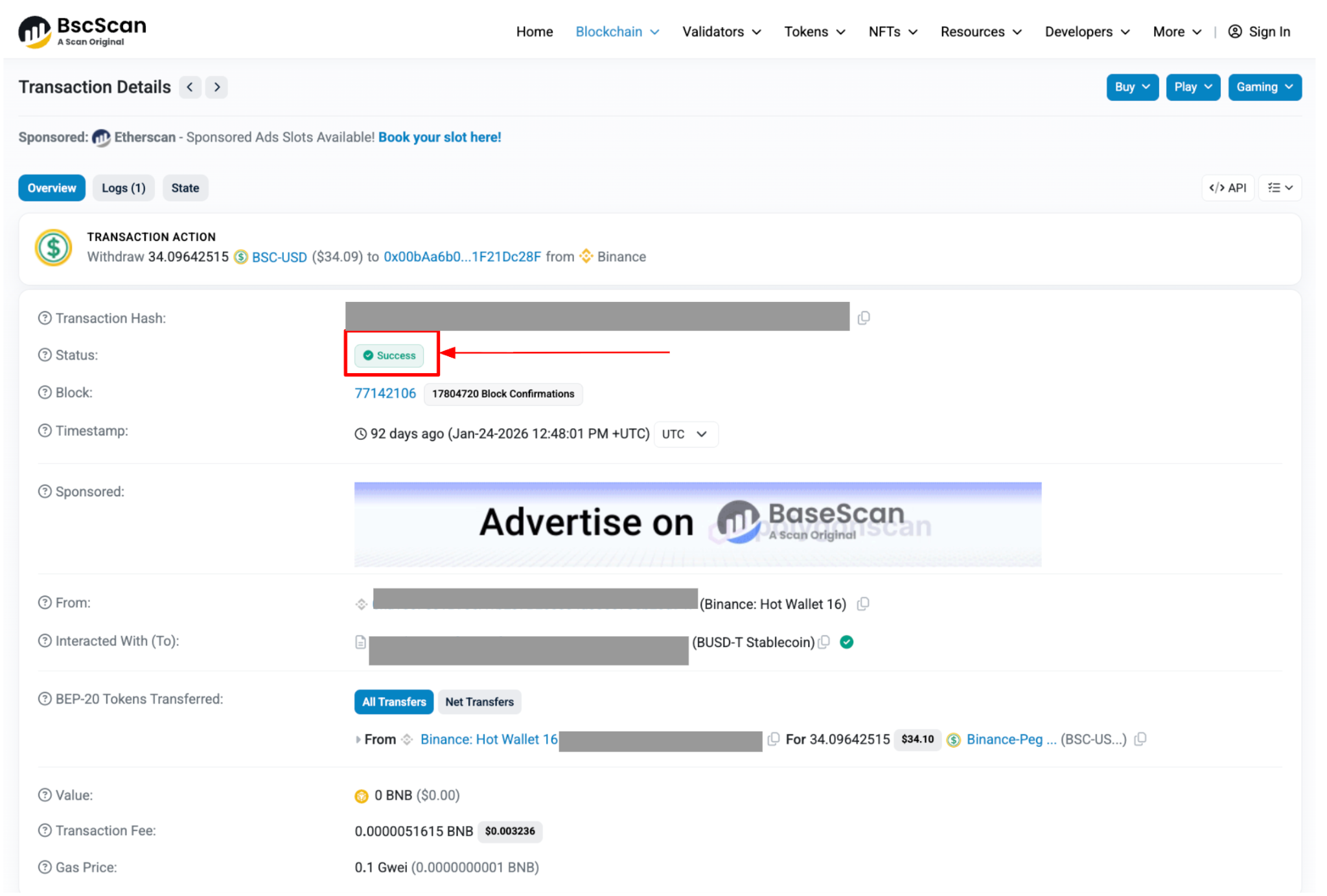
Important note: Only submit applications for transactions with Confirmed or success status on the blockchain.
Confirmed/Success → [Check your TxID/TxHash here]
Unconfirmed/Failed → Contact the sending platform directly for further assistance
For guidance on locating your Transaction ID (TxID), please refer to the instructions provided.
How to Submit a Deposit Recovery Application
Sequence of steps
Step 1: Go to Transaction History
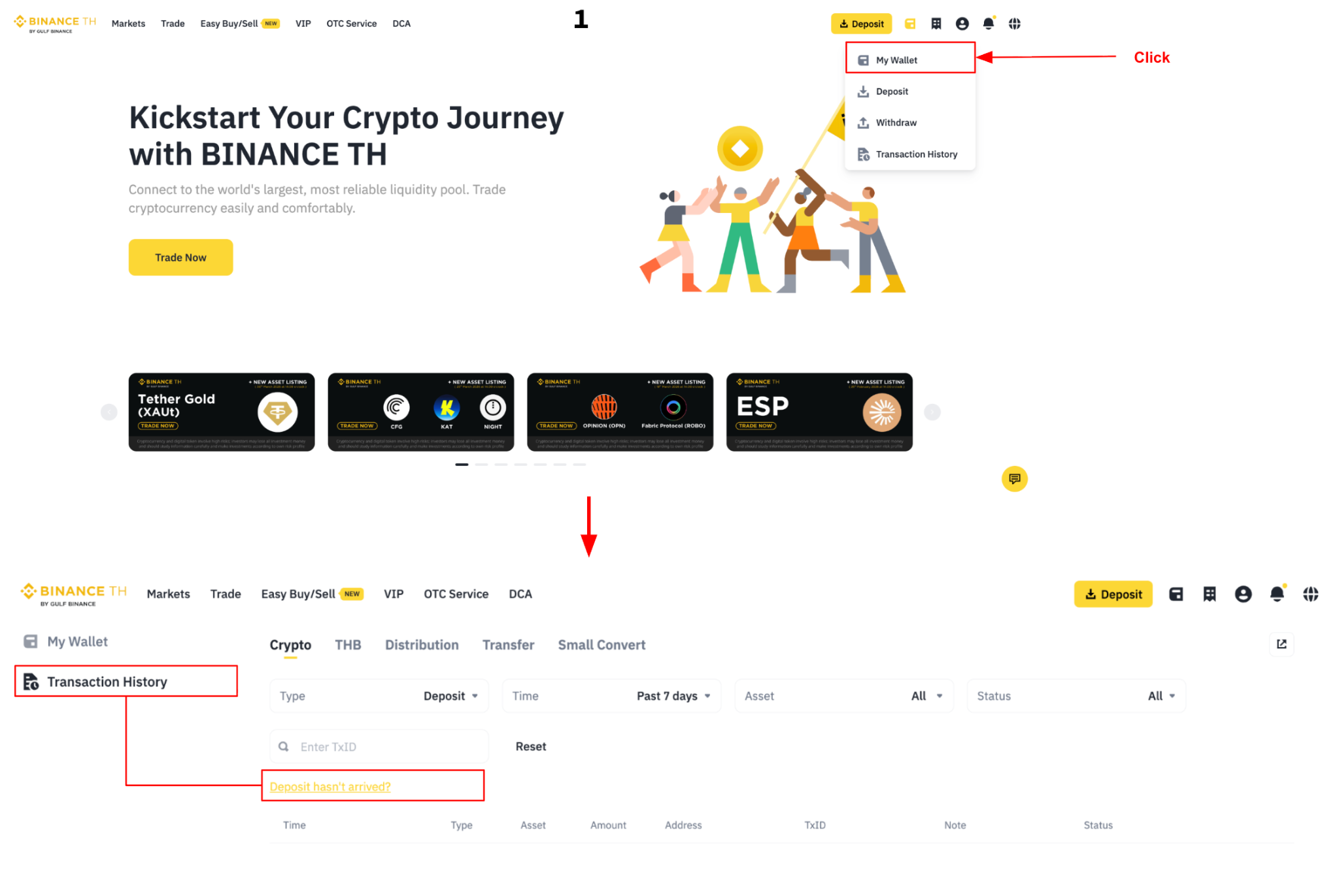
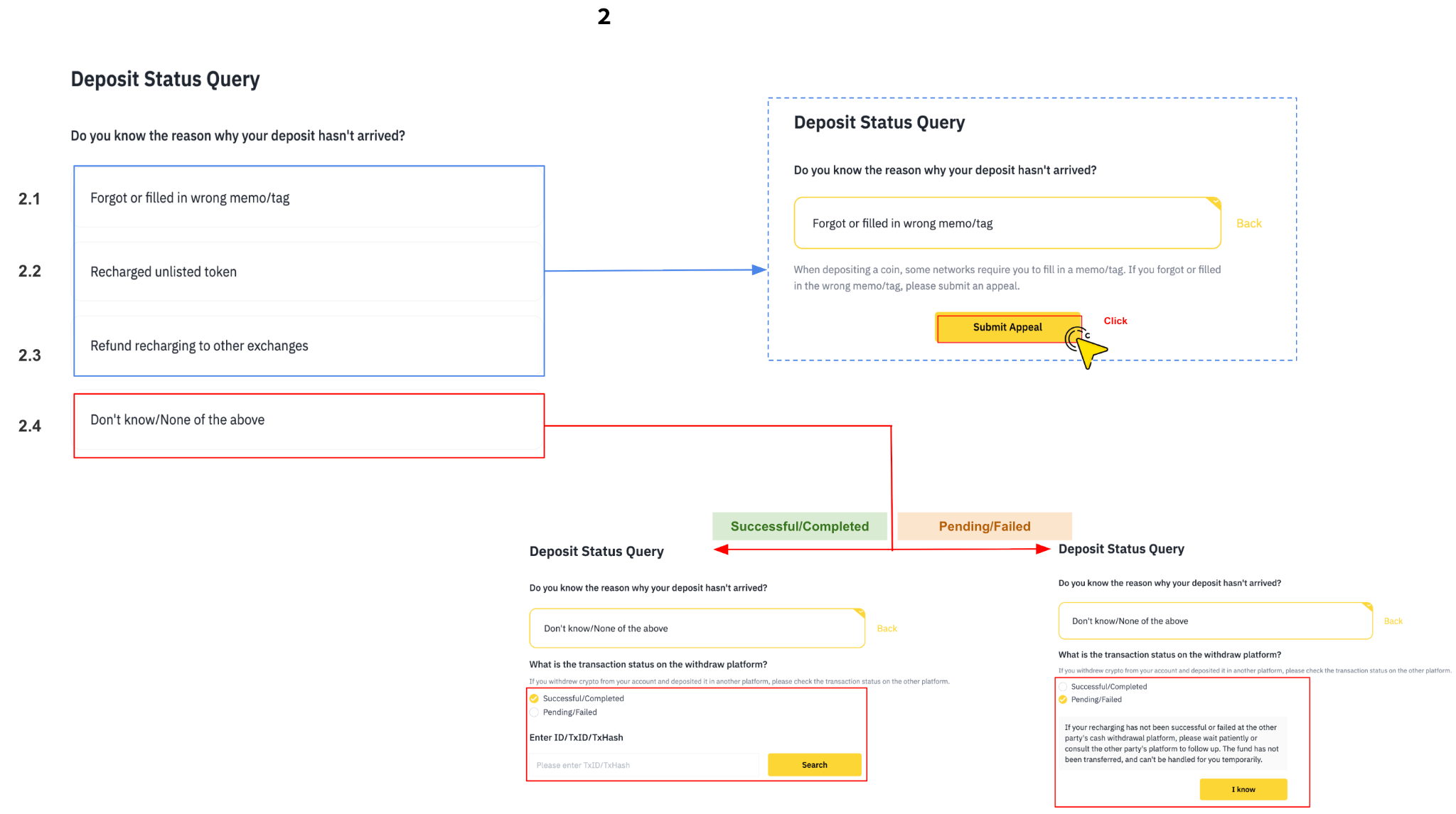
Log in to your Binance TH account, then go to [My Wallet] > [Transaction History] and click [Deposit Hasn’t Arrived?].
Step 2: Select the reason your deposit hasn’t arrived
Choose the option that best describes your situation, then click [Submit Appeal]:
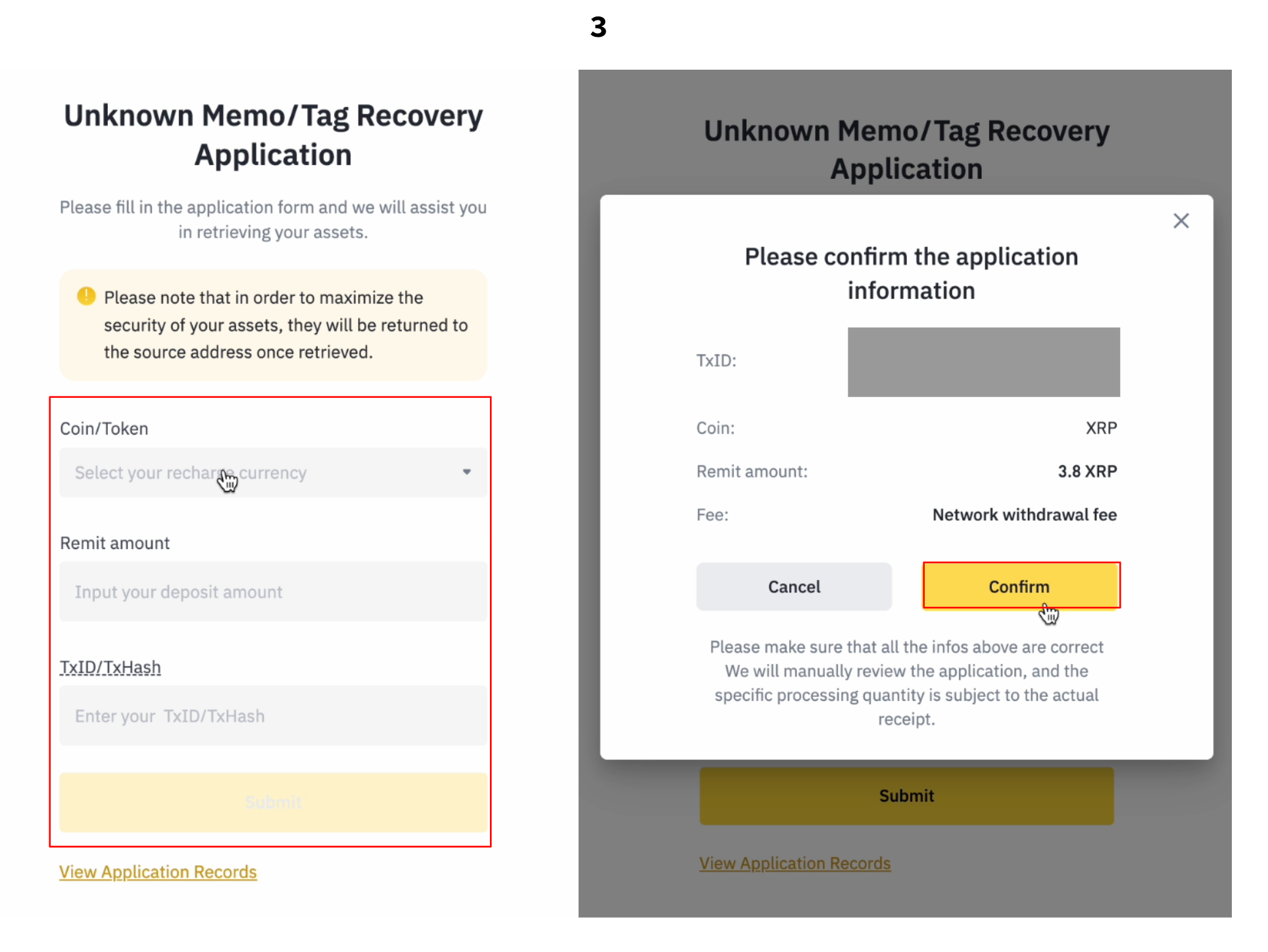
2.1 Forgot or filled in wrong memo/tag
Some networks require a memo or tag when depositing. If you omitted it or entered it incorrectly, select this option and submit an appeal.
2.2 Deposited unlisted token
If you deposited a token that is not listed or supported on Binance TH, select this option and submit an appeal.
2.3 Refund recharging to other exchanges
If the source platform has already returned the assets to Binance TH, you can submit a “Deposit Recovery Application” directly through the system. Please make sure you have the TxID from the refund transaction (provided by the source platform) ready before submitting your request.
2.4 Don’t know / None of the above
Select this option and answer the follow-up question:
What is the transaction status on the withdrawal platform?(If you withdrew crypto from another platform and deposited it here, please check its status there.)
Successful / Completed→ Enter your Transaction ID (TxID/TxHash), then click [Search]
Pending / Failed
The system will notify you that the funds have not yet been transferred.message will appear:“If your recharging has not been successful or failed at the other party's cash withdrawal platform, please wait patiently or consult the other party's platform to follow up. The fund has not been transferred and can't be handled for you temporarily.”→ Click [I know] to acknowledge, then contact the sending platform directly.
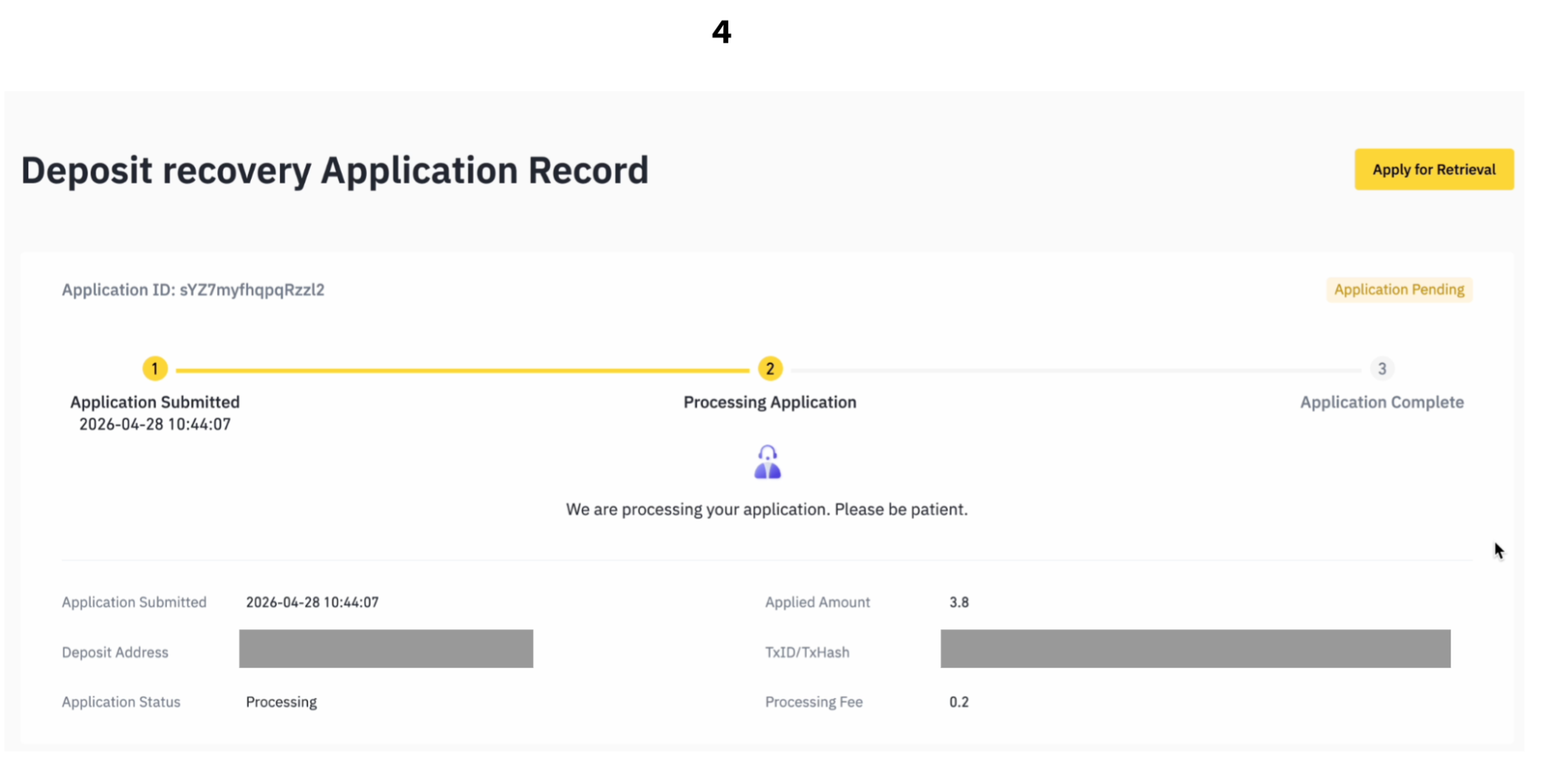
Step 3: Complete and submit the application form
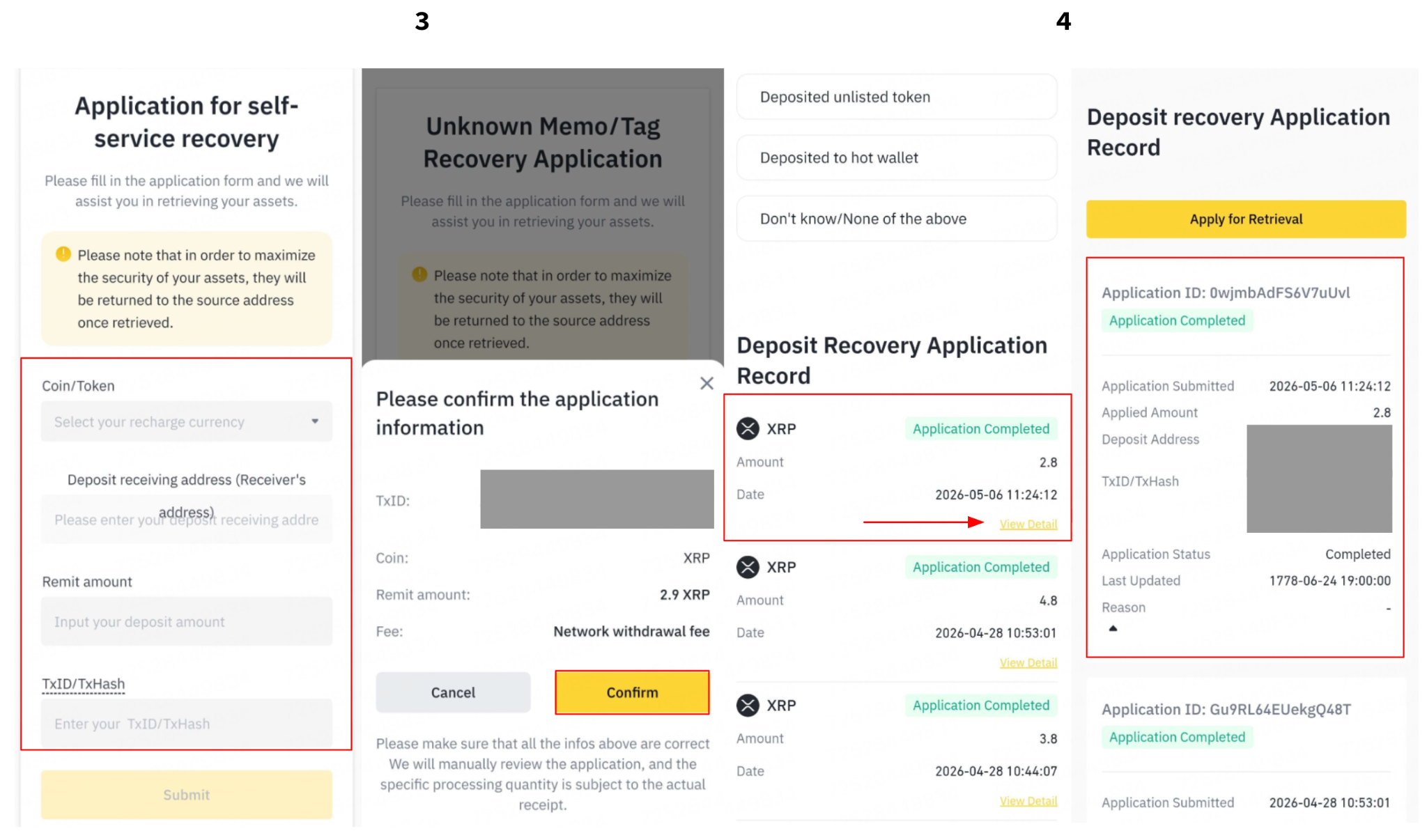
Enter the required details below, then click [Submit]. Review the information carefully before clicking [Confirm].
Coin/Token
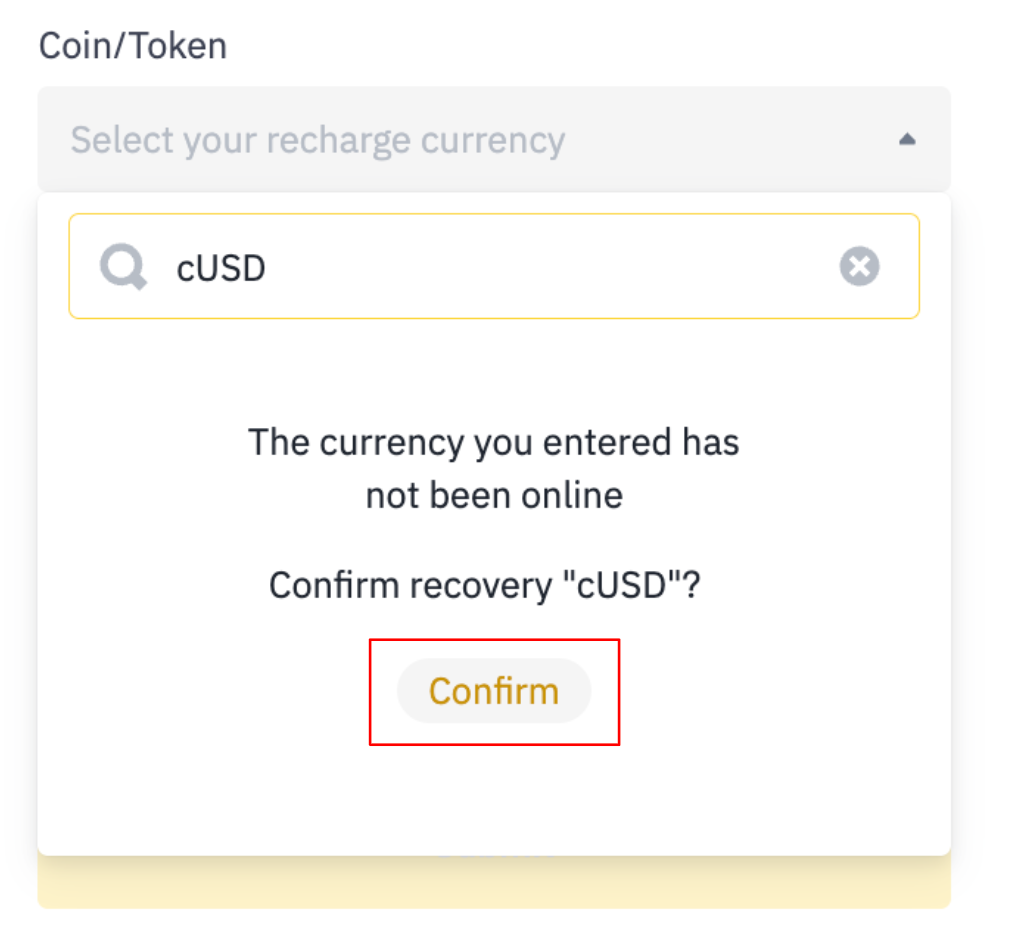
You can use the search function to find the coin you want to retrieve. Please enter the complete ticker symbol of the coin to avoid confusion. If you can't find the coin you deposited, click [Confirm] to save.
Deposit network
Select the blockchain network used to send your deposit (e.g., Ethereum (ERC20), BNB Smart Chain (BEP20). This must match the network used by the sending platform.
Deposit receiving address (Receiver's address)
Enter the wallet address that received the funds deposit. This is the destination address you used when making the transfer to your BINANCE TH account. The address must match data in TxID
Remit Amount
Enter the exact amount you deposited. You can use up to 8 decimal places. Remove any commas or other separators before submitting.
TxID/TxHash
A TxID (Transaction ID) or TxHash (Transaction Hash) is a unique identifier assigned to every blockchain transaction. You can use it to check and verify the status of your transaction on a blockchain explorer.
Refund Address
Enter the wallet address where you wish to receive the refunded assets. Make sure the address is not a contract address, is compatible with the refunded asset and network, and does not belong to Binance TH.
Upload video requirement
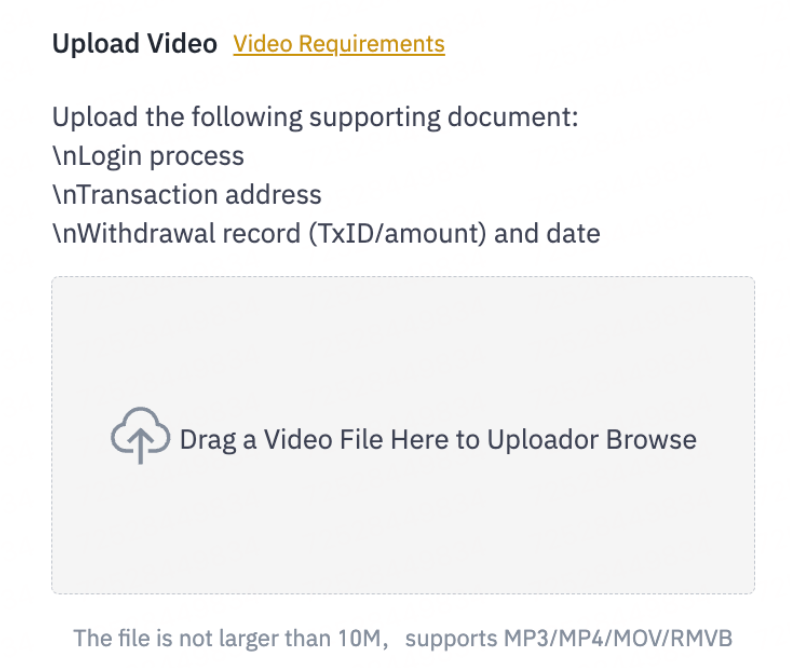
Upload a clear video from the sending platform that includes the following:
Scenario 1: Deposit to Binance TH hot wallet by mistake
Original ID document
Login process to the source platform (Not on Binance.TH)
Transaction amount and full TxID at withdrawal record (Not on Binance.TH)
Scenario 2: Funds returned to Binance.TH hot wallet by other wallets/platforms
Your original ID document
Login process to the source platform
All conversations with the source platform, where the sender’s email address is visible.
The source platform should provide both the Deposit TXID and Refund TXID (If the appeal page on the source platform clearly shows both the Deposit TXID and Refund TXID, it can also be accepted)
Note: The video file must be 10 MB or smaller and in a supported format (MP4, MOV, RMVB, or MP3).
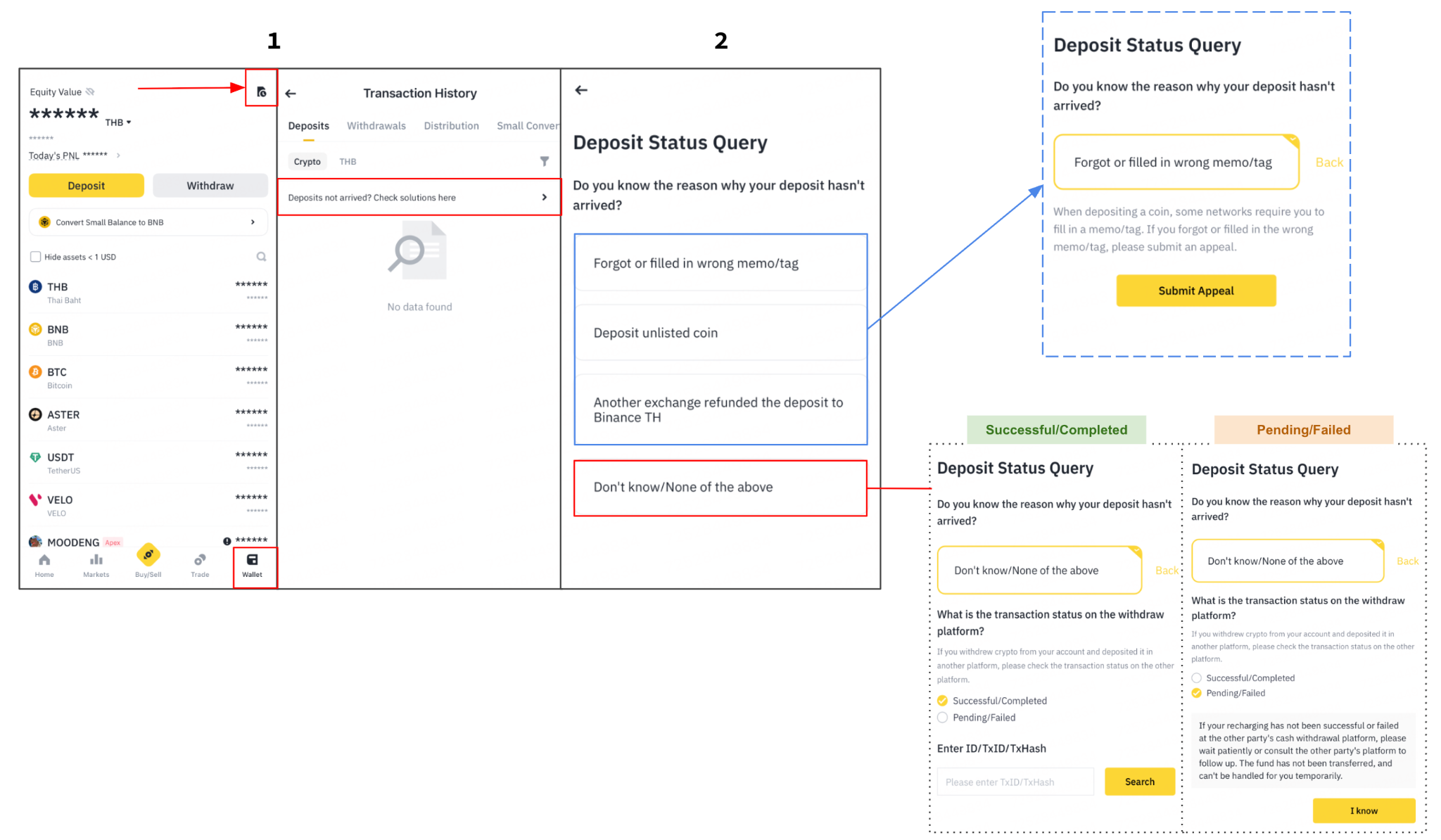
Step 4: Track your application status
After submission, you can monitor your application under the “Deposit Recovery Application Record”. Your request is currently under review. Please wait while it is being processed.
You will see updates such as:
Application Submitted
Processing Application
Application Complete
Once the process is complete, any recovered funds will be credited directly to your account.
Journey on website
Journey on Application
Fees & Processing Times
You will only be charged if your recovery is successful. You can find more details in the table below, including:
An overview of potential scenarios for incorrect deposits
The projected wait time for recovering your funds
The expected fees for retrieval
The outcome you can anticipate upon resolution (refund or credit)
Please note: that fund recovery is not guaranteed. Due to technical limitations, resource constraints, and other complexities, not all deposits may be retrievable. The information in this table is for reference only and does not constitute a commitment by Binance TH to recover funds in all cases. Ultimately, you are responsible for your funds, and it's essential to thoroughly understand our services before using them.
*Disclaimer: This table only contains general information, and certain retrieval processes may take longer than stated. Various factors can extend the duration, including the type of unsupported tokens and the complexity of their recovery. Fees are subject to change and not fixed. They may vary in accordance with changing market conditions, operational costs, and technological advancements.
Frequently Asked Questions
1. My application was refunded — how do I get the TxID to provide to the source platform?
You can check the TxID (Transaction Hash) for your returned coins in the details page of your deposit recovery request once the request status has been completed. The system will display the transaction details, which you can use to notify the originating platform.
2. Why does the system say my deposit network or address is incorrect?
The address you entered must be your Binance TH Wallet address or a Binance TH Hot Wallet address. If your application is rejected, it may be due to one of the following reasons:
The transaction is a withdrawal, not a deposit.
You are the sender — meaning you sent funds to another user's account and they haven't arrived.
The deposit address is a smart contract address not supported by the BNB Pioneer Burn Program.
You are submitting the application on behalf of someone else.
If any of these apply, please contact Binance TH Support for further assistance.
3. Are there any fees for requesting coin recovery?
Fees are only charged if the recovery is successful. You can view the applicable fee in your [Deposit Recovery Application Record]. Refer to the fees table above for a full breakdown by recovery type.
4. Why was my application rejected?
Here are some of the common reasons:
Wrong TxID/TxHash or address
If your TxID/TxHash and address do not match, we cannot check the transaction on the blockchain. Therefore, we strongly suggest you directly copy and paste the TxID/TxHash and address instead of entering it manually.Deposit amount mismatch
The deposit amount you entered does not match the blockchain record.Deposit already arrived
The transaction was completed before or during the retrieval process. Please check your deposit before submitting an application.Unconfirmed or unfound transaction
Please make sure that the transaction status is “confirmed/success” and that you can view the complete transaction details on the blockchain explorer.Amount shows "0" on blockchain
We are unable to assist with zero-value transactions.Not a deposit retrieval case
Applications for withdrawals, fiat, or account-related issues will not be accepted here.Third-Party Submission (Non-Account Owner)
This application is being submitted on behalf of the account owner. Please ensure all information provided is accurate and has been authorized by the account holder.
BNB Pioneer Burn Program conditions not met
Your application didn't qualify because eligibility requires all of the following:
- The token you deposited is not supported by this program.
- The contract address used is not on our approved list.
- The deposit amount was below the minimum required
Note: Customers can check the reason for the rejection of their coin recovery request in the deposit recovery request details, under the “Reason” and “Application Result” sections.